

Hive Mail can show a small card in a corner of your site asking whether it may recognise a visitor's browser later. It has an optional title, your text with a Privacy policy link, and two equal buttons, Accept and Decline. It covers Hive Mail's own tracking only, not Google Analytics, ad pixels, chat widgets or videos; use a full cookie-consent plugin for those (cookie-consent plugin).
The banner is off by default and its fields appear only with Visitor tracking on Full and Consent on Wait for consent (recommended) (Turn on visitor tracking). Nothing is recorded until the visitor accepts. The answer is kept in the visitor's browser (hivemail_consent, no cookie): a refusal for 6 months, an agreement for 12, or until the wording changes. Escape closes the banner for that page without answering.
Set it up #
- Open Settings > Tracking & Privacy.
- In the card Consent banner, switch on Show Hive Mail's consent banner.
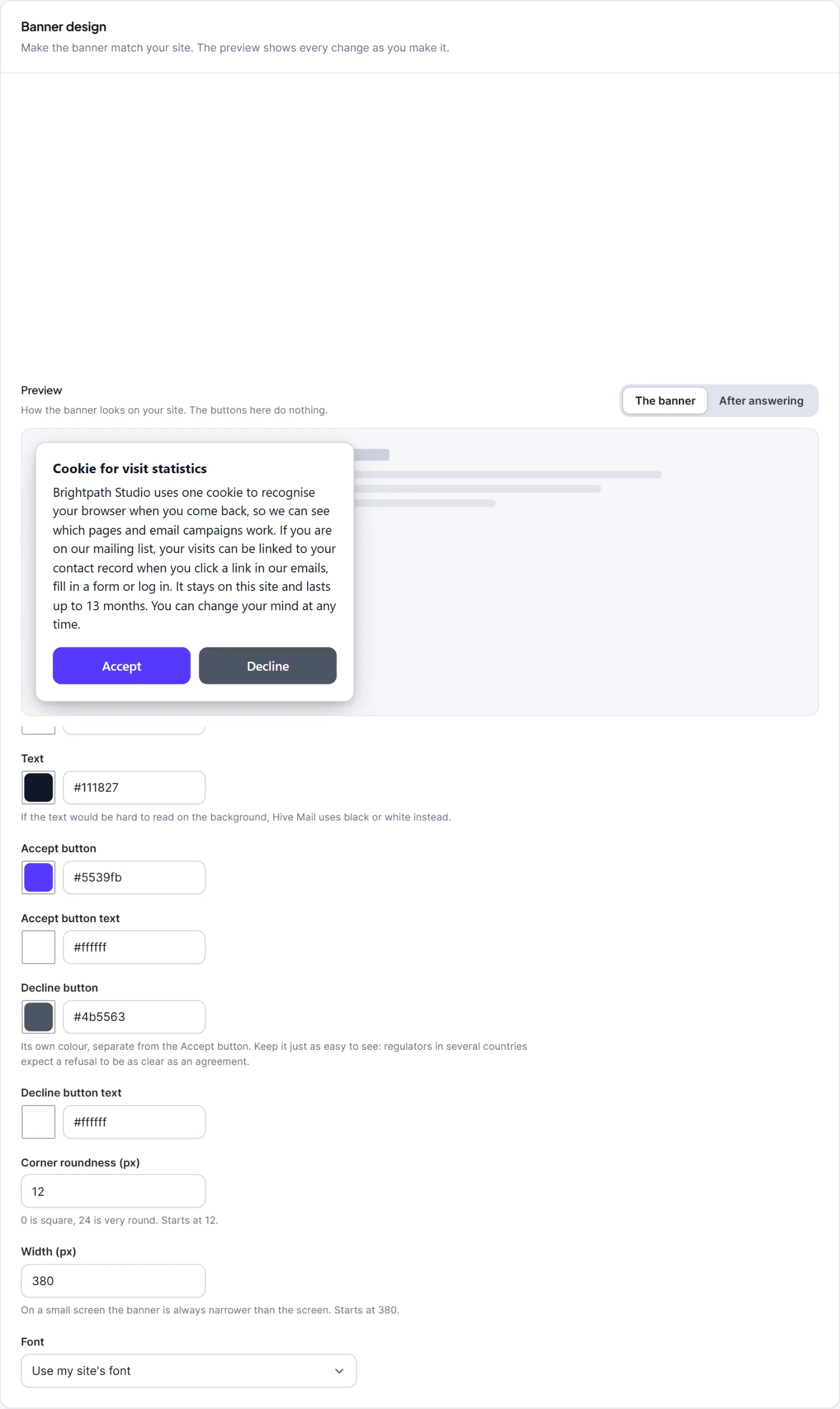
- Edit the text fields below, then style it in Banner design while watching the Preview.
- Click Save changes, then test in a private window while logged out.
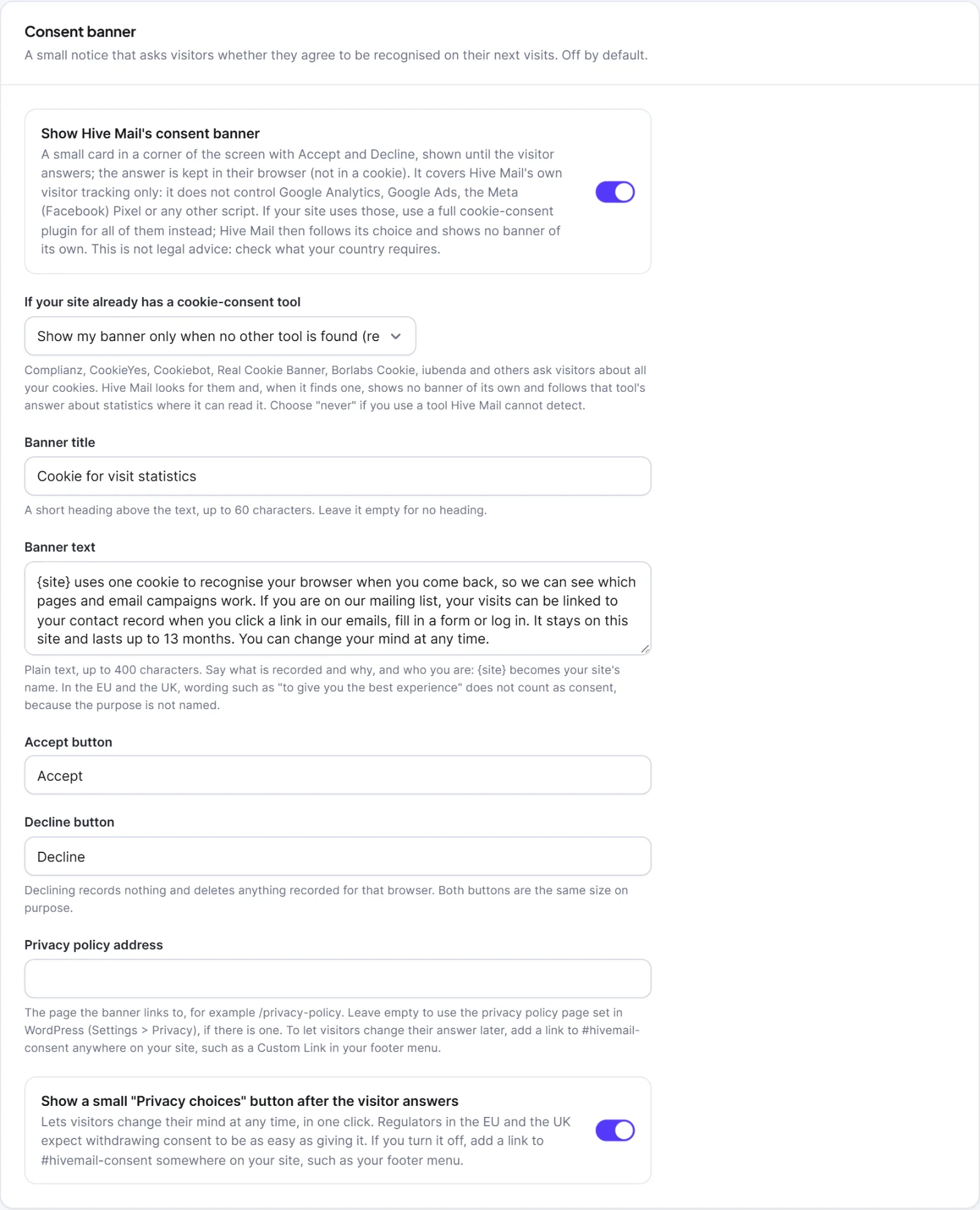
| Setting | What it does | Default |
|---|---|---|
| Show Hive Mail's consent banner | Shows the built-in banner | Off |
| If your site already has a cookie-consent tool | Show my banner only when no other tool is found (recommended), I use another cookie-consent tool: never show Hive Mail's banner or Always show Hive Mail's banner, even beside another tool | The recommended choice |
| Banner title | Heading, up to 60 characters; empty means none | Cookie for visit statistics |
| Banner text | What is recorded and why, up to 400 characters; {site} becomes your site name |
A ready text naming the cookie, the link to contact records and the 13 months |
| Accept button, Decline button | Button words, up to 30 characters. Decline records nothing and erases what was recorded for that browser | Accept, Decline |
| Privacy policy address | Where the Privacy policy link goes (address or path such as /privacy-policy); empty uses the WordPress privacy page |
Empty |
| Show a small "Privacy choices" button after the visitor answers | Keeps a small button in the corner to reopen the banner | On |
| Position | Bottom left or Bottom right | Bottom left |
| Colours | Match the visitor's device (light or dark), Light, Dark or Custom colours | Match the device |
| Background, Text, Accept button, Accept button text, Decline button, Decline button text | Six colour fields, only for Custom colours | #ffffff, #111827, #5539fb, #ffffff, #4b5563, #ffffff |
| Corner roundness (px) | Corner radius, 0 to 24 | 12 |
| Width (px) | 280 to 520 | 380 |
| Font | Use my site's font or Plain system font | Site font |
Colours are saved as #rrggbb. Hive Mail swaps text to near-black or white if contrast falls under 4.5:1, and outlines a button that would blend into the card, so refusing can never be hidden by colour.
The Preview uses the form as you type; choose The banner or After answering, and Light device or Dark device. It can warn This wording will not count as consent in the EU or the UK (vague phrases such as "best experience") and Accept and Decline should be equally clear.
Warning: The text must name the purpose, for example "so we can see which pages and campaigns work". Changing the title, text or buttons asks everyone again.
Privacy choices button and link #
After an answer, a small Privacy choices button stays in the corner and reopens the banner. You can also add a link whose address is exactly #hivemail-consent (for example a footer menu Custom Link); do so if you turn the button off. The EU and UK expect withdrawing consent to be as easy as giving it.
The banner never shows when the mode is not Full with Wait for consent, when another tool is found (unless you chose Always show), when the browser sends Do Not Track or Global Privacy Control, for an excluded role, or on an excluded page.
JavaScript for your own banner #
| Call | What it does |
|---|---|
HiveMail.consent( true ) |
The visitor agreed; sending starts and held events (up to 20) go at once |
HiveMail.consent( false ) |
Declined or withdrawn; same as HiveMail.forget() |
HiveMail.forget() |
Stops tracking and erases the visitor's recorded visits and cookie |
HiveMail.track( name, props ) |
Custom event. name: 1 to 40 characters. props: optional, up to 5 values (text up to 64 characters, number or true/false). form_submitted is reserved |
HiveMail.banner() |
Shows the banner again (nothing if another tool is in charge) |
If your code runs before the script loads, queue it: window.HiveMail = window.HiveMail || { q: [] }; HiveMail.q.push( [ 'consent', true ] );
If the banner does not appear, check the list above, clear caches and test in a private window (Visitor tracking shows nothing).
Next: Use Hive Mail with a cookie-consent plugin, Consent and the law.
This is information, not legal advice.


