
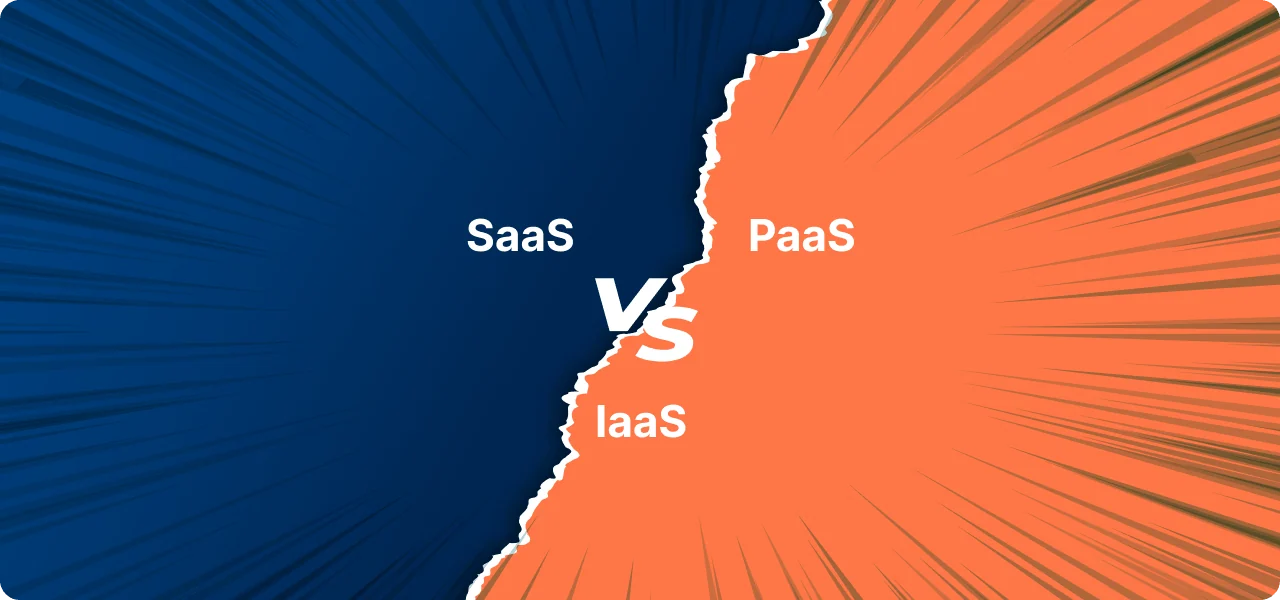

Cloud computing offers lots of benefits like flexibility and saving money, but picking the right type can be hard. There are three main types:
Thank you for reading this post, don't forget to subscribe!
- Software as a Service (SaaS)
- Platform as a Service (PaaS)
- Infrastructure as a Service (IaaS)
In this guide, we’ll explain the differences between them in simple terms. We’ll talk about what each one does, what they’re good for, and how they can help your business.
This guide will help you to choose the right cloud computing model for your needs, no matter if you’re just starting, working on apps, or running a large company. Let’s make cloud computing easy to understand.
Table of Contents
SaaS (Software as a Service)
So, what exactly is Software as a Service (SaaS)? Let’s break it down in simple terms and explore its transformative potential.
SaaS, at its core, is a software distribution model where applications are hosted by a third-party provider and made available to users over the Internet. Instead of purchasing and installing software on individual devices, users access SaaS applications via web browsers or dedicated clients.
Here’s why SaaS is a game-changer:
1. Accessibility: With SaaS, you can use software from any device with an internet connection. This means you’re not limited to using the software on a specific computer or in a specific location.
2. Scalability: Need to add more users or features? No problem. SaaS solutions offer scalability on demand, allowing businesses to adapt to changing requirements without costly infrastructure investments or downtime.
3. Cost-Efficiency: Say farewell to hefty upfront expenses for software licenses and hardware. SaaS operates on a subscription-based model, where users pay a recurring fee for access to the latest software updates and support services.
4. Automatic Updates: Forget about manual software updates and patches. SaaS providers handle maintenance and upgrades behind the scenes, ensuring users always have access to the latest features and security enhancements.
5. Collaboration and Integration: SaaS fosters collaboration by enabling seamless sharing and real-time collaboration on documents and projects. Plus, most SaaS solutions offer integration capabilities with other essential tools, enhancing productivity and workflow efficiency.
If you’re a small business wanting to make things run smoother or a big company looking to be more flexible and innovative, Software as a Service (SaaS) can help. SaaS can give your company many new opportunities and make it easier to run.
Some Famous SaaS Products
1. Salesforce: A leading customer relationship management (CRM) platform that helps businesses manage sales, marketing, customer service, and more, all in one centralized system.
2. Microsoft Office 365: A suite of productivity tools including Word, Excel, PowerPoint, and Outlook, offered as a subscription service. Users can access these applications online or install them locally on their devices.
3. Google Workspace: A collection of cloud-based productivity and collaboration tools such as Gmail, Google Drive, Google Docs, Google Sheets, and Google Slides. It enables real-time collaboration and communication among teams.
4. Zoom: A video conferencing platform that allows users to host virtual meetings, webinars, and online events. It offers features like screen sharing, recording, and chat functionality.
5. Dropbox: A cloud-based file storage and sharing service that enables users to store, access, and collaborate on files from anywhere. It provides file synchronization across devices and robust security features.
6. Slack: A messaging and collaboration platform designed for teams, Slack facilitates communication through channels, direct messages, and integrations with other tools. It streamlines internal communication and project management.
7. HubSpot: A comprehensive inbound marketing and sales platform that offers tools for email marketing, lead generation, customer relationship management (CRM), social media management, and more.
8. Zendesk: A customer service software suite that provides ticketing, self-service options, and customer support tools to help businesses deliver exceptional customer experiences.
9. Adobe Creative Cloud: A subscription-based service that gives users access to a collection of Adobe’s creative software applications such as Photoshop, Illustrator, InDesign, and Premiere Pro, among others.
10. Shopify: An e-commerce platform that enables businesses to create and manage online stores. It provides features for product listing, payment processing, order management, and website customization.
These examples show the different types of software-as-a-service (SaaS) applications that are available in many different industries. These applications are designed to meet the different needs and goals of businesses.
Disadvantages of SaaS
Here are some disadvantages of Software as a Service (SaaS):
- Dependency on Internet Connection: Any SaaS application is dependent on an internet connection as its delivery method. Any interruption, slow connection to the internet, or any other connectivity problem may cause problems in using the software and can also hamper the flow of business.
- Limited Customization: Most SaaS solutions provide certain generic characteristics and parameters of performance, which, in fact, could not be optimally suitable for a business. The software can be tailored to only some extent or for an extra fee.
- Data Security Concerns: Below are the security and privacy challenges associated with the stored data when hosted on third-party servers. Employees of different companies have to depend on the security measures offered by the SaaS providers.
- Subscription Costs: Whilst SaaS can help mitigate the costs associated with upfront installation, costs for subscription fees in the long term also build up. Subscriptions present other important issues that businesses have to consider: the costs accruing from recurrent subscriptions.
- Vendor Lock-in: There are difficulties in changing the provider because of the migration of data or other problems associated with the use of proprietary formats.
- Performance Issues: This is due to the fact that the usage of SaaS applications can be constrained by factors like server capacity, bandwidth, and latency. This can lead to slower response rates and eventually lower the value of the application as per the users.
- Compliance Challenges: The last challenge comes in case the business belongs to an industry that is very much regulated because this means that it will be so much harder to guarantee that the SaaS solution it uses is going to meet the regulations and standards of that industry.
- Limited Control: The employer has minimal control over the software use, updates, the features to incorporate as well as the overall management. This could be through modifications done by the provider which may not suit the users.
- Integration Issues: The integration of SaaS applications to existing systems and software may prove challenging and could entail other costs or even demand custom development.
- Reliance on the Vendor: This means that any problem with the SaaS provider: availability issues, low-quality customer support, and other issues can potentially affect the business’s operations and productivity.
When to Use SaaS
Using SaaS depends on several factors, including business needs, budget, and operational goals. We are going to discuss some important factors that influence the choice of SaaS.
- Scalability and Flexibility: SaaS is ideal when your business is growing, and you need a solution that can scale with you. For example, the global SaaS market is predicted to more than double from $108.4 billion in 2020 to $225 billion by 2025 (Exploding Topics). This growth is driven by businesses that need flexibility in adding or removing features as they grow.
- Cost-Effectiveness: Companies looking to minimize upfront costs often opt for SaaS. Instead of large investments in hardware and software, SaaS offers a subscription-based pricing model, making it easier for small businesses and startups to manage their budgets. A study showed that SaaS spending typically accounts for less than 15% of a company’s total IT budget (DevSquad).
- Rapid Deployment: If you need quick setup and deployment, SaaS can offer immediate solutions. Unlike traditional on-premise software that requires time for installation and setup, SaaS applications are ready to use once subscribed to, often with customizable features that can be implemented without the need for specialized IT staff.
- Accessibility and Collaboration: SaaS is the go-to option if your team is distributed across multiple locations or working remotely. Being cloud-based, SaaS applications can be accessed from anywhere, facilitating real-time collaboration. Studies indicate that 70% of CIOs are attracted to SaaS for its agility and accessibility (DevSquad).
- Data Backup and Disaster Recovery: For businesses that prioritize security and data recovery, SaaS solutions provide built-in disaster recovery features. According to industry reports, 38% of companies adopt SaaS specifically to enhance their disaster recovery capabilities (DevSquad)(Exploding Topics).
PaaS (Platform as a Service)
Platform as a Service (PaaS) is a cloud computing service that gives businesses the tools they need to create, deploy, and manage applications. It is a cloud-based platform that gives you the tools you need to build and run applications without worrying about the underlying infrastructure.
PaaS provides a cloud-based platform that includes all the tools and resources developers need to build and deliver applications without the complexity of managing underlying infrastructure. Essentially, it abstracts away the underlying hardware and software layers, allowing developers to focus solely on writing code and delivering value to end-users.
Here’s why PaaS is a game-changer:
1. Streamlined Development: PaaS offers a comprehensive set of development tools, frameworks, and middleware that streamline the application development process. Developers can quickly build, test, and deploy applications without worrying about provisioning and configuring servers.
2. Scalability and Flexibility: PaaS platforms are designed to scale effortlessly to accommodate fluctuating workloads and user demands. Whether you’re launching a new application or scaling an existing one, PaaS provides the scalability and flexibility you need to grow with confidence.
3. Cost-Efficiency: By eliminating the need to invest in and manage on-premises infrastructure, PaaS reduces upfront capital expenditures and ongoing operational costs. Pay only for the resources and services you use, without the burden of hardware maintenance and upgrades.
4. Collaboration and Integration: PaaS fosters collaboration among development teams by providing centralized repositories, version control, and collaboration tools. Additionally, most PaaS platforms offer seamless integration with other cloud services and third-party APIs, enabling developers to leverage a wide range of tools and services.
5. Focus on Innovation: With the operational burden of infrastructure management lifted, developers can focus their time and energy on innovation and delivering value to customers. PaaS empowers developers to experiment, iterate, and innovate rapidly, driving business growth and competitive advantage.
Some Famous PaaS Products
Platform as a Service (PaaS) helps developers build and manage applications without worrying about the underlying infrastructure. Here are some well-known PaaS products:
- Heroku: Heroku is a popular platform that lets developers quickly deploy and manage web apps. It supports many programming languages and is easy to use, making it a great choice for beginners and small businesses.
- Google App Engine: This platform is part of Google Cloud and allows developers to build and host applications in Google’s data centers. It offers automatic scaling, meaning your app will handle more traffic without extra effort.
- Microsoft Azure App Service: Azure App Service provides a secure and scalable environment to build and deploy apps. It integrates well with other Microsoft tools, making it ideal for businesses using Microsoft products.
- AWS Elastic Beanstalk: Part of Amazon Web Services, Elastic Beanstalk helps developers deploy and manage applications in the cloud. It simplifies the process by automatically handling the infrastructure.
- Red Hat OpenShift: OpenShift is an open-source PaaS that helps developers build and deploy apps in the cloud or on-premises. It offers strong security features and flexibility, making it popular among large businesses.
These PaaS products save time and effort by managing servers, storage, and networking, so developers can focus on building their applications.
Disadvantages of PaaS
- Limited Control: Most of the infrastructure with PaaS belongs to the provider. This diminishes much of the control one may have over applications or services. A business may not be able to dig deep and tweak or optimize the underlying servers or systems in this regard.
- Vendor Lock-In: Once you choose a PaaS provider, migration to another provider will be pretty difficult. The custom configurations and tools your provider applied could make the migration process unnecessarily complicated, and due to “vendor lock-in,” businesses may get tied to that particular platform.
- Security Risks: PaaS, being hosted on external cloud infrastructure, presents potential security risks. While providers offer security measures, the fact that data is externally managed might not fit all compliance requirements for businesses, especially those highly regulated.
The limitations to customization are that most of these PaaS platforms contain predefined environments, and these cannot facilitate all the possible customizations that businesses might want to carry out. Also, in highly specialized needs, perhaps a PaaS solution will not be able to provide all the flexibility needed.
- Integration Challenges: Sometimes, integrating PaaS with existing on-premise or other third-party systems can be difficult. There can be compatibility issues since most businesses have very old software or highly customized software.
- Un-budgeted Cost: Although PaaS saves development costs, subscription fees for continuous platform services, storage, and other resources accumulate over time. Businesses may experience unexpected costs in terms of increasing needs, especially data storage or processing power.
When to Use PaaS
PaaS (Platform as a Service) is helpful when you need a simple way to build and manage applications without dealing with the setup of hardware and software.
- Faster Development: If you need to develop and launch an app quickly, PaaS gives you ready-to-use tools that speed up the process. Developers can focus on coding instead of spending time setting up the infrastructure.
- Lower Costs: PaaS is useful when you want to save money. It lets you pay only for what you need, which is helpful for small businesses or startups. You don’t have to invest in expensive servers or hire a large IT team.
- Building Apps for Different Platforms: If your app needs to work on both web and mobile, PaaS makes it easy. It supports multiple platforms, so you can develop and test your app in one place without worrying about compatibility.
- Focus on Your Product: If you want to focus on improving your product rather than maintaining servers, PaaS is a good choice. The provider handles all the background tasks, like updates and security.
- Scaling Your App: If you expect your app to grow in the future, PaaS can scale with you. As your needs increase, you can easily add more resources like storage and processing power without needing to rebuild your system.
- Team Collaboration: If your development team is spread across different locations, PaaS makes it easier for them to work together. Everyone can access the same platform and work on the project at the same time.
IaaS (Infrastructure as a Service)
IaaS, or Infrastructure as a Service, is a cloud computing service that lets users rent computing resources, like virtual machines (VMs), storage space, and networks, over the internet. This is different from setting up and maintaining your physical hardware.
IaaS lets you focus on building and running your applications without having to worry about the hardware.
Here’s why IaaS is a game-changer:
1. Scalability and Elasticity: With IaaS, organizations can scale their infrastructure resources up or down in response to changing demands and workloads. Whether you’re experiencing a sudden surge in traffic or planning for long-term growth, IaaS offers the scalability and elasticity needed to meet your evolving needs.
2. Cost-Efficiency: By shifting from a capital expenditure (CapEx) model to an operational expenditure (OpEx) model, IaaS helps organizations reduce upfront costs and pay only for the resources they consume. This pay-as-you-go pricing model allows for cost optimization and better budget management.
3. Flexibility and Control: IaaS provides organizations with the flexibility to customize and configure their infrastructure according to specific requirements and preferences. From choosing hardware configurations to selecting operating systems and software stacks, IaaS offers unparalleled control over your IT environment.
4. Reliability and Resilience: Leading IaaS providers offer robust infrastructure with built-in redundancy, failover mechanisms, and data replication to ensure high availability and reliability. With geographically distributed data centers and advanced security measures, IaaS delivers enterprise-grade reliability and resilience.
5. Rapid Deployment: With IaaS, organizations can provision and deploy infrastructure resources within minutes, rather than weeks or months required for traditional hardware procurement. This agility enables faster time-to-market for applications and services, driving business innovation and competitiveness.
Some Famous IaaS Products
Infrastructure as a Service (IaaS) products give businesses the tools they need to manage their IT resources in the cloud. Here are some popular IaaS products:
- Amazon Web Services (AWS) – AWS is a leader in cloud computing. It offers a wide range of services like storage, computing power, and networking. Companies of all sizes use AWS for their flexibility and reliability.
- Microsoft Azure – Azure is another top IaaS provider. It allows businesses to build, test, and manage applications using Microsoft’s powerful cloud infrastructure. It is highly popular among businesses already using Microsoft products.
- Google Cloud Platform (GCP) – GCP offers fast and secure cloud services. It is known for its strong data analytics and machine learning tools. Many tech companies choose GCP for its innovative features.
- IBM Cloud – IBM Cloud provides advanced IaaS options with strong security and data protection. It’s often used by companies in industries that need extra security, like healthcare and finance.
- Oracle Cloud Infrastructure (OCI) – OCI is designed for businesses that need high-performance computing and databases. It’s popular with large organizations that require strong data management.
When to Use IaaS Products
IaaS products are great when you need flexibility and control over your IT resources but don’t want the hassle of managing physical hardware.
- Growing your business – If your business is growing fast, you’ll need more resources like servers and storage. With IaaS, you can easily add what you need without buying new hardware.
- Launching new apps – When you’re developing or launching a new app, IaaS lets you set up servers quickly, test your app, and make changes as needed. It saves time and money.
- Handling big workloads – If your business deals with heavy data processing, like analyzing large datasets or running complex calculations, IaaS gives you the power to handle these tasks without slowing down your systems.
- Backing up data – IaaS is great for securely storing backups of your important data. You won’t have to worry about losing files or buying expensive backup equipment.
- Managing seasonal traffic spikes – If your website or app gets busy during certain times of the year, like holidays, IaaS lets you scale up your resources during those times and scale back down afterward, saving you money.
How to Choose the Right Model
When it comes to determining the best platform, the answer largely depends on your specific needs, objectives, and constraints.
Start by clearly defining your requirements and objectives. What are you looking to achieve with the platform? Consider factors such as scalability, customization options, integration capabilities, pricing, and support services.
You can also look at the market share of these software models. It will give you a better idea about the popularity and usability of each of them.
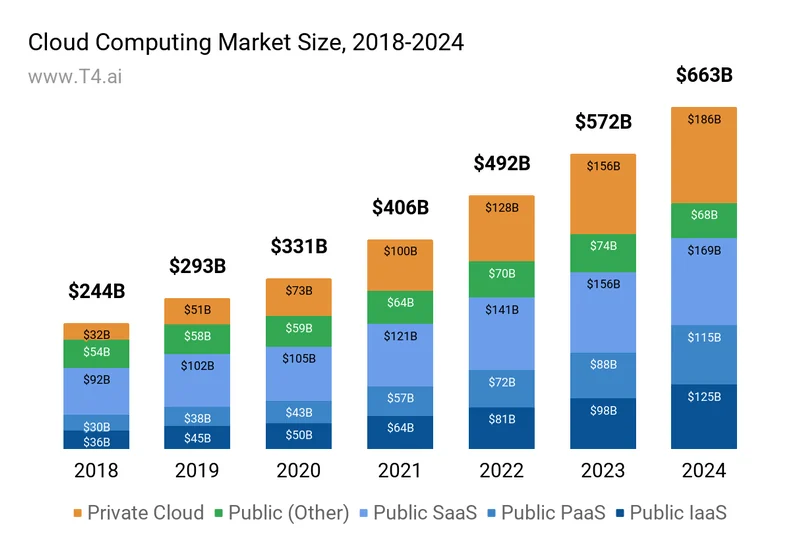
Make sure the platform you use has strong security measures in place to keep your sensitive data safe and protected from cyber threats. Look for features like data encryption, access controls, compliance certifications, and systems that actively look for threats.
The best platform for your business is the one that fits your goals, budget, and the way you do things. Consider these factors and do your research. That way, you can pick a platform that will help your business grow and reach its long-term goals.
Conclusion
Choosing the right cloud computing model – whether it’s SaaS, PaaS, or IaaS can significantly impact your organization’s efficiency, scalability, and overall success. Each model has its strengths and weaknesses, making it crucial to consider your specific needs, objectives, and constraints before making a decision.
For businesses looking for ready-to-use software applications with minimal setup and maintenance, SaaS offers a convenient solution. Developers seeking a platform to build and deploy custom applications without managing infrastructure can benefit from PaaS. Organizations requiring scalable and flexible infrastructure resources for their applications and workloads may find IaaS to be the best fit.
What is SaaS (Software as a Service)?
SaaS is a cloud computing model where applications are hosted by a third-party provider and accessed via the Internet. Users do not need to install or maintain the software on their devices, making it a cost-effective and convenient option for businesses.
What are the advantages of using SaaS?
SaaS offers several benefits, including:
– Easy accessibility from any device with an internet connection
– Scalability to meet growing business needs
– Cost-efficiency due to its subscription-based pricing
– Automatic updates managed by the provider
– Collaboration and integration features for seamless workflows
What is PaaS (Platform as a Service)?
PaaS is a cloud computing model that provides developers with tools and resources to build, deploy, and manage applications without worrying about the underlying infrastructure. It allows developers to focus on coding and delivering value.
How is PaaS different from SaaS?
While SaaS delivers ready-to-use software to end-users, PaaS provides a platform for developers to create and manage their own applications. SaaS is ideal for businesses that need access to software, while PaaS is suitable for businesses focusing on application development.
What are some examples of popular SaaS products?
Popular SaaS products include:
– Salesforce (CRM platform)
– Microsoft Office 365 (productivity suite)
– Google Workspace (collaboration tools)
– Zoom (video conferencing)
– Shopify (e-commerce platform)
What is IaaS (Infrastructure as a Service)?
IaaS is a cloud computing model that provides virtualized computing resources such as servers, storage, and networking over the internet. Businesses can rent these resources instead of purchasing and maintaining physical infrastructure.
How does IaaS differ from SaaS and PaaS?
IaaS offers infrastructure components (e.g., virtual servers and storage), while PaaS provides a platform for application development, and SaaS delivers software to end-users. IaaS gives businesses more control over infrastructure but requires more technical expertise.