

Setting up an online store can be an exciting yet daunting task, especially if you’re new to e-commerce. WooCommerce, the go-to plugin for WordPress, offers a comprehensive solution to turn your website into a powerful online store.
Thank you for reading this post, don't forget to subscribe!
However, to ensure your store runs smoothly and efficiently, it’s essential to follow a structured strategy. Enter the WooCommerce Setup Checklist, a detailed guide designed to help you navigate each critical step in establishing your online presence.
From installing the plugin to configuring payment gateways, this checklist covers all the essential tasks, ensuring you don’t miss any crucial details.
Table of Contents
Why is WooCommerce Essential for Online Store?
Nowadays, selling products online is becoming more popular because more and more people are using the internet. One of the best ways to sell online is through eCommerce, which allows businesses to reach a lot of customers.
WooCommerce is one of the best platforms for building an online store. Many online stores are built using WooCommerce.
It’s a store builder plugin of WordPress, which is a popular content management system. Currently, over 5 million people use WooCommerce to create their online stores.
However, there is a competitor platform of WooCommerce, which is named Shopify. It is also often used by lots of people. But WooCommerce wins this competition for multiple reasons. One of the main reasons is it’s free for the users.
So, you can easily build an online store just by using WordPress and installing WooCommerce.
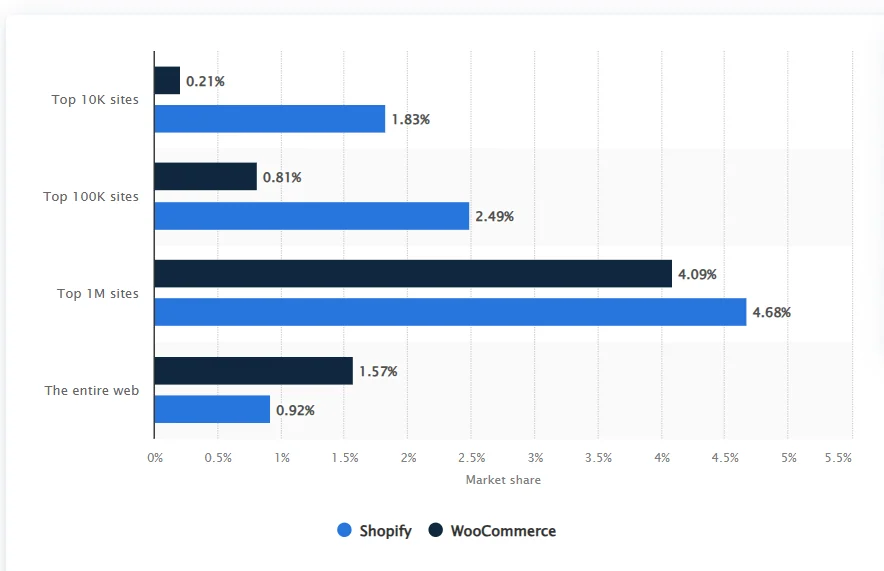
As you can see, this is the comparison between the market share of WooCommerce and Shopify. WooCommerce has conquered most of the market right now. So we can say that WooCommerce can be a better option for crafting a new online shop. Also, WooCommerce is often preferred by web developers.
Because it speeds up the overall website development task. It becomes more handy and flexible for them. They can easily create, customize, and change any element of the website within a few moments.
Finding any technical error on the WooCommerce website is easier than on any other platform. So, fixing the website performance also becomes fluent for the developer.
The integration capability of WordPress is broad. So you can easily integrate valuable tools and platforms with your online store. Also, there are lots of perks of using this platform. In the next section, we will talk about it.
1. Flexibility and Customization
WooCommerce offers unparalleled flexibility and customization options. Whether you’re selling physical or digital products, subscriptions, or appointments, WooCommerce can be tailored to meet your specific needs.
2. Scalability
As your business grows, WooCommerce scales with you. Whether you’re selling a few products or thousands, WooCommerce can handle it. For the reason of customization facility, multiple product improvement opportunities will come up.
3. Seamless Integration with WordPress
Built on WordPress, WooCommerce seamlessly integrates with your website, giving you access to thousands of themes and plugins to enhance your store’s functionality and appearance.
4. Powerful E-commerce Features
WooCommerce offers a wide range of e-commerce features, including inventory management, secure payments, shipping options, and customizable checkout processes.
5. Analytics and Reporting
With built-in analytics and reporting tools, WooCommerce provides valuable insights into your store’s performance, helping you make informed decisions to grow your business.
6. Community and Support
With a large and active community of users and developers, getting support and finding resources for WooCommerce is easy. Whether you’re a small business just starting or a large enterprise, WooCommerce provides everything you need to run a successful online store.
7. WooCommerce Setup Checklist You Should Know
Hopefully, you already have an idea about the effectiveness of WooCommerce for building an online store. But before jumping on crafting a WooCommerce store, you need to check all the factors properly.
We have researched and prepared a checklist for you. It will be helpful for you to create and run your online shop with WooCommerce. So let’s check it out.
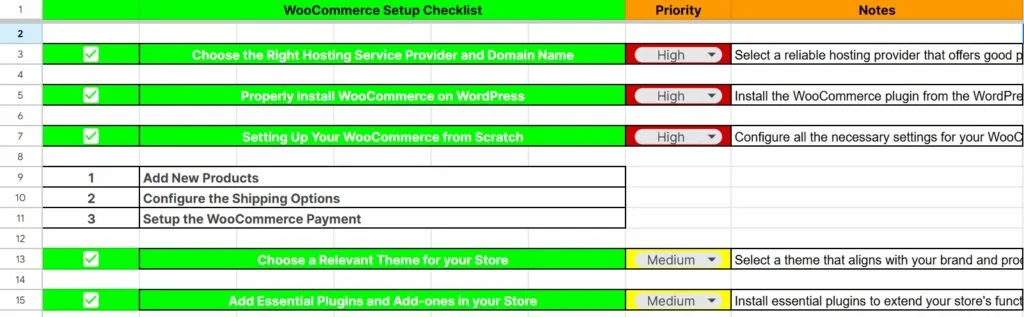
- Choose the Right Hosting Service Provider and Domain Name
You are going to establish your store online. So you need a website to set up your online store. So, first, you need a reliable hosting service provider for your website. What is a hosting service provider?
Well, a hosting service provider is a company that offers the technology and services needed for a website or web page to be viewed on the Internet. These companies provide the necessary server space, storage, and connectivity to make a website accessible online.
Hosting service providers typically offer a range of hosting options, including shared hosting, virtual private servers (VPS), dedicated servers, and cloud hosting, to accommodate the needs of different websites and businesses.
- Shared Hosting Server – Shared hosting servers are a type of web hosting service in which multiple websites share the same physical server. This type of hosting is often used by small businesses or individuals who do not need the resources of a dedicated server. Shared hosting servers can be a cost-effective way to host a website, but they do have some limitations.
- Dedicated Hosting Server – A dedicated hosting server is a type of web hosting service in which a physical server is dedicated to a single customer. This means that the customer has exclusive use of the server’s resources, such as its processing power, memory, and storage space. Dedicated hosting servers are typically used by businesses or organizations that have high-traffic websites or applications that require a high level of performance and security.
- Cloud Hosting Server – Cloud hosting is a type of web hosting in which a website is hosted on a network of remote servers. This means that the website is not stored on a single physical server, but rather is spread across multiple servers in different locations. This can provide several benefits, including improved performance, scalability, and reliability.
- Virtual Private Server(VPS) – A virtual private server (VPS) is a virtual machine that runs on a physical server. It is a dedicated server that is hosted on a shared physical server. VPSs are often used for hosting websites, applications, and other online services. They offer more control and flexibility than shared hosting but are less expensive than dedicated servers.
Popular hosting service providers include Bluehost, SiteGround, HostGator, Hostinger, and WP Engine.
Now the question comes up: which is the best hosting service for your store?
Well, as you are building your online for the first time, so you are a beginner. So we can suggest you choose the shared hosting server. The shared hosting is entirely managed and maintained by the service provider.
Also, shared hosting plans often allow you to easily upgrade your resources as your website grows, making it a flexible option for small to medium-sized websites. So it would be better for you to choose the shared hosting server.
After choosing the hosting service provider, you have to select a proper domain name for your online shop.
Your domain name is often the first thing potential customers see. It’s your online storefront’s address. A memorable and relevant domain name helps establish your brand identity and makes it easier for customers to remember and return to your shop.
A professional and trustworthy domain name gives your online shop credibility. Customers are more likely to trust and shop from a website with a domain name that reflects the business name or the products they are looking for.
- Properly Install WooCommerce on WordPress
After choosing the hosting service and domain name, the next task is installing WooCommerce in your WordPress website. You already know that WooCommerce is an eCommerce store builder plugin in WordPress.
To install the online store, first, you have to set up the WordPress platform properly. Generally, most of the hosting service providers contain integrated WordPress installation facilities.
We have used the Siteground hosting service provider to use WordPress. First, log in to your hosting service provider account. Now go to the following path – Websites > New Websites.
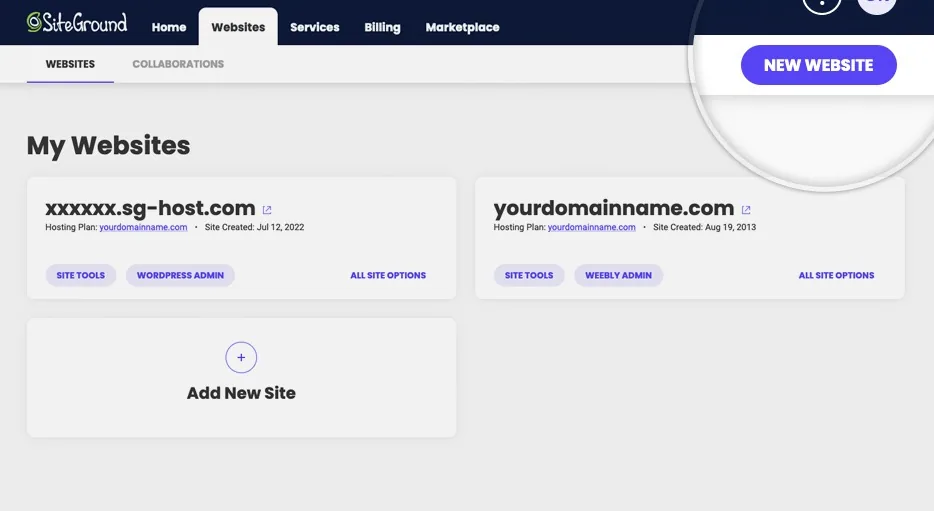
Now choose the domain type for your site. You can choose three different types of domains such as –
- New Domain
- Existing Domain
- Temporary Domain
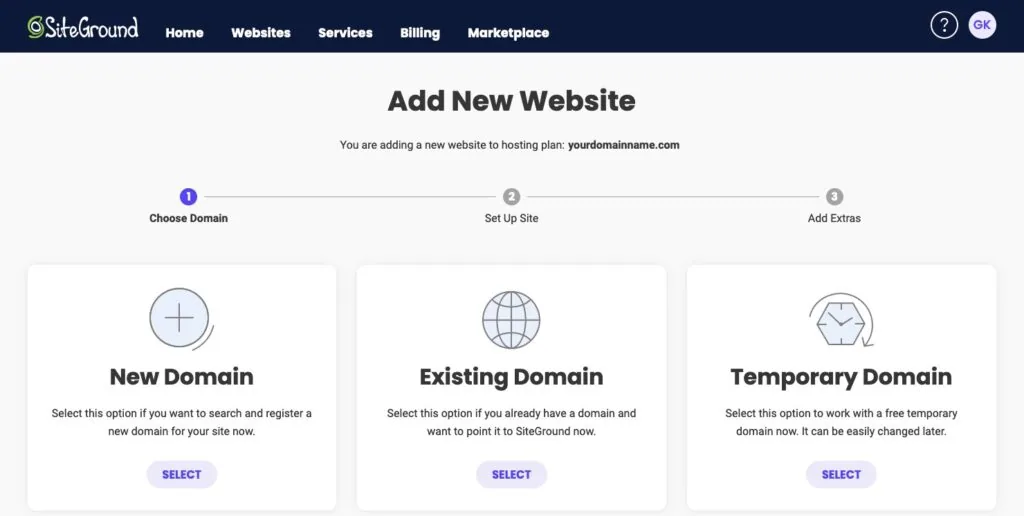
Now tap on the continue button, and you will see the functions for installing WordPress.
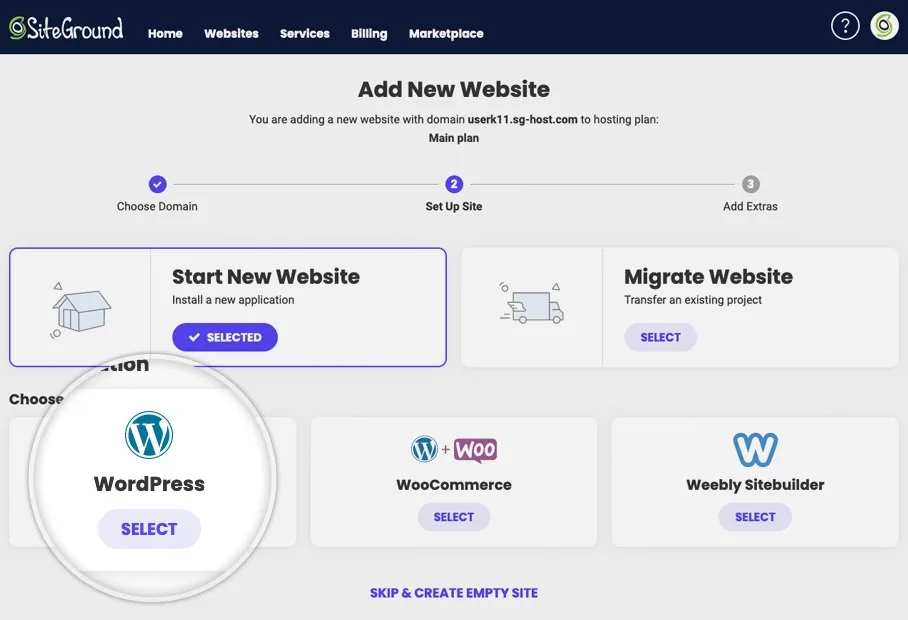
As you can see, it has efficient options for choosing website builders such as WordPress, WooCommerce, and Weebly Sitebuilder. We want to install WordPress, so select it from the option.
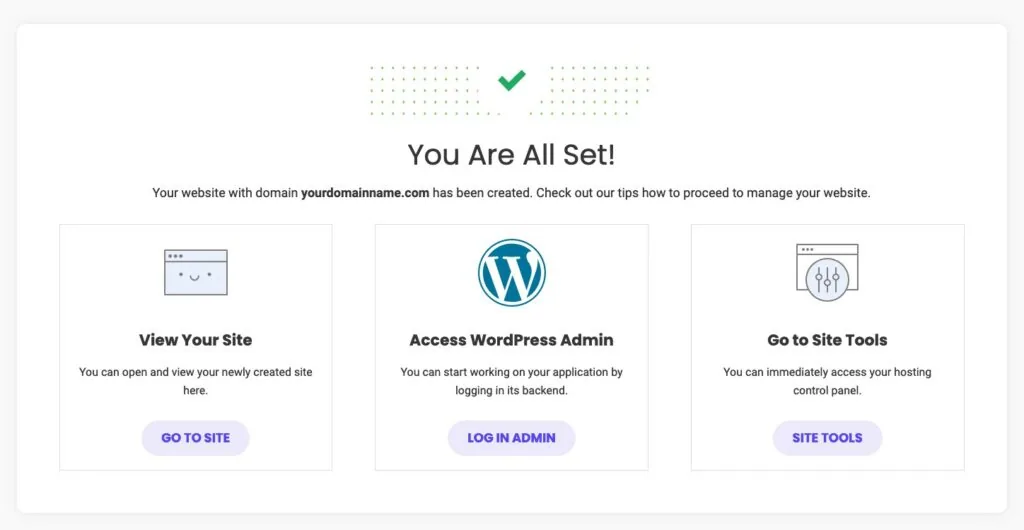
Congratulations, our WordPress site is ready. Now you can easily access your WordPress Dashboard and visit your site whenever you want. Finally, our WordPress website is ready. Now it’s time to install WooCommerce on our site.
Well, WooCommerce is a plugin of WordPress. So the installation process of this plugin is straightforward like others. We are going to show you the process here.
Go to your WordPress Dashboard > Plugins > Add New Plugins. Now Search with the plugin name(WooCommerce) on the search bar.
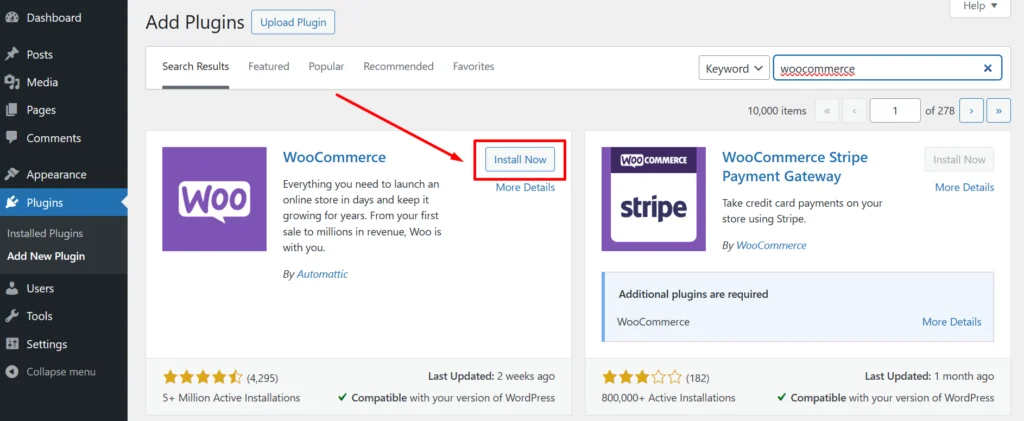
Tap on the install button and activate the plugin.
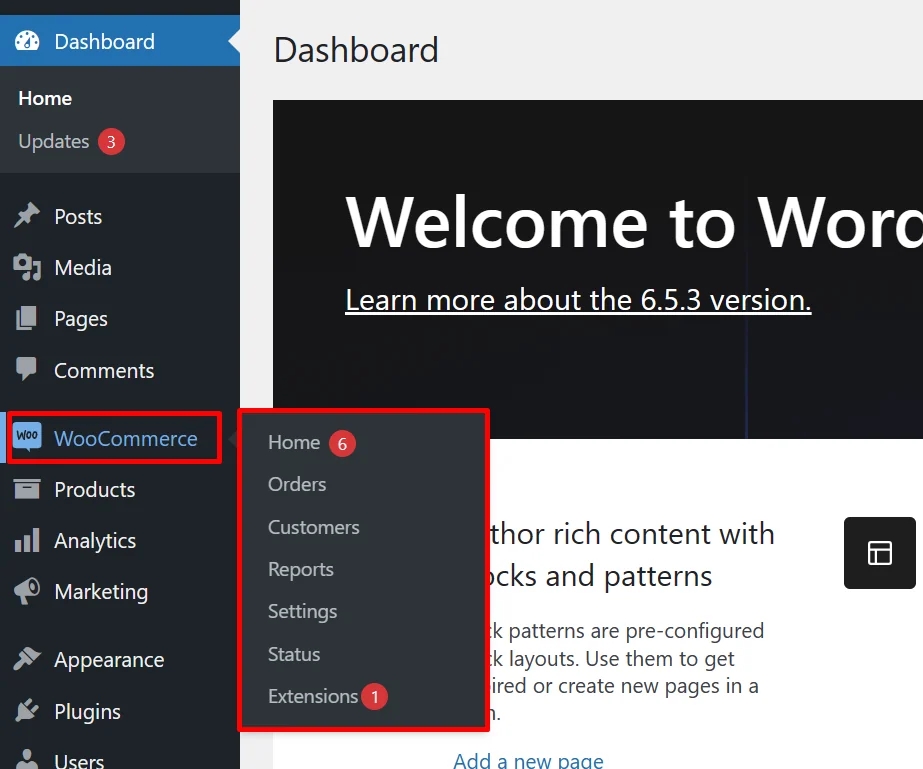
Now you can easily manage all the settings of your WooCommerce store from the dashboard. However, installing a WooCommerce store is a very easy process. Because WordPress is the most flexible platform for building any type of website.
You don’t need to have any advanced coding knowledge to run the website or online store. You can maintain your website with different types of useful plugins.
Our next section is to properly set up our online store from the beginning. So let’s go there.
- Setting Up Your WooCommerce from Scratch
Now the time has come to set up our WooCommerce store. In this section, we are going to show you step-by-step. It includes different types of factors such as adding products, setting up the payments, setting up the shipping, etc.
You must carefully go through each section and provide the right information. Our first step is adding products to our WooCommerce store.
Without products how can a store run? Isn’t that true?
Step 1 – Add New Products
Well, go to your WordPress Dashboard > Products.
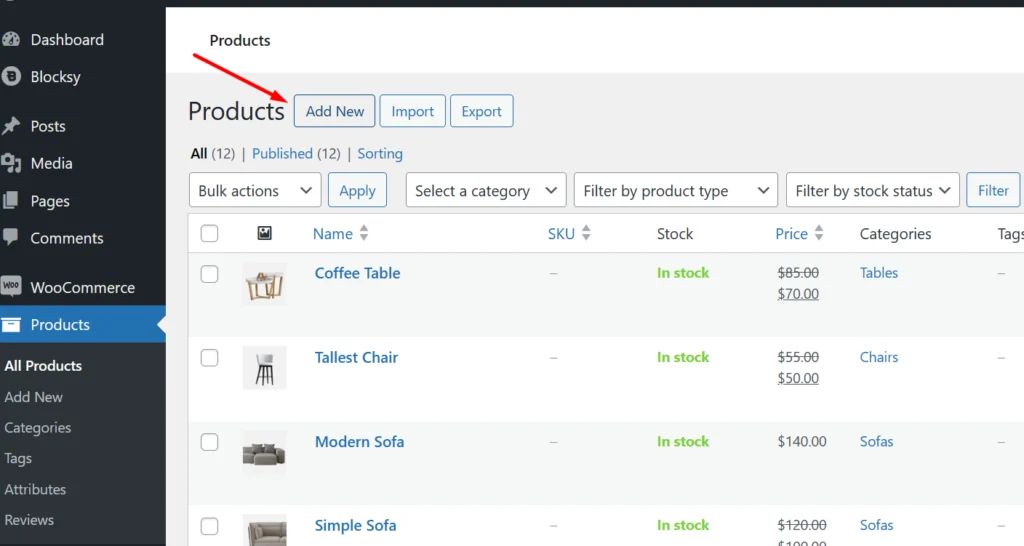
We already have some products in our online store. To include a new product tap on the Add New Option.
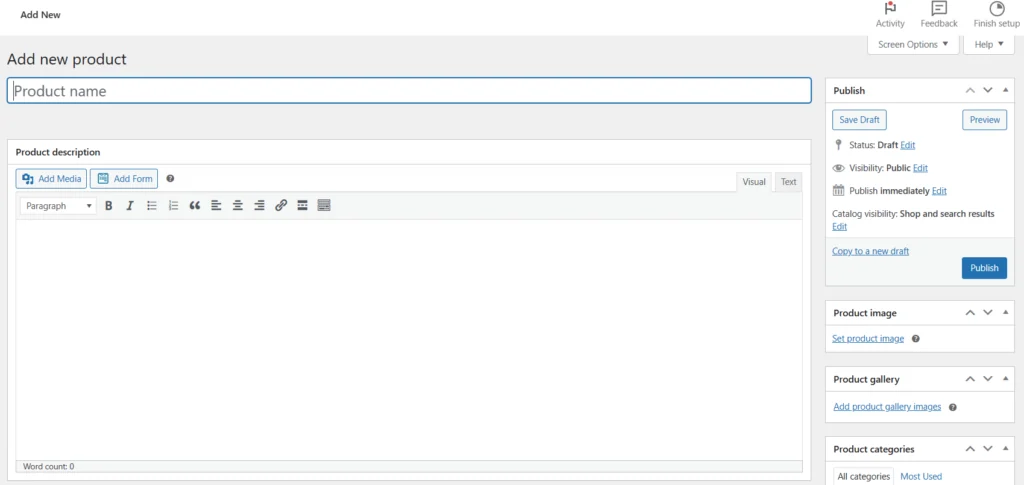
- Fill up your product name and product description. Also, add the product image from the right section of the page.
- You can also change the product publish settings such as status, visibility, publish date, and time. Scroll down the page to set up more product relation information.
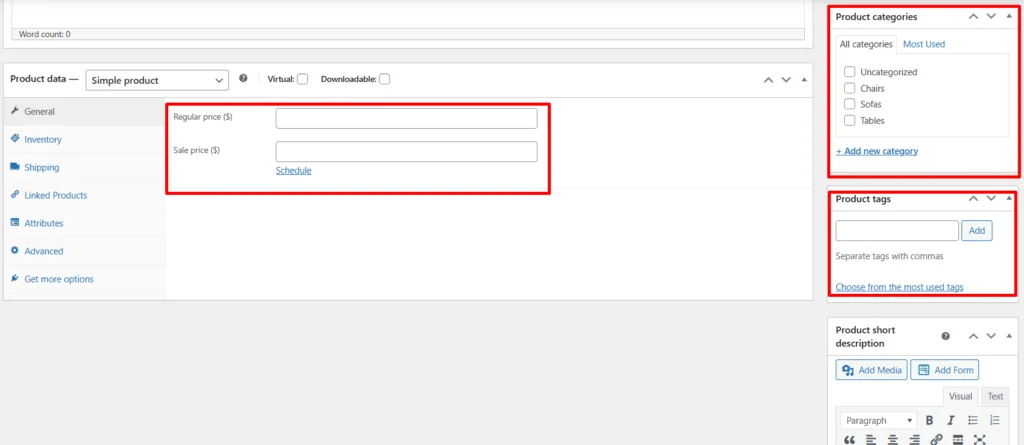
- Set a regular price and sale price(if applicable) for your products.
- Choose the product category from the right section of the page.
- Also, you can use product tags and short product descriptions.
fter filling up all the necessary information about your products, finally, click on the publish button. By following this process you can easily add multiple types of products in different categories.
Step 2 – Configure the Shipping Options
After adding the products we need to configure the shipping options for our WooCommerce store. A flexible shipping option is always necessary to provide the products at the right time to your customers. If there were no shipping options available in your store, customers would feel dissatisfied while purchasing the product.
To set up the shipping method follow the process – Go to your WordPress Dashboard > WooCommerce Settings > Shipping.
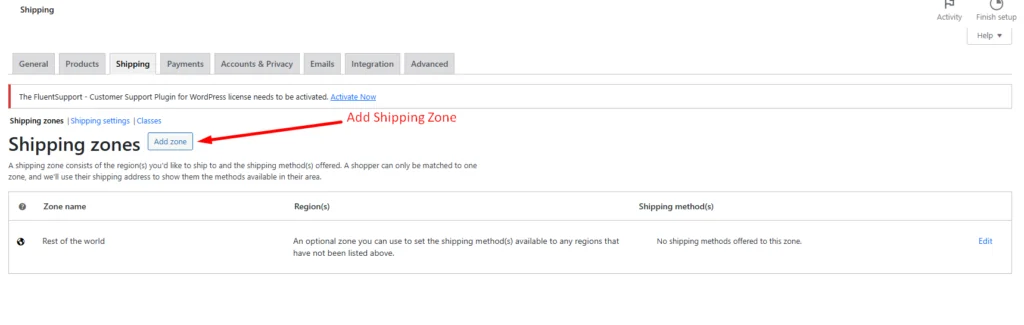
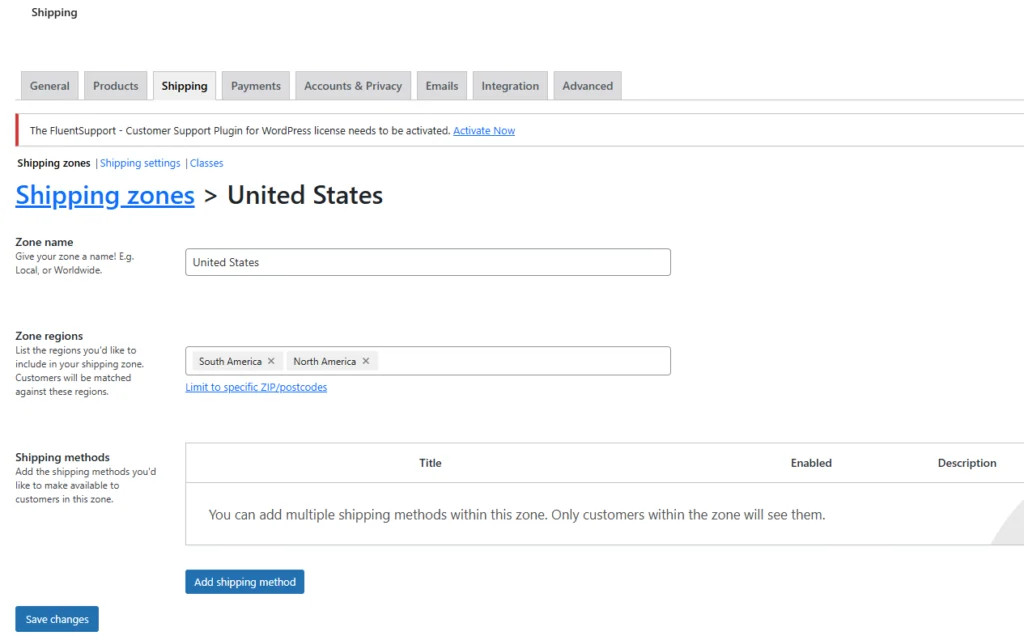
- First, set the shipping zone name.
- Choose the zone regions for your shipping option.
- Add the shipping method for this shipping zone.
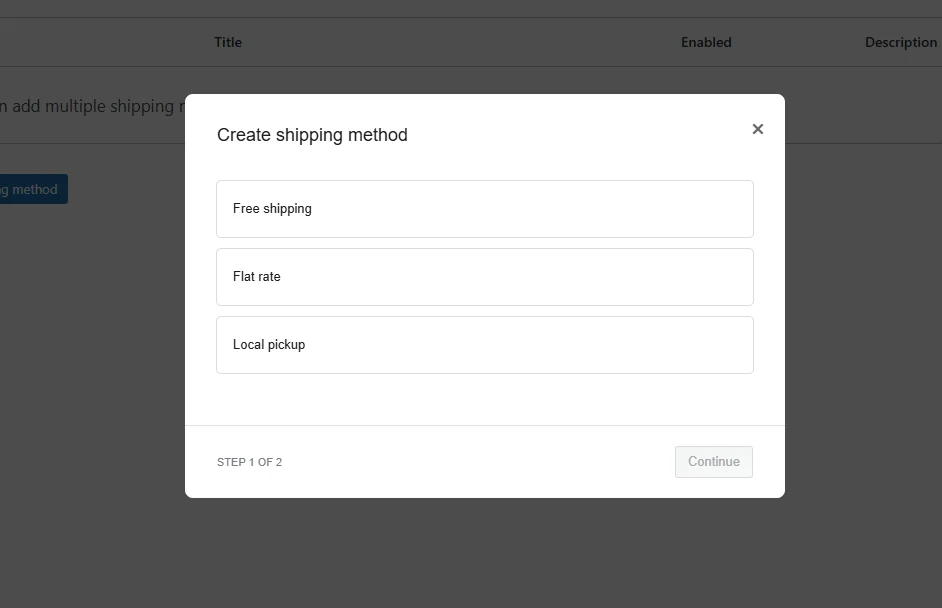
There are three different types of shipping methods available – free shipping, flat rate, and local pickup.
Choose any of the shipping methods for your store based on your demands. Tap to the continue button.
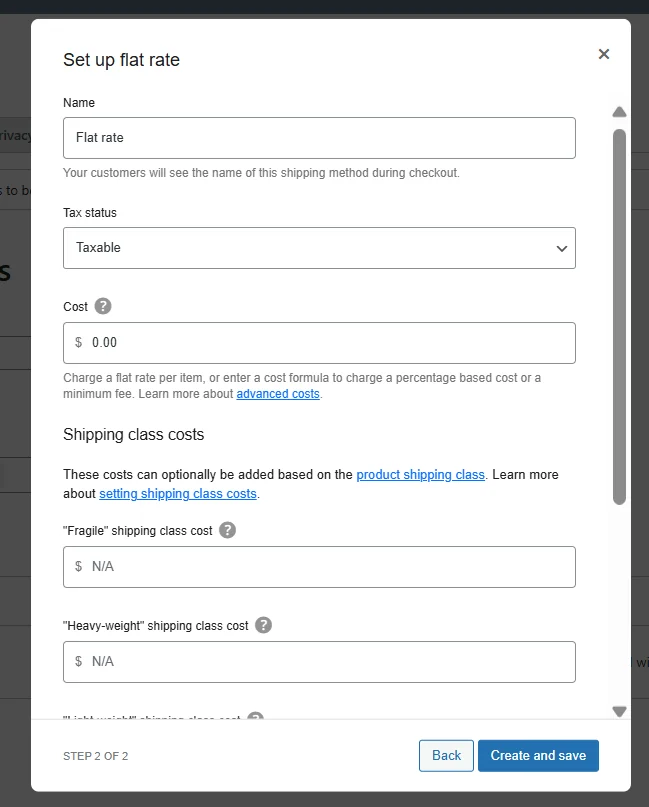
It’s time to set the shipping cost for our chosen shipping zone. With the shipping cost, you have to set up the shipping class cost. Then click on Create and Save.
Also, WordPress has multiple types of shipping calculator plugins to calculate shipping costs. By the way, you can easily change the shipping price from the shipping settings.
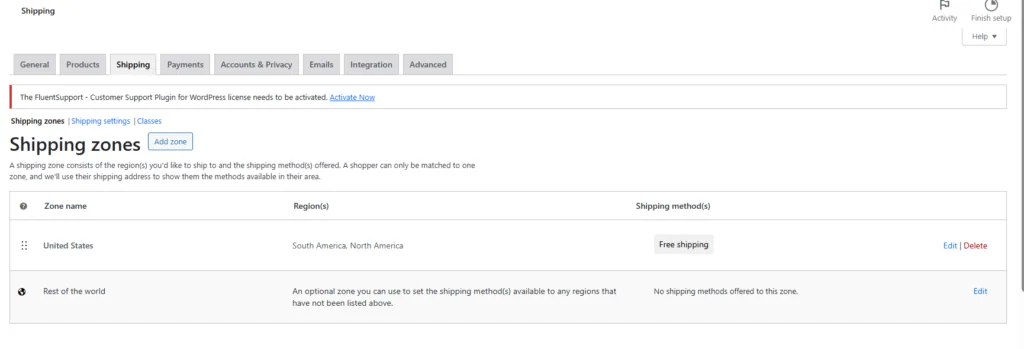
Finally, we have added the shipping zone for our online store.
Step 3 – Setup the WooCommerce Payments
Now we have to set up the payment methods for the customers. Otherwise, they can’t purchase the product from us.
To set up the payment system we need a payment gateway plugin. There different types of payment gateway plugins and add-ons are available for the WooCommerce stores. Here are some examples of common types of payment gateway plugins for WordPress.
- WooCommerce PayPal Payments – One of the most widely used payment gateways, PayPal allows customers to pay using their PayPal balance, bank accounts, or credit cards. WooCommerce integrates seamlessly with PayPal Standard, PayPal Checkout, and PayPal Pro, offering flexibility and ease of use.
- Stripe – Stripe is another highly popular payment gateway that supports credit and debit card transactions. It is known for its developer-friendly API, robust security features, and support for recurring payments. Stripe is often preferred for its simplicity and ability to handle a wide range of currencies.
- Square – Square is ideal for businesses that operate both online and offline. It allows for seamless integration with WooCommerce, enabling businesses to accept payments via credit cards and maintain a unified sales and inventory system across online and physical stores. There are different types of Square plugins available for the WooCommerce store.
These payment tools have different features that can help businesses with their different needs. Some of these features include basic payment processing, recurring billing, international transactions, and fraud prevention.
When choosing a payment gateway for a WooCommerce store, it’s important to think about things like transaction fees, how easy it is to set up, what customers want, and what the business needs specifically.
We will choose the Stripe payment gateway for our store. That’s why we need to install the Stripe plugin.
To install the Stripe, go to your WordPress Dashboard > Plugins > Add New Plugin. Now search for Stripe on the search bar. Now install & activate the plugin.
Go to WooCommerce > Settings > Payments.
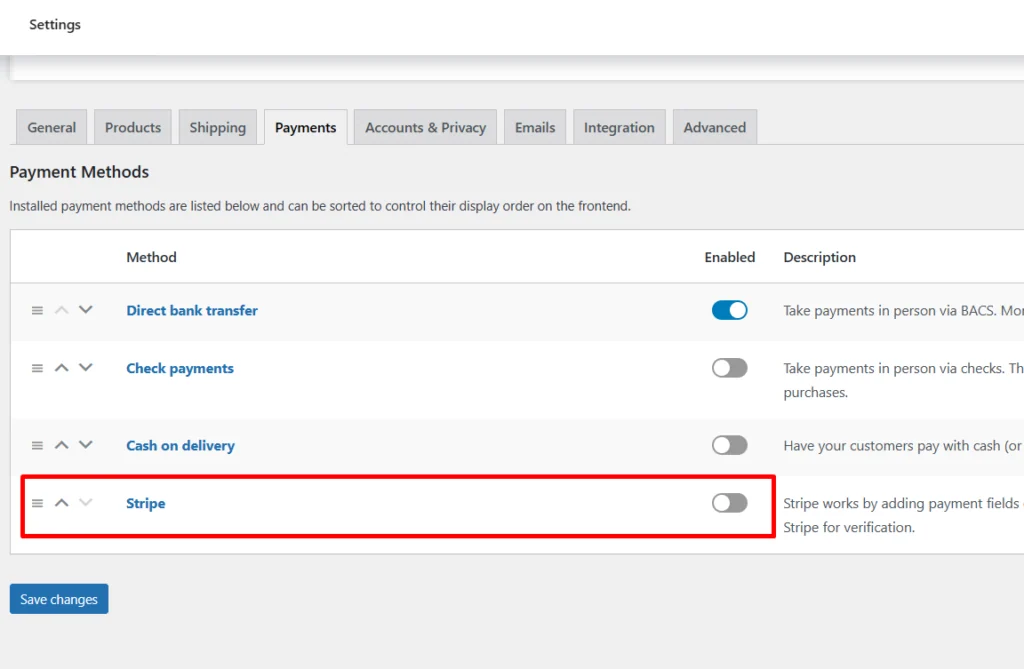
The stripe plugin option was added to our payment section. Tap to the enable button from here.
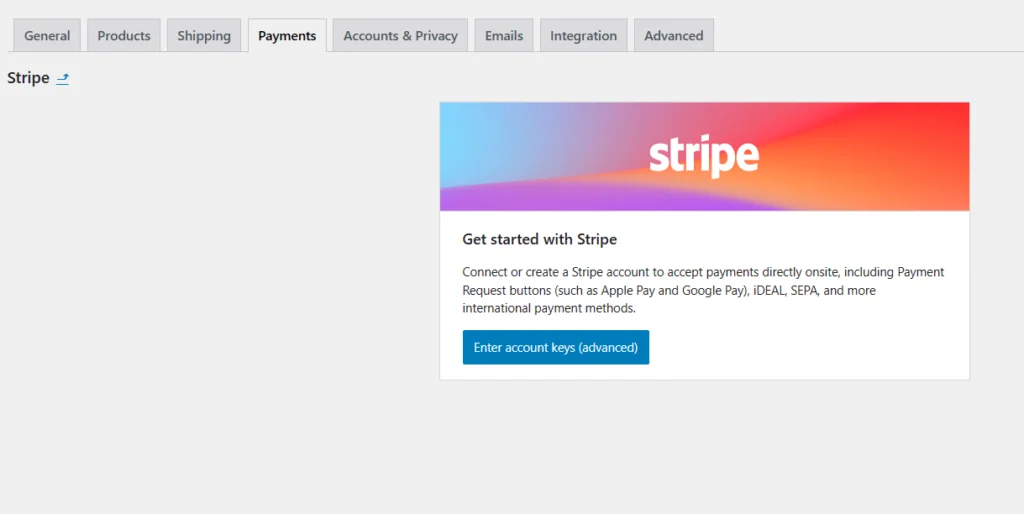
Now properly fill up all the necessary data about your Stripe account.
- Choose a Relevant Theme for your Store
We are using the WordPress platform to build our online store. You already know that WordPress has various types of free and premium themes for its users. There are also specified themes for the WooCommerce stores.
You can choose any theme for your WooCommerce store and also you can customize it whenever you want. Along with that, you can change the theme also.
Here are some tips to help you choose the best theme for your WooCommerce site –
1. Prioritize Compatibility: Ensure the theme is specifically designed for WooCommerce and is compatible with the latest version. This ensures seamless integration and functionality.
2. Responsive Design: Choose a theme that is fully responsive and mobile-friendly. A significant portion of online shopping is done on mobile devices, so a responsive design will provide a better user experience across all devices.
3. Loading Speed: Opt for a lightweight and fast-loading theme. A theme that is optimized for speed will enhance user experience and improve your site’s SEO performance.
4. Customization Options: Look for themes that offer extensive customization options. This allows you to tailor the design to match your brand’s identity without requiring extensive coding knowledge.
5. Design and Layout: Choose a theme with a clean, modern design that suits your product range and target audience. Ensure the layout is intuitive and user-friendly, with easy navigation and clear calls to action.
7. Support and Updates: Opt for a theme from a reputable developer that offers regular updates and reliable support. This ensures that your theme stays compatible with the latest WordPress and WooCommerce updates and security patches.
After analyzing all these factors, choose the perfect theme that suits your demands. Now we are going to choose a theme for our WooCommerce store.
To set the theme go to WordPress Dashboard > Themes > Add New Theme
Now search with the term “WooCommerce” on the search bar. It will show you all the store-related themes that are available on the WordPress theme storage.
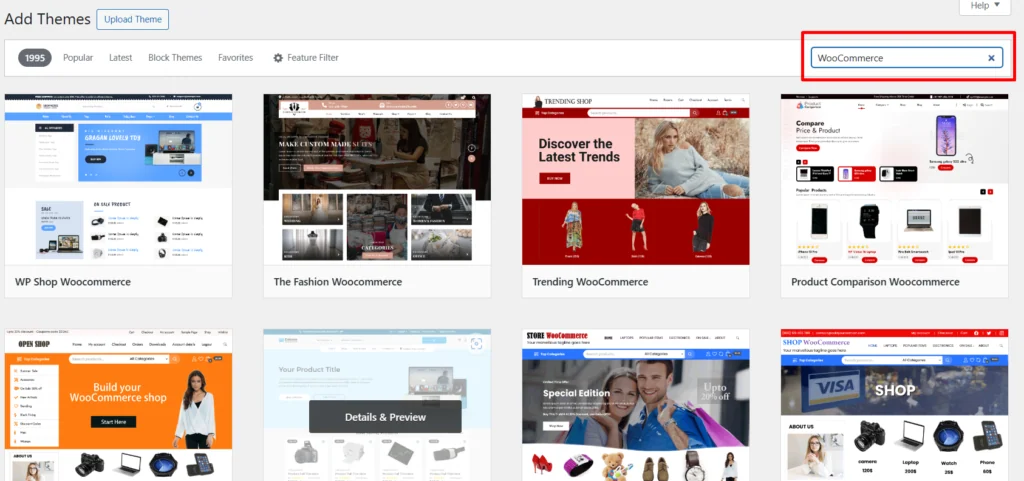
Choose any of the themes from here. There are also premium themes available. So you can purchase them. Some of the themes have demo templates and products. You can also customize the themes whenever you want.
Nowadays, dark interface appearance has become very popular among website designs. You can find multiple types of dark themes in WordPress theme stores. Along with that, you can provide a dark slick to your website with the dark mode plugins.
- Add Essential Plugins and Add-ones in your Store
Plugins are a crucial component for any WooCommerce store, enhancing functionality, streamlining operations, and improving the overall user experience.
They allow you to add features beyond the default WooCommerce capabilities, such as advanced product filtering, custom payment gateways, and enhanced shipping options. This extended functionality is essential for tailoring your store to meet specific business needs.
Customization is another significant advantage of plugins. They enable you to create a unique shopping experience that aligns with your brand, from personalized product recommendations to custom checkout processes.
Enhancing the user experience is vital for retaining customers and driving sales, and plugins like product reviews, product wishlists, and live chat support play a crucial role in improving the customer journey.
Also, furnishing product images and adding more functionality on product pages like magnifying zoom can be a good option for enhancing customers’ purchasing journey.
SEO and marketing plugins help boost your store’s visibility and attract more traffic, which is essential for growth. SEO plugins like Yoast SEO optimize your site for search engines, while marketing plugins enable email campaigns, social media integrations, and other promotional activities.
Protecting your store and customer data is also a top priority, and security plugins provide features like malware scanning, firewall protection, and secure payment processing to safeguard your store against threats.
Let’s talk about some prominent plugins that are necessary for a WooCommerce store. We researched and suggested some of the essential plugins. Hopefully, it will be helpful for optimizing your store performance.
- Elementor Website Builder – More than Just a Page Builder
Elementor is the most famous and used page builder for WooCommerce and WordPress websites. With the help of this plugin, you can easily create the pages of your website within a few moments.
The drag-and-drop interface of this plugin will make your customization more flexible. Along with that, this plugin added the AI feature. With the AI Copilot, you can easily create a complete section, proper code, text, etc within a few moments.
Elementor has 40 different types of widgets for making website customization more flexible and efficient.
- WP Guidant – Product Recommendation Quiz Builder
Make your customer purchasing journey more efficient with an advanced multi-step product recommendation quiz and form builder called WP Guidant. You can easily create unlimited numbers of guided selling processes with different types of cards, sliders, and forms. This plugin offers conditional logic functions to make the guides more work for the customers. This ultimate guide plugin is also considered a form builder for WordPress. You can create a conversational form for your website with this plugin.
- Mailchimp for WooCommerce
Mailchimp is a powerful email marketing tool, and this plugin helps integrate it with your WooCommerce store. You can sync your customer and order data with Mailchimp, allowing you to create targeted email campaigns and automated marketing workflows.
- wcEazy – All-in-one WooCommerce Solution
wcEazy is a complete solution for your online store. It offers dozens of features for customizing your WooCommerce store functionality and making it more efficient. wcEazy has 13 different types of modules such as BOGO Deal, auto-apply coupon, coupon generator, floating cart, one-click-checkout, pdf invoice and packing slip, etc.
- WooCommerce Advanced Shipping
This plugin provides advanced shipping options for your WooCommerce store. It allows you to set up multiple shipping methods and rates based on conditions like weight, destination, and product categories, offering more flexibility in your shipping policies.
- WooCommerce Product Add-Ons
This plugin lets you offer additional options and customization for your products. Customers can select options such as engraving, gift wrapping, or custom messages, enhancing their shopping experience and increasing the average order value.
- WP Rocket
Speed is crucial for e-commerce success, and WP Rocket is a top-notch caching plugin that improves your site’s loading times. Faster websites provide a better user experience and can lead to higher conversion rates.
- WooCommerce Social Login
This plugin allows customers to log in to your store using their social media accounts like Facebook, Google, Twitter, and more. Simplifying the login process can reduce cart abandonment and improve user experience.
- WooCommerce Currency Switcher
If you sell products internationally, this plugin is a must-have. It enables customers to switch currencies and see product prices in their preferred currency, making it easier for them to make purchasing decisions.
There are also numerous types of WooCommerce plugins available. Each plugin has different features and benefits. So you can’t choose them randomly. If a plugin is required for your website then you can choose it.
However, using too many plugins also creates a huge problem for a WordPress website.
- Slower Load Times: Each plugin adds additional code that must be executed, which can slow down page load times. This can negatively impact user experience and SEO rankings.
- Increased Server Load: Plugins consume server resources. Excessive use of plugins can overwhelm the server, leading to slower responses and potential downtime.
- Vulnerabilities: Not all plugins are maintained to high-security standards. Some may contain vulnerabilities that can be exploited by hackers, compromising your site.
- Compatibility Issues: Plugins may conflict with each other or with the core WordPress updates, creating security loopholes or causing the site to break.
- Frequent Updates: Each plugin requires regular updates to stay secure and functional. Managing updates for numerous plugins can be time-consuming and cumbersome.
- Dependency on Developers: If a plugin developer stops providing updates or support, you may be left with outdated and insecure code that needs to be replaced or removed.
So, while you are choosing a plugin for your store, you should consider all these factors.
- Properly Test your Online Store and Update Info
Testing a WooCommerce store before launching is always essential. Testing ensures that all features, from product browsing to checkout, work correctly. This prevents user frustration and cart abandonment caused by broken links, non-functional buttons, or errors during the purchase process.
So before launching a WooCommerce store, you must test it properly. Your main idea is selling products to the customers. If a customer faces difficulty while purchasing a product, he will automatically leave your store as soon as possible.
On the other hand, your online store is entirely new. So it will also create a bad impression about your business. For that reason, you can’t build a trustworthy group of customers.
Don’t take stress. We are going to tell you about some essential factors that you should focus on while launching your store.
Here’s a strategic checklist to guide your pre-launch process:
1. Optimize Product Presentation
Content Accuracy and Quality –
- Verify Product Information: Ensure all product descriptions, product id, titles, prices, and specifications are accurate.
- High-Quality Media: Use high-resolution images and, if applicable, videos to showcase products effectively.
Category and Tag Structure –
- Organize Products: Implement a logical categorization and tagging system to enhance navigation and SEO.
2. Streamline the Checkout Process
Payment Gateways
- Comprehensive Testing: Test all payment options, including credit cards, PayPal, and other gateways, to ensure reliability.
Shipping Configuration
- Validate Shipping Options: Confirm that shipping methods and rates are accurate and transparent during checkout. Also, add shipping classes to improve the product delivery system.
3. User Experience
- Guest and Registered Checkouts: Ensure both guest and registered user checkouts function smoothly without friction.
4. Enhance Performance
Site Speed
- Optimization Tools: Use tools like Google PageSpeed Insights or GTmetrix to identify and fix performance issues.
Caching and CDN:
- Implement Caching: Use caching plugins and a Content Delivery Network (CDN) to improve load times globally.
5. Fortify Security
SSL and Encryption
- SSL Certificate: Ensure your site has an active SSL certificate for secure data transmission (look for HTTPS in the URL).
Security Plugins
- Install Security Measures: Use security plugins like Wordfence or Sucuri for ongoing protection against threats.
6. Ensure Responsiveness and Compatibility
Mobile Optimization
- Test Across Devices: Verify that your store is fully responsive and performs well on various devices (smartphones, tablets, desktops).
Browser Compatibility
- Cross-Browser Testing: Ensure functionality across different web browsers (Chrome, Firefox, Safari, Edge).
7. Legal and Compliance Readiness
Policy Pages
- Privacy Policy: Update your privacy policy to comply with regulations such as GDPR.
- Terms and Conditions: Clearly outline terms and conditions, including returns, shipping, and payment policies.
- Implement a Marketing Strategy to Boost Conversion
If you have an online store using WooCommerce, you need a great marketing plan. It’s like adding a secret ingredient to your store that makes it shine and attracts customers like a magnet.
By having a clever marketing strategy, you can make more people see your store, get people to talk about it, and bring in a lot of visitors. You can do this through SEO, social media, email, and even paid ads. Well, your sales budget is also aligned with planning a marketing strategy. So along with a marketing strategy, you should have a sales strategy.
On top of that, you’ll create a brand that people will remember and recognize. You’ll also reach the right people with messages that they will like, which makes them more likely to buy your products or services.
In a world where there are a lot of choices, a strong marketing strategy is your secret weapon. It makes your store special and helps you get more customers. So, if you want your WooCommerce store to be a success, it’s time to take marketing seriously.
For online businesses using WooCommerce, effective marketing strategies are essential for success. WooCommerce is a powerful e-commerce platform suitable for businesses of different sizes, but to stand out in the online market, you need to use different marketing methods.
Here, we present some of the most effective marketing strategies for WooCommerce businesses:
- Search Engine Optimization (SEO): Optimize product pages and content with relevant keywords to enhance visibility in search engine results. Engage in strategic link building to acquire high-quality backlinks, boosting your website’s authority and ranking. Continuously monitor and improve your website’s performance in search engine results pages (SERPs) through analytics and optimization efforts.
Some Useful SEO Tools: Semrush, Ahrefs, Google Search Console, Google Keyword Planner, Moz, etc.
- Content Marketing: Create valuable and engaging content such as blog posts, articles, and guides that cater to your audience’s needs and interests. Share your content across multiple platforms, including social media, to reach a broader audience and establish thought leadership. Collaborate with influencers and bloggers in your industry to expand your reach and tap into their established audience.
- Email Marketing: Cultivate an email list of your customers and subscribers to foster ongoing communication and engagement. Send regular newsletters and promotional emails that provide valuable information, offers, and updates. Utilize email marketing automation tools to personalize your messages and enhance customer engagement.
Some Useful Email Marketing Tools: Mailchimp, HubSpot, Omnisend, Zoho, etc.
- Social Media Marketing: Establish a strong presence on relevant social media platforms where your target audience is active. Engage with your followers through genuine interactions, storytelling, and community building. Leverage social media advertising to reach a targeted audience and drive traffic to your website.
- Paid Advertising: Utilize paid advertising platforms such as Google Ads and Facebook Ads to reach a wider audience and generate targeted traffic. Experiment with different advertising formats, including search ads, display ads, and video ads, to optimize your campaigns.
- Affiliate Marketing: Collaborate with other businesses, influencers, and bloggers in your industry to promote your products through their channels. Offer attractive commission rates and incentives to your affiliates to motivate their efforts and drive sales.
- Influencer Marketing: Partner with influencers and bloggers who align with your brand values and have a significant following in your target market. Leverage their influence and credibility to showcase your products and reach a wider audience.
- Public Relations (PR): Pitch your products and brand to media outlets, journalists, and industry publications to secure media coverage and mentions. Cultivate relationships with media professionals to increase your visibility and build brand credibility.
- Local Marketing: Optimize your website for local search by including relevant keywords and optimizing your Google My Business listing. Engage with local customers through events, partnerships, and community involvement to build brand awareness and foster loyalty.
- Constantly Maintain & Monitor your Online Store
Well, you are running a WooCommerce store. It’s a constant process of selling products online to your customers.
It’s necessary to keep updating your store regularly to provide the best service to your customers. So maintaining a WooCommerce store is more tactical than publishing a store. For example, a customer faces difficulty while completing the payment for a product purchase.
That means there is some issue happening in your store payment system. So you have to inspect the payment issue and fix it as soon as possible. For the reason of unfixed issues, you might lose your customers.
Focus on Regular Updates
- Core WordPress Updates: Always keep WordPress updated to the latest version to ensure you have the latest features and security patches.
- WooCommerce Updates: Regularly update WooCommerce to benefit from new features and security fixes.
- Theme and Plugin Updates: Update themes and plugins to their latest versions to ensure compatibility and security. Sometimes WordPress plugin updates fail because of technical reasons. You have to inspect and fix that issue.
Backup Your Website
- Regular Backups: Schedule regular backups of your entire site, including the database and all files. There are various types of backup plugins available for WordPress websites.
- Off-site Storage: Store backups off-site on services like Google Drive, Dropbox, or Amazon S3 to protect against server failures.
Security Measures
- Secure Hosting: Choose a reliable hosting provider that offers robust security features.
- SSL Certificate: Ensure your site has an SSL certificate to encrypt data and improve SEO rankings.
- Security Plugins: Install security plugins like Wordfence or Sucuri to monitor and protect against threats.
- Regular Scans: Perform regular security scans to identify and fix vulnerabilities.
Performance Optimization
- Caching: Use caching plugins like W3 Total Cache or WP Super Cache to speed up your site.
- Image Optimization: Optimize images using plugins like Smush or ShortPixel to reduce load times. You know sometimes product images are not showing because of unoptimized images.
- Content Delivery Network (CDN): Implement a CDN such as Cloudflare to serve content faster to users across the globe.
- Database Optimization: Regularly clean and optimize your database using plugins like WP-Optimize.
Monitor Website Health
- Uptime Monitoring: Use services like UptimeRobot or Pingdom to monitor your site’s uptime and receive alerts if it goes down.
- Performance Monitoring: Regularly test your site’s performance using tools like PageSpeed Insights or GTmetrix and make necessary improvements.
- Error Logs: Check error logs regularly to identify and fix issues promptly.
Manage Inventory
- Stock Management: Regularly update your product inventory to reflect current stock levels.
- Automated Stock Alerts: Set up automated order management alerts for low stock levels to manage reordering processes effectively.
Final Words
Is building a WooCommerce store easy? Well, it’s a step-by-step process. You can’t craft a store within a moment. Before jumping on crafting you must go through proper research and prepare an effective strategy for that.
Throughout this entire blog, we have discussed a full guide about creating an online store on WooCommerce. Where we have discussed all the sectors of WooCommerce in choosing a hosting server to market an online store. It’s a well-researched WooCommerce checklist for our readers. By following this guide you can easily create a full-fledged store and make it more convenient for your customers.