

A WordPress CRM plugin is software that runs inside your own WordPress site and keeps your leads, deals, contacts, proposals and invoices in one place. Your client data stays in your own database, and you manage everything from the admin you already use. This guide explains what a WordPress CRM plugin does, how it differs from a hosted CRM, and seven checks to run before you choose one.
Thank you for reading this post, don't forget to subscribe!
Table of Contents
What does a WordPress CRM plugin do?
CRM stands for customer relationship management. Wikipedia describes it as a process organisations use to manage, analyse and improve their interactions with customers, usually supported by information systems that store customer data and coordinate sales, marketing and service. A WordPress CRM plugin delivers that inside WordPress, next to your pages and forms.
In practice a good one does five jobs:
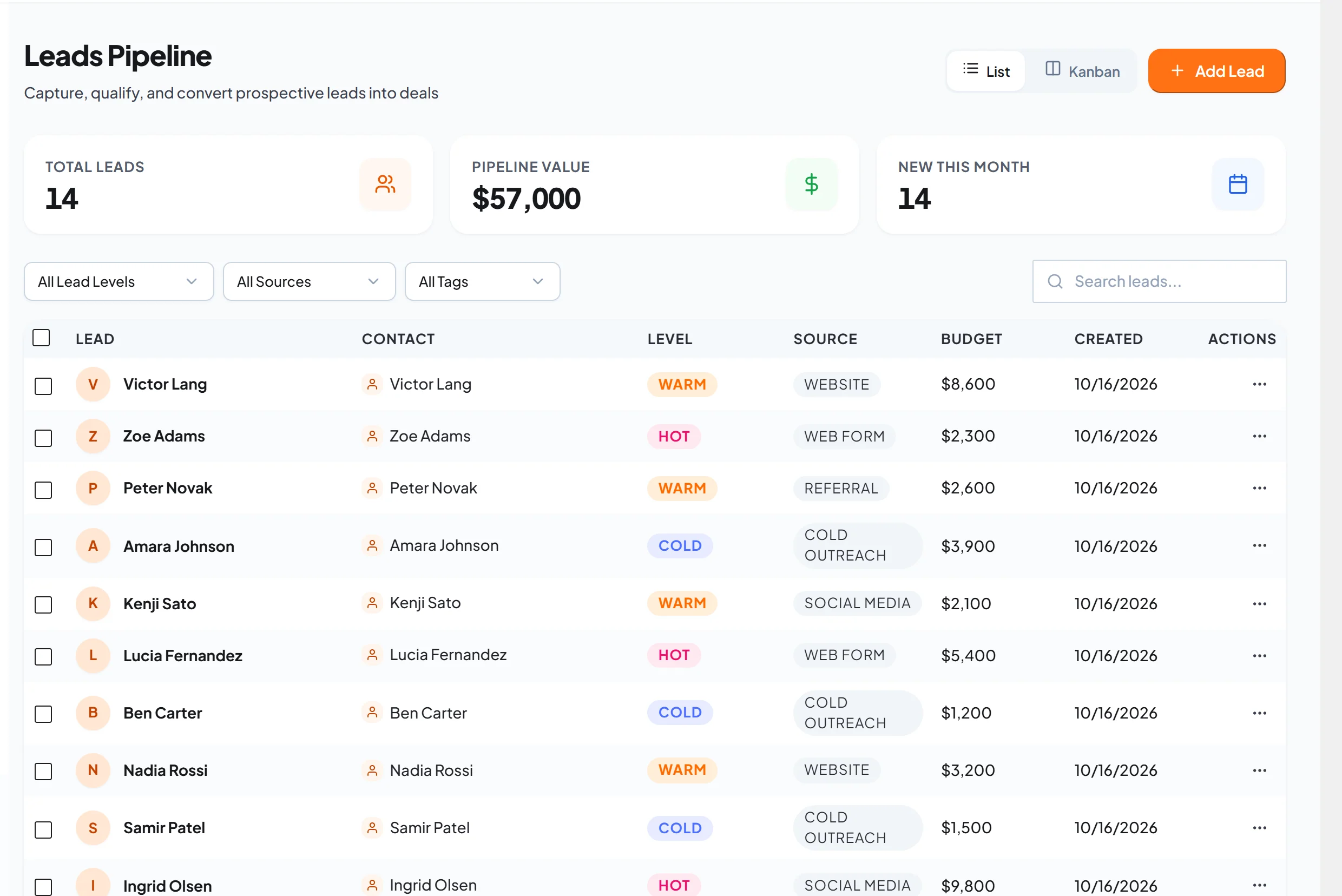
- Captures leads. Enquiries from your contact forms arrive as leads you can manage, with their source and budget attached.
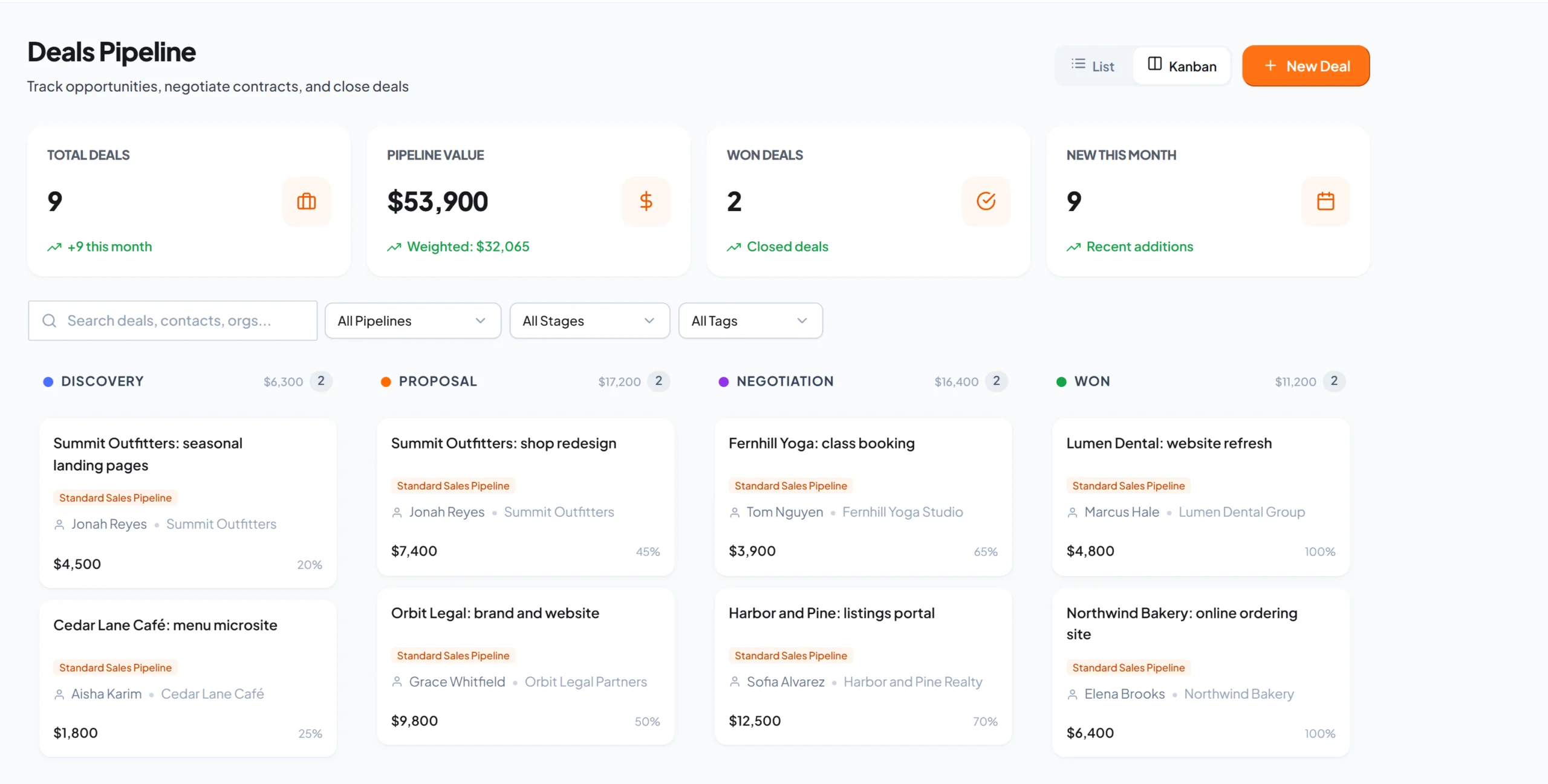
- Moves deals forward. Each deal sits in a pipeline stage, so you always know what needs a follow-up.
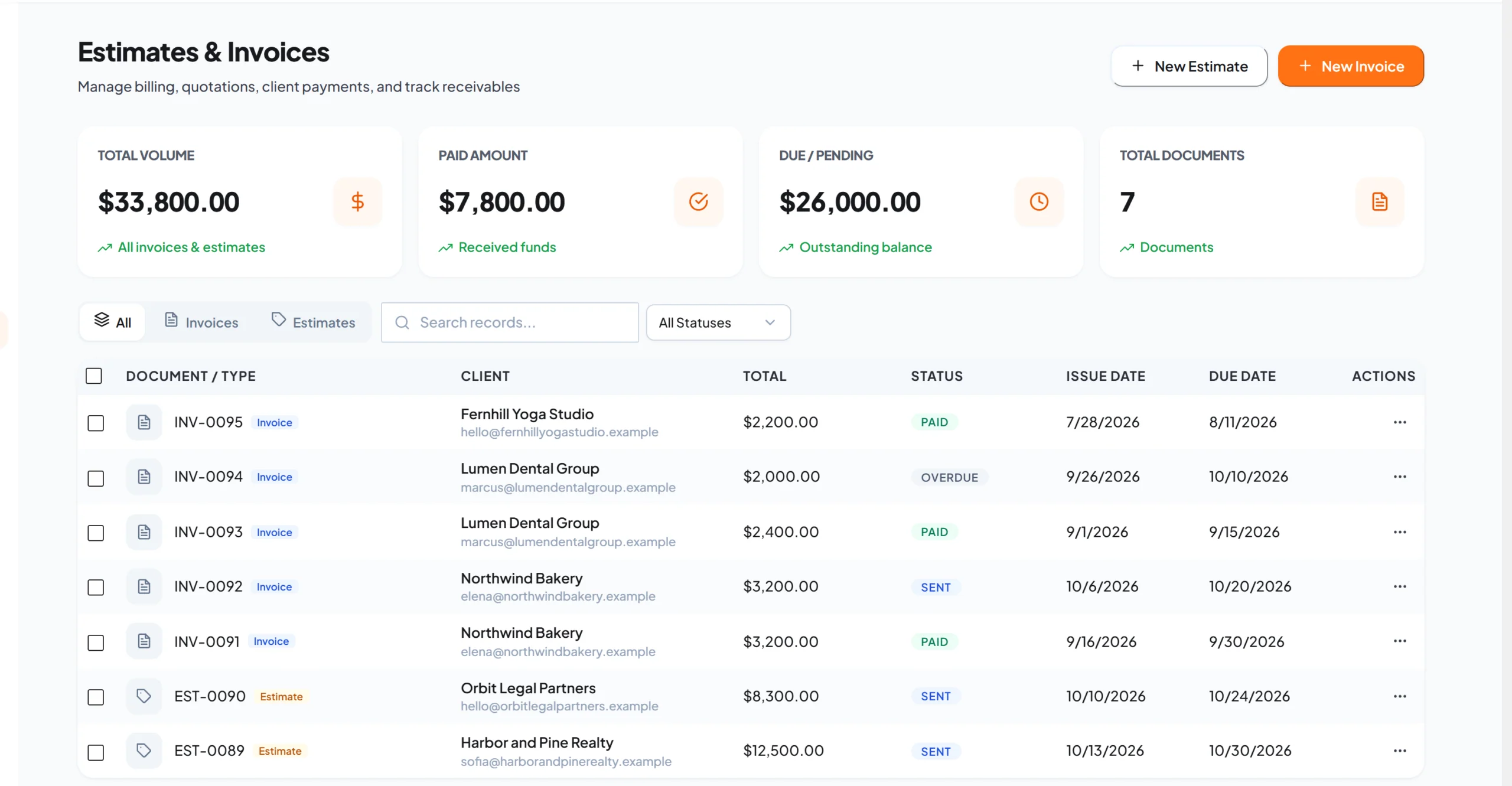
- Sends proposals and invoices. An accepted estimate becomes an invoice, and the client can pay it.
- Tracks the work after the sale. Projects and support tickets live next to the client record.
- Gives clients a place to look. A client portal shows proposals, invoices and tickets, so they stop asking by email.
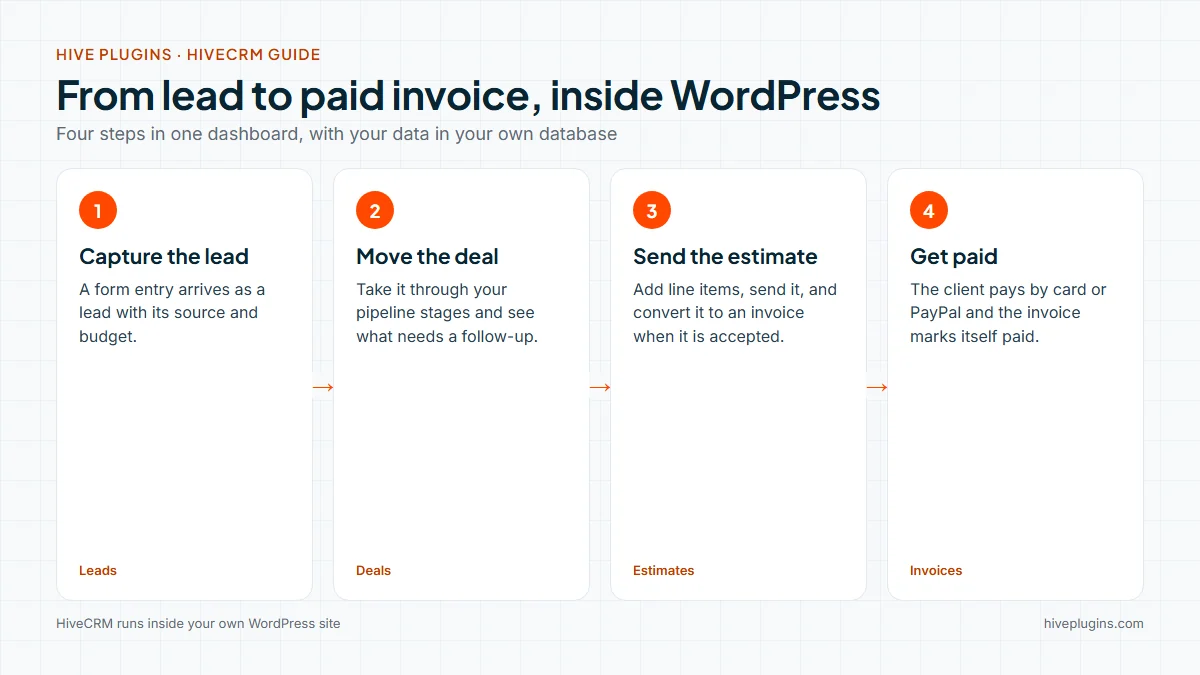
A spreadsheet remembers what you typed. A CRM remembers what to do next. That difference matters most in the week a lead goes quiet, because the CRM shows you which deals have not moved and who is waiting for an answer.
Who needs a CRM on a WordPress site?
WordPress is the base for a very large part of the web: W3Techs reports that it is used by 58.4% of all the websites whose content management system is known. That means a lot of people already run their business site on WordPress and answer enquiries from the same dashboard.
A CRM plugin fits you if any of these sound familiar:
- You answer enquiries by email and lose track of who replied.
- Your proposals live in documents and your invoices in another app.
- Clients ask you for the latest invoice or for a status update.
- You sell through a store and want to follow up with customers.
If you have only a handful of clients and a clear memory, a spreadsheet can carry you for a while. Once follow-ups start slipping, a CRM pays for itself in missed work you no longer miss.
WordPress CRM plugin or hosted CRM: how do they differ?
A hosted CRM is a separate app you log in to on the provider’s website. A WordPress CRM plugin installs on your own site. Neither is better for everyone, so here are the real trade-offs:
| WordPress CRM plugin | Hosted CRM (separate app) | |
|---|---|---|
| Where the data lives | In your own WordPress database | On the provider’s servers |
| How you pay | Depends on the plugin: a one-time licence or a subscription | Usually a subscription, often per user |
| Setup | Install it like any plugin and use your WordPress login | Create an account, then connect your site through forms or an integration |
| Fit with WordPress | Reads your forms, users and store directly | Connects through integrations |
| Works best when | WordPress is already the centre of your business | You need deep tools outside WordPress, for example a large dedicated sales team |
A hosted CRM can be the better fit for a big sales team with its own admin. A WordPress CRM plugin fits when your site is already where clients find you, and you want one tool fewer to pay for and keep in sync.
7 checks before you choose a WordPress CRM plugin
Run these seven checks on any WordPress CRM plugin, including the one you already have in mind.
- Where does the data live? Look for records stored in your own database, so you decide who can reach them and where they are backed up.
- How do you pay, and what about updates? Compare a one-time licence with a subscription, and check whether updates and support are included for life or for a year.
- Does it cover the whole client flow? Lead, deal, proposal, invoice, payment, project and ticket. Every missing step is another tool to keep in sync.
- Is there a client portal? A place where clients see proposals and invoices saves you a stream of status emails.
- Does it work with your forms and your store? Check that it creates leads from the form plugin you already use, and that it can read customers and orders from WooCommerce if you sell online.
- Can it automate the boring parts? Look for simple rules such as “when a lead is created, make a task” that you can read and understand.
- Does it respect roles? Your team should see what they need and nothing more, and clients should see only their own records.
How does HiveCRM answer the seven checks?
HiveCRM is a CRM that lives inside WordPress, built to pass these checks. Here is how it answers each one:
- Data: records are stored in your own WordPress database, and you can export your leads, deals, clients, contacts, invoices, projects and tickets to CSV or PDF.
- Payment and updates: it is one payment, “Pay once. Own it forever.”, with lifetime updates. See the pricing page for the current plans.
- Whole client flow: leads, deals, estimates, invoices, projects and support tickets sit in one dashboard.
- Client portal: included. Clients see proposals, invoices, projects and tickets, and can pay invoices from the portal.
- Forms and store: new form entries become leads automatically from Contact Form 7, WPForms, Gravity Forms, Ninja Forms, Fluent Forms and MetForm. WooCommerce sync brings customers in as contacts, products as packages and orders as deals, in one direction from the store to the CRM. The integrations page lists the rest.
- Automation: the workflow builder starts from a trigger, such as a record being created or updated, adds conditions, and runs actions: send an email, add a tag, update a field or call a webhook.
- Roles: separate roles for admins, managers, staff and clients.
Here is the leads screen from a demo studio with fictional clients. Level, source and budget sit in one list, so you can see which enquiries are hot.
Deals then move across the board stage by stage. Each card shows the contact, the value and the win probability, and the column totals show where the money is.
When the client agrees to an estimate, you convert it to an invoice in one click. The client pays by card with Stripe Checkout or with PayPal, and the invoice marks itself paid.
If you use an AI assistant, HiveCRM also includes a built-in MCP server with 43 tools, so ChatGPT or Claude can read and update your records. The MCP page shows what it can do.
What does the first week look like?
You do not need a big setup. A realistic first week looks like this:
- Install and activate the plugin, then enter your company details under Settings, General Profile.
- Check the deal stages. HiveCRM starts with Discovery, Proposal, Negotiation, Won and Lost, which you can rename to match how you sell.
- Connect the form plugin you already use, so new enquiries arrive as leads. The guide to integrations and webhooks shows the settings.
- Add the clients you already work with.
- Send your first estimate and convert it to an invoice when the client agrees. The guide to creating an estimate walks through the form.
By the end of the week every open enquiry has a stage and a next step, which is the whole point of a CRM.
Frequently asked questions
Is there a free WordPress CRM plugin?
Some CRM plugins offer a free version with limits, so check what the free version includes and which features sit behind an upgrade. HiveCRM is a paid plugin with one payment and no subscription.
Will a WordPress CRM plugin slow down my site?
It depends on the plugin. In a check on a HiveCRM demo site, the home page loaded no HiveCRM files at all, and only the client portal page loaded the portal's own script and styles. The CRM dashboard itself runs in the WordPress admin.
Can a CRM plugin work with WooCommerce?
Yes. HiveCRM syncs WooCommerce customers, products and orders into contacts, packages and deals, in one direction from the store to the CRM. If you are still setting up your store, the WooCommerce setup checklist covers the basics.
Where is my client data stored?
In your own WordPress database, on your own hosting. You decide who has access and how it is backed up.
Do I need a CRM if I only have a few clients?
Not on day one. A CRM starts to help when you have more enquiries and open jobs than you can keep in your head, and the first missed follow-up costs more than the tool.
Try HiveCRM on your own site
If you run client work or a service business on WordPress, see how HiveCRM handles leads, proposals, invoices and the client portal in one place, and compare the full feature list with the seven checks above.