

A Black Friday email schedule WooCommerce stores can copy is a short, dated series of emails that tells customers when a sale starts, opens it to your best buyers first and closes it honestly. For 2026 that means six emails between 19 November and 2 December, built in Hive Mail, an email marketing and automation plugin that runs inside your WordPress site. You get the dates, the audience for each email, subject lines and a checklist.
Thank you for reading this post, don't forget to subscribe!
Table of Contents
Black Friday email schedule WooCommerce stores can use: at a glance
- Dates: Black Friday is Friday 27 November 2026 and Cyber Monday is Monday 30 November 2026.
- Emails: teaser, early access, launch, last chance, Cyber Monday, thank-you.
- First send: Thursday 19 November. Everything should be written and scheduled by Monday 16 November.
- Free in Hive Mail: campaigns, scheduling, WooCommerce segments, A/B subject tests, abandoned cart recovery and revenue reports.
- Hive Mail Pro: ready-made Black Friday and Cyber Monday automations, and a flow step that makes a one-customer coupon.
How do you plan a Black Friday email campaign?
Work backwards from 27 November. This email schedule WooCommerce stores can run needs only the Free plugin. Send one preview a week before, a private early start two days before, the launch on the day, a deadline reminder on Sunday, a new angle on Cyber Monday and a plain thank-you afterwards. Times below are examples in your site's timezone. Move them to when your own customers read email.
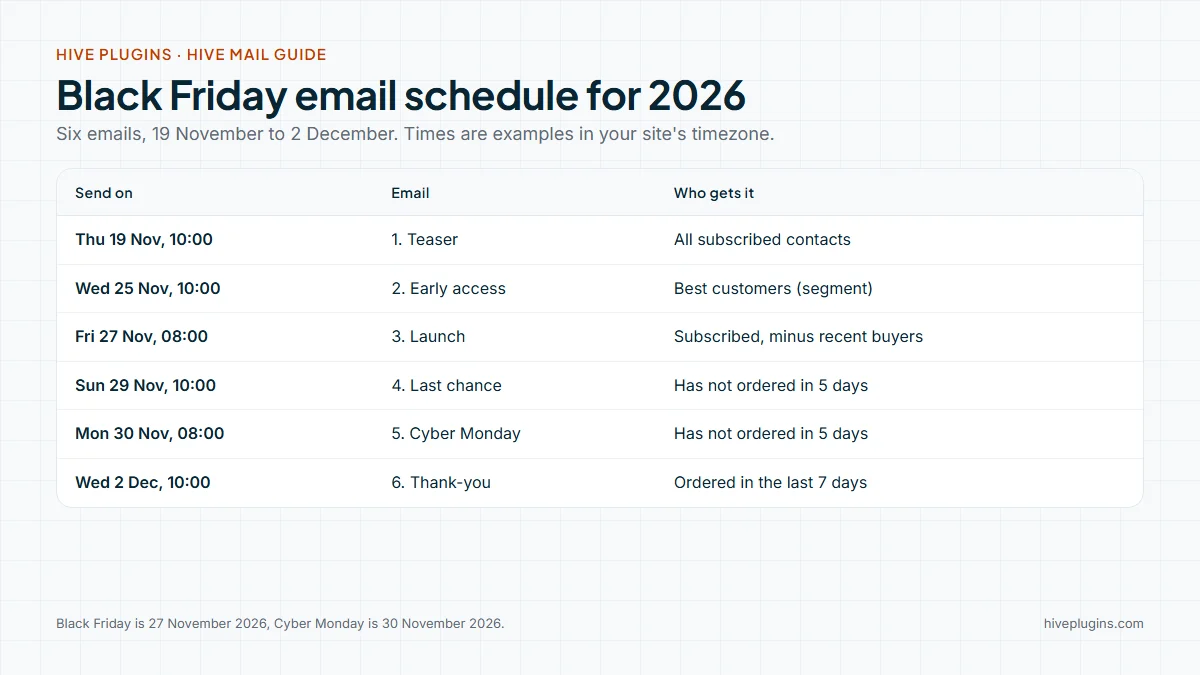
Copy this email schedule WooCommerce owners can run into your calendar and change the times:
| # | Send on | Who gets it | |
|---|---|---|---|
| 1 | Teaser | Thu 19 Nov, 10:00 | All subscribed contacts |
| 2 | Early access | Wed 25 Nov, 10:00 | Your best customers (segment) |
| 3 | Launch | Fri 27 Nov, 08:00 | Everyone subscribed, except people who ordered in the last 5 days |
| 4 | Last chance | Sun 29 Nov, 10:00 | Subscribed contacts who have not ordered in the last 5 days |
| 5 | Cyber Monday | Mon 30 Nov, 08:00 | Subscribed contacts who have not ordered in the last 5 days |
| 6 | Thank-you | Wed 2 Dec, 10:00 | People who ordered in the last 7 days |
A small store does not need every email in this email schedule WooCommerce shops can run. If your list is small or you email rarely, send four: teaser, launch, last chance and thank-you. Watch unsubscribes and spam complaints on each send. If they rise, drop an email rather than rewriting it.
What do you put in each of the six emails?
Each email has one job and one button. Keep the offer, the dates and the code identical in all six, and only promise a deadline you will keep. A subject line must also describe what is inside, which is a CAN-SPAM rule in the United States (FTC compliance guide). This is information, not legal advice.
- Teaser. Say the sale exists, the exact start date and one reason to come back. No code yet if you want the launch to feel new.
- Subject ideas: "Black Friday starts on 27 November", "A preview before Friday", "What is coming on the 27th".
- Early access. A private start for people who already bought from you. Say why they get it (they ordered before) and when it ends.
- Subject ideas: "Early access is open, {{first_name|there}}", "Two days before everyone else".
- Launch. The offer in the first line, the code, the end date, three products at most, one button.
- Subject ideas: "Black Friday is open: 30% off until Sunday" (30% is an example), "The sale starts now".
- Last chance. The same offer with the real end time. Use this only if the sale really ends.
- Subject ideas: "Black Friday prices end at 23:59 tonight", "Last day for 30% off".
- Cyber Monday. Something that is new on Monday: a different category, a free-shipping threshold or a small extra. Do not resend the launch email.
- Subject ideas: "Cyber Monday: new prices on one day", "Cyber Monday ends at midnight".
- Thank-you. No offer. Say thanks, when orders ship and how to reach you. It earns a reply and a calmer inbox. New subscribers from the sale can then start a welcome email series.
- Subject ideas: "Thank you, and what happens to your order next".
Put the code in WooCommerce first and set it up to match the emails. WooCommerce coupons can have an expiry date, a minimum spend, a usage limit and an individual-use setting. Set the expiry to the same minute as your last chance email says, then test the code at checkout in a private window.
Who should get each Black Friday email?
A good email schedule WooCommerce stores run sends different emails to different people. In Hive Mail a segment is a saved filter with a live count, and with WooCommerce active it has shop rules. Build four segments before you write a word.
| Segment | Rules (match all) | Used for |
|---|---|---|
| Best customers | Number of orders is at least 2 (or Total spent is at least an amount you choose) | Email 2 |
| Ordered in the last 5 days | Purchases has ordered in the last 5 days | Leave out of emails 3 to 5 |
| Ordered in the last 7 days | Purchases has ordered in the last 7 days | Email 6 |
| Cart waiting | Abandoned cart has one waiting | Leave out of campaigns on days when a cart reminder is already running |
The last row matters for a store that runs abandoned cart recovery. A shopper who leaves a cart on Friday could otherwise get the launch email and a cart reminder on the same day. The guide to WooCommerce abandoned cart emails covers how the three cart reminders work.
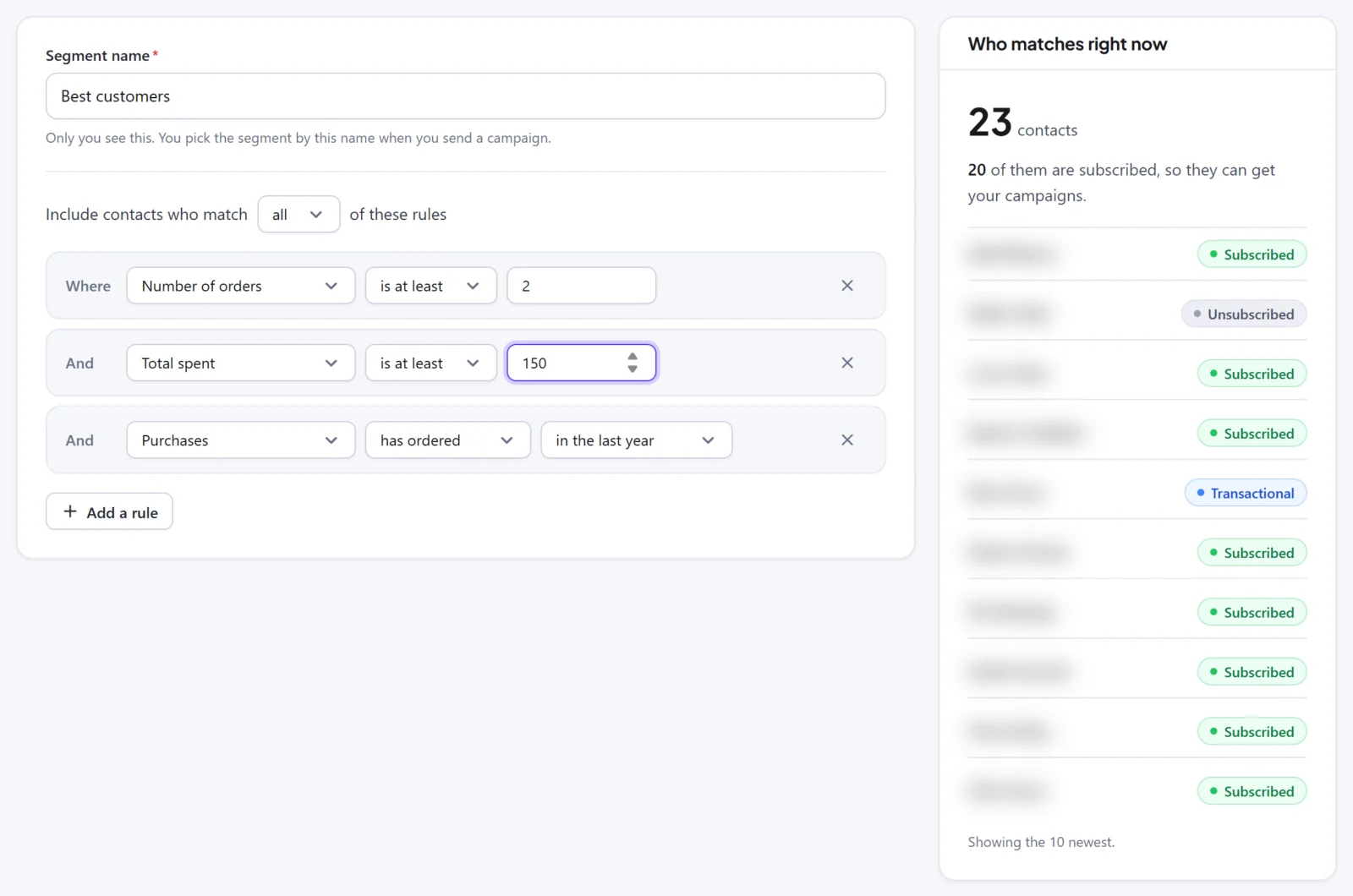
Segments are worked out live when a campaign starts, so the "ordered in the last 5 days" exclusion catches people who bought an hour ago. A count shown while you build is a preview. Read how segments work before you rely on a rule.
Use clicks, not opens, for any "engaged" rule. Opens from Apple Mail privacy protection do not count in segment rules, and opens in general are a weak signal.
How do you build this Black Friday email campaign in Hive Mail?
Create one campaign per email, choose the audience, write the email, then schedule it. A campaign has four steps: Setup, Audience, Content, Review and send. Nothing is sent until you confirm on the last step.
- Go to Messaging > Campaigns and click New campaign. Type a name that includes the date, such as "BF 3 launch, 27 Nov".
- Type the Subject line. Add a fallback to every merge tag:
{{first_name|there}}. - Optional: tick Test a second subject line (A/B). Use this on the teaser, where a wrong guess costs little. Hive Mail does not pick a winner and send it to the rest.
- On Audience, choose Choose lists, tags and segments, add your segment, then use Leave people out for the exclusion. Check Who gets it right now.
- On Content, pick a starter design or your saved template, write the email and click Send a test. Open it on your phone.
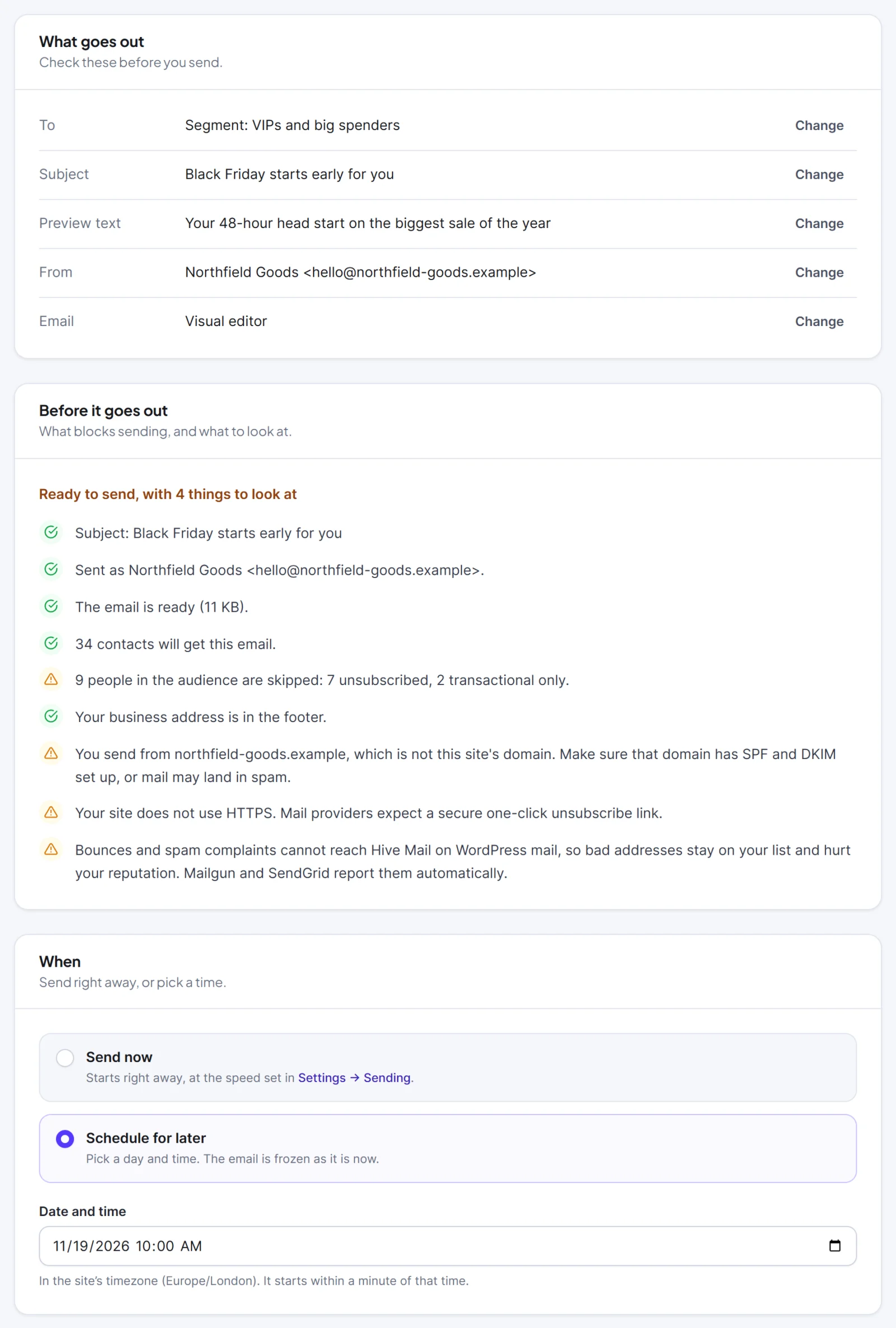
- On Review and send, fix any red items, choose Schedule for later, set the date and time, and click Schedule.
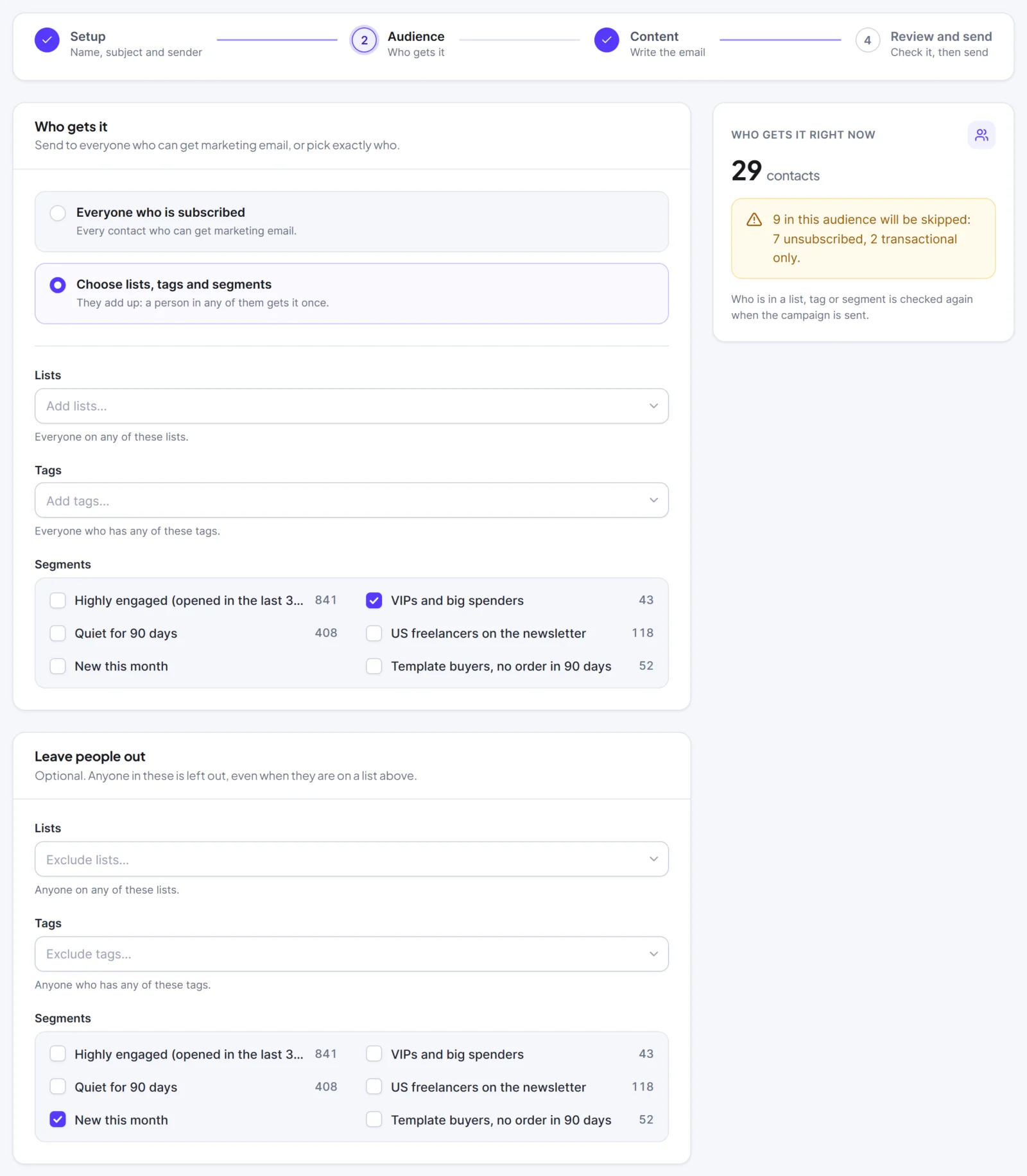
The email is frozen when you schedule it, and the audience is counted when the campaign starts. People who join a list after you schedule it can receive the email too. A time up to five minutes in the past counts as now. The date field starts one hour from now by your computer's clock, so check it. See the full schedule, pause and cancel steps.
With Hive Mail Pro: the Black Friday and Cyber Monday recipes make a three-email draft flow (teaser, launch, last chance) with dates filled in for the next occasion. Their sample offer is a placeholder, so replace it. A date that has already passed sends that email at once, so check every date before you add people. The starter designs and seasonal recipes page lists them. Pro also has a flow step that makes a WooCommerce coupon only one customer can use, once, which suits a personal code in a flow email.
What should you check before you schedule anything?
Check that your site can send at volume, that mail is authenticated and that every email has a working unsubscribe link. Google asks bulk senders to set up SPF, DKIM and DMARC, to support one-click unsubscribe and to keep the spam rate below 0.30%, with 0.10% as the target (Google sender guidelines). The guide to WordPress email deliverability explains each record.
Use this list on Monday 16 November, before the email schedule WooCommerce will send starts:
- Sending method. An SMTP plugin, Mailgun or SendGrid. Plain WordPress mail is for testing only.
- Readiness checklist. In Settings > Sending, open Is your site ready to send? and fix every Fix this row (guide).
- Check my domain. It looks for SPF, DKIM (common selectors only) and DMARC records.
- From address on your own domain, not a free mailbox address.
- Business address filled in. Hive Mail will not send a campaign without it.
- Scheduler running. Scheduled emails go out late if it is not.
- Sending speed. Recommended is up to 60 emails a minute. At that speed 5,000 emails take about 83 minutes, so schedule the launch early. Match your host's limits, which can be much lower.
- Tests. Send each email to a Gmail address and an Apple Mail address and read both on a phone.
- Code and links. Click every button. Check the code at checkout.
- Timezone. The schedule uses your site's timezone, not your computer's.
Google also asks you to send at a steady rate, to start with a low volume to engaged people and to raise it slowly. If you email your list rarely, send the teaser to people who clicked an email recently first, then widen the audience from the launch. Google warns that suddenly doubling your usual volume can lead to rate limiting or a drop in reputation.
How do you read the results of your Black Friday email campaign?
Judge each email by clicks and by revenue, not by opens. Open each campaign report and read Sent, Clicked, Unsubscribed and the Attributed revenue card. Hive Mail credits a paid order to the latest email the customer clicked in the previous 7 days, once, and per currency. It shows what followed an email, not what caused it.
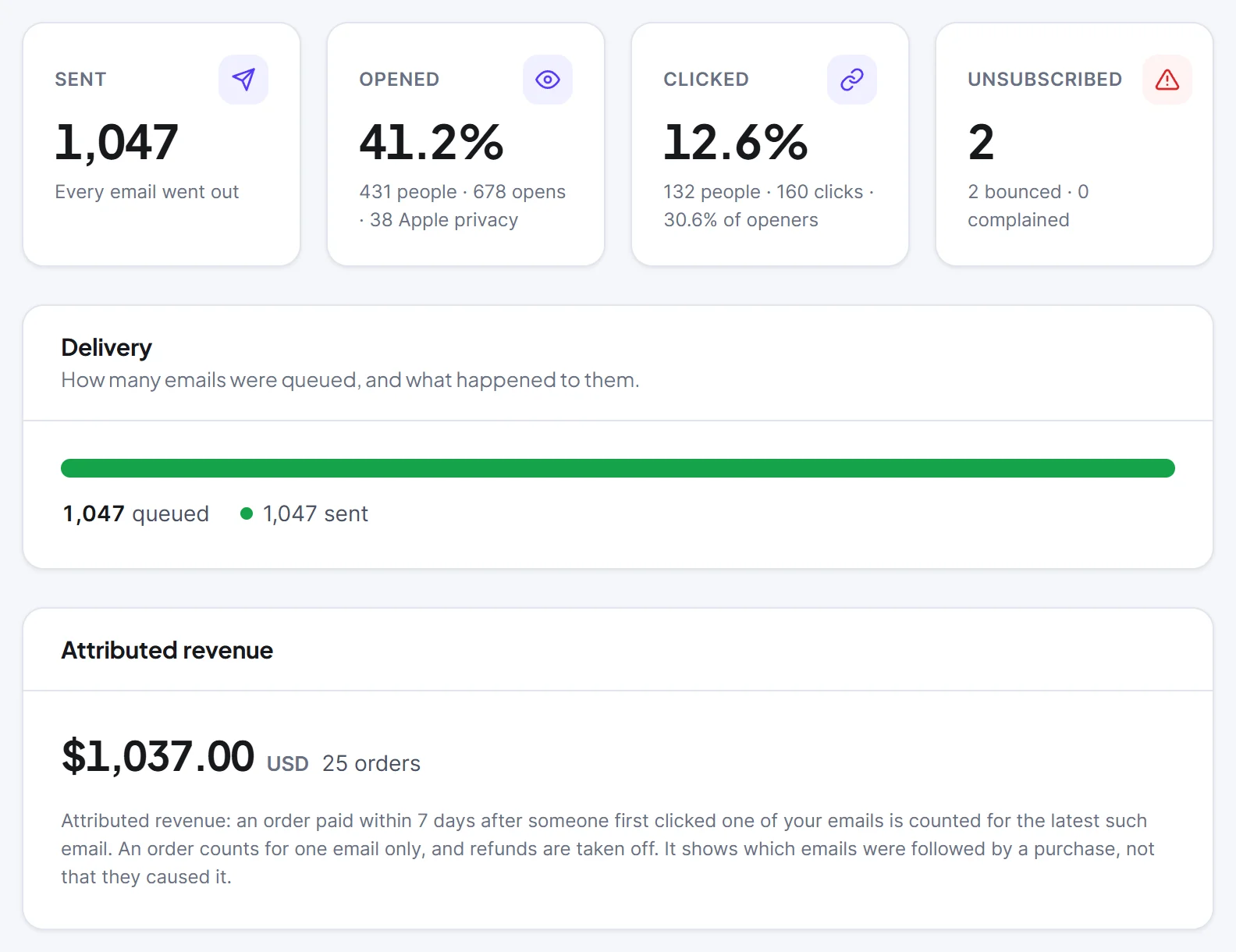
- Clicks and the Links table show which product and button worked.
- Attributed revenue appears when WooCommerce is active. Refunds lower it afterwards.
- Opens are a guide. Hive Mail ignores scanners and shows Apple privacy opens apart from the open rate.
- Unsubscribed, bounced and complained tell you when you have sent too many emails.
The reports and revenue page explains the 30 and 90 day views on Messaging > Reports. Write down what worked on 2 December while it is fresh, because it becomes next year's plan.
Build your Black Friday email schedule WooCommerce can run
Hive Mail is free and has no limit on contacts or emails, and its WooCommerce features cover segments, cart recovery and revenue reports. Install it, run the readiness checklist and build the segments this week. If you want the ready-made seasonal automations, see the Hive Mail Pro plans. If you are shopping for tools rather than planning emails, the WordPress Black Friday deals roundup lists current plugin offers. To compare what to look for in a plugin, read the guide to choosing a WordPress email marketing plugin.
Frequently asked questions
When should you send Black Friday emails in 2026?
Send the first one about a week before, on Thursday 19 November, and the launch on Friday 27 November. Add a last chance email on Sunday 29 November and a Cyber Monday email on 30 November. Choose the hour that matches when your customers read email.
How many Black Friday emails is too many?
There is no fixed number. Six emails over two weeks is a plan, not a rule. Watch unsubscribes and spam complaints after each send, and keep complaints under Google's 0.10% target. If they rise, cut the next email.
Should you send a Black Friday email to everyone?
No. Send the early access email to your best customers only, and leave people who already bought out of the last chance and Cyber Monday emails. Segments with shop rules do this for you.
Can you schedule Black Friday emails in Hive Mail ahead of time?
Yes. Each campaign has a Schedule for later option on its last step, in your site's timezone. The scheduler must be running, so check Settings > Scheduler first.
Do you need Hive Mail Pro for this email schedule WooCommerce stores can copy?
No. Campaigns, scheduling, segments, A/B subject tests and reports are in the free plugin. Pro adds the ready-made Black Friday and Cyber Monday automations and the one-customer coupon step.