

An abandoned cart is a cart with items in it that nobody ordered. Hive Mail tracks these in WooCommerce and emails reminders to people who agreed to hear from you. Easy Digital Downloads has no carts. In Settings > WooCommerce, Track abandoned carts for must not be "Off" (WooCommerce settings).
Set up recovery #
- Go to Automation > Automation recipes and click Use this automation on Abandoned cart recovery, then Create the draft flow and Open it on the canvas.
- Open each of the three emails, write your text and put
{{cart_url}}in each.{{cart_items}}shows the items and{{cart_total}}the total. - Check the This flow panel says "Ready to switch on.", then switch the flow on.
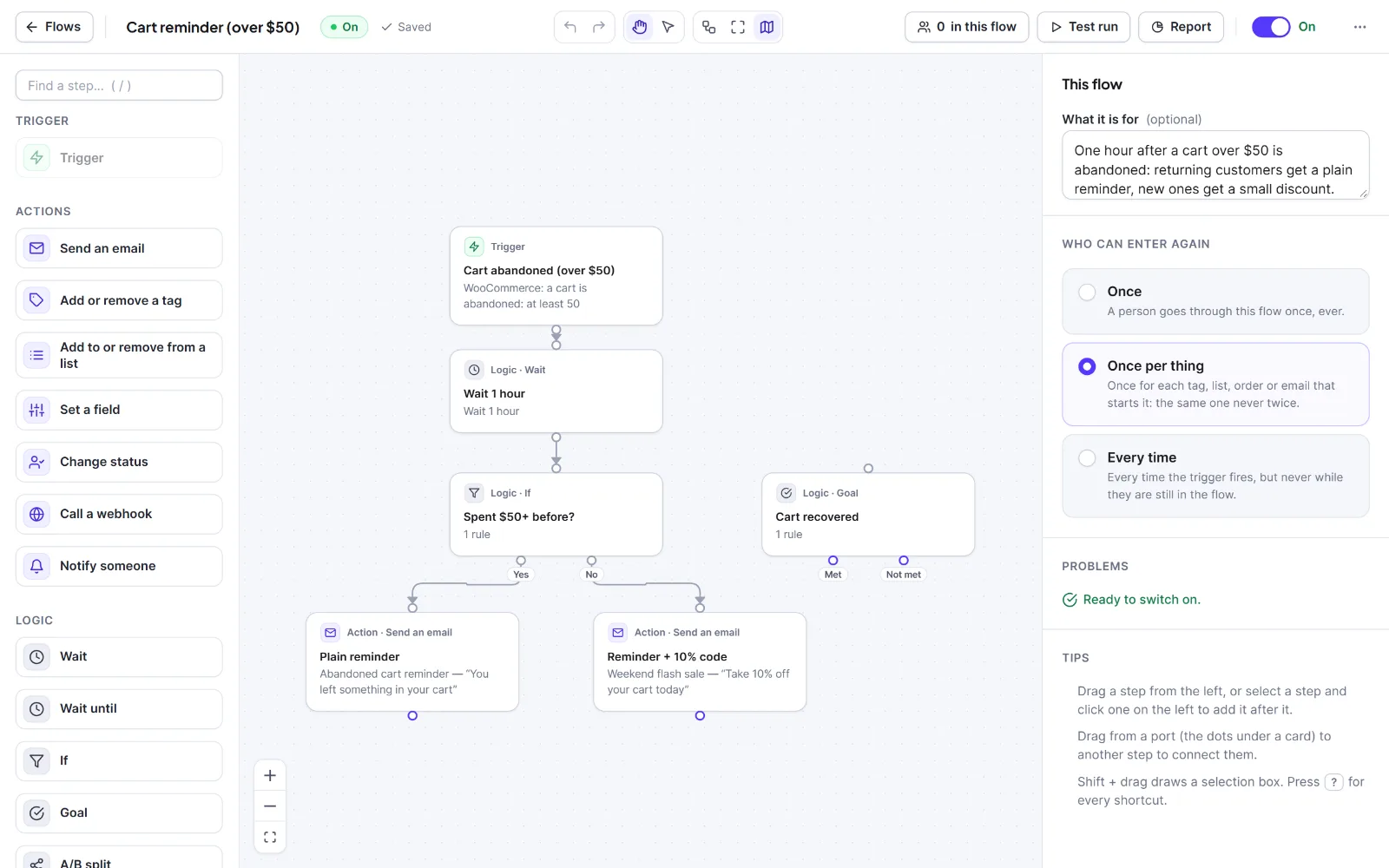
The recipe uses the trigger WooCommerce: a cart is abandoned (with Only carts worth at least (0 = any)), the tag "Abandoned cart", three emails with waits of 1 and 2 days, and a Goal "Cart recovered" (rule: Abandoned cart "has none waiting"). The first email goes out right after abandonment. Anyone who orders jumps to the goal, which removes the tag and skips the remaining reminders. Re-entry is once per cart.
Cart states #
| State | Meaning |
|---|---|
| Open | Items and an email address, and nothing has happened for less than the waiting time. |
| Abandoned | No order or change for the waiting time (60 minutes by default). Recovery flows start for people who may be emailed. |
| Recovered | An abandoned cart that later became an order. |
| Ordered | A cart that became an order before it was abandoned. |
Who may be emailed #
- The cart needs an email address: a customer's, or a guest's typed at checkout (tracked once the email field loses focus).
- Only a subscribed contact enters the flows when the cart is abandoned.
- A guest, or a pending or transactional contact, who ticked the sign-up box on that cart: with Ask guests to confirm by email first on (default) they get one confirmation email, and recovery emails start only if they confirm within 3 days of abandonment; with it off, the tick counts as permission and subscribes them.
- A guest who did not tick the box is tracked but never emailed. Unsubscribed, bounced and do-not-email people are skipped, and every email is checked again when it is sent.
The cart dialog shows the reason, for example "Did not tick the checkout box: tracked, never emailed." This is information, not legal advice.
The Abandoned carts tab #
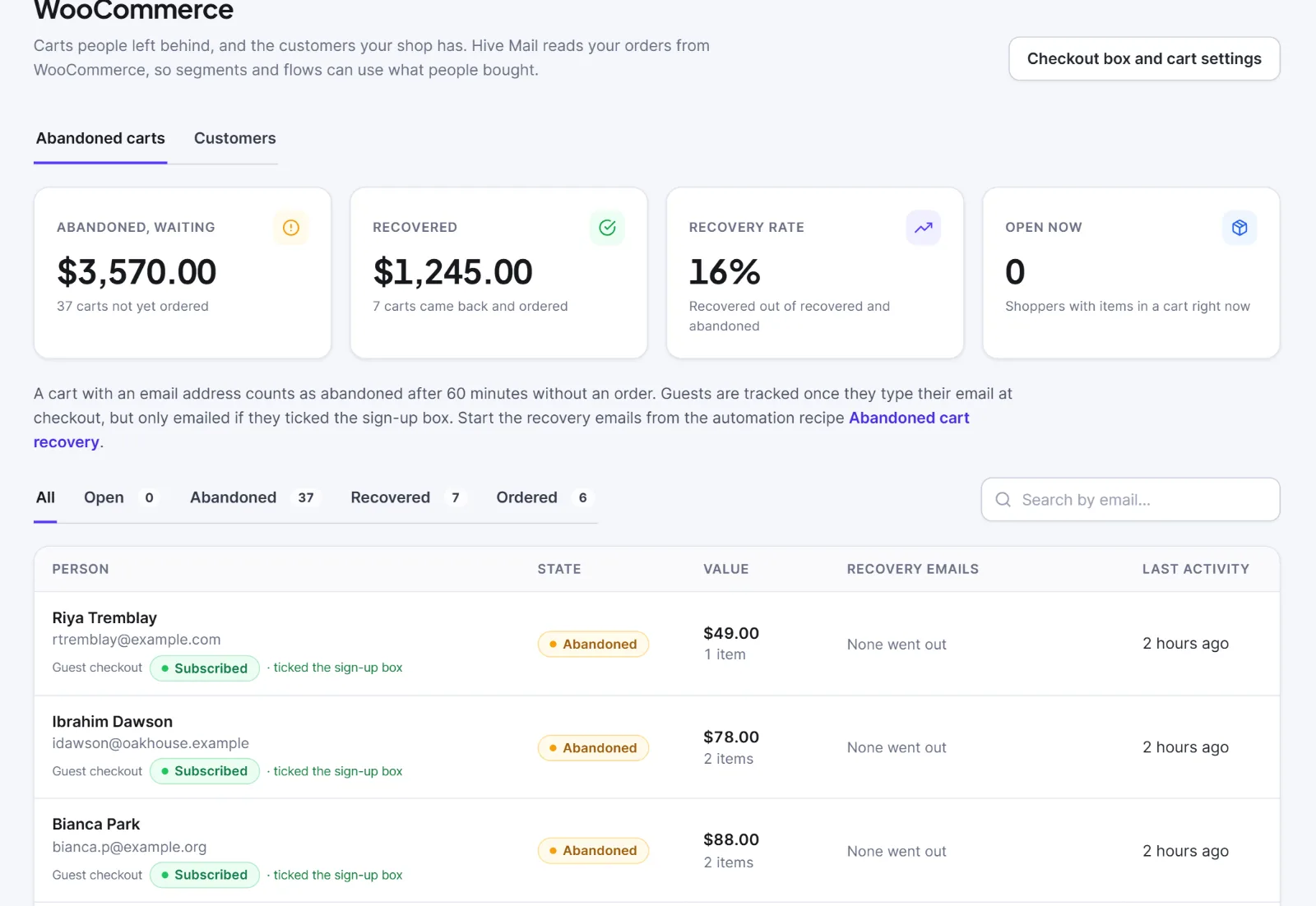
Go to Commerce > WooCommerce; Abandoned carts is the default tab.
- Cards: Abandoned, waiting, Recovered, Recovery rate, Open now. A line under them shows the waiting time, or says tracking is off.
- Filter with All, Open, Abandoned, Recovered, Ordered, or Search by email….
- Columns: Person, State, Value, Recovery emails (an icon per email: clock queued, tick sent, eye opened, pointer clicked), Last activity. Click a row to open the cart.
The cart dialog shows the items, the facts (First seen, Last activity, Abandoned, the order), each recovery email's result, and the Restore link. Forget this cart (then Forget it) deletes the cart and its link; flows already running for it go on.
The restore link #
{{cart_url}} gives a link like {site}/?hivemail=cart&t=…. Opening it empties the visitor's current cart and refills it with the saved items, fills the billing email if empty, and sends the visitor to the checkout. Unavailable items are skipped with a notice. It never logs anyone in. A link for a deleted cart shows an "invalid link" page.
Warning: The restore link replaces the visitor's current cart. Someone who opens an old link while shopping loses what is in their cart.

Carts are kept 90 days by default (7 to 730 in the settings). An order closes every live cart with that address. Turning tracking off stops recording new carts; existing ones stay until the retention time. Orders that follow a recovery click appear as attributed revenue.
Next: WooCommerce with Hive Mail, Reports and revenue attribution.


