

Queued emails, scheduled campaigns and automation steps all run from one job that should fire every minute (the tick). Each tick sends queued email at your sending speed, starts scheduled campaigns, moves people along automations, finishes imports and scans for abandoned carts. A daily job does the clean-ups.
WordPress starts these jobs with WP-Cron, which only wakes up when someone visits an uncached page. On a quiet or heavily cached site, scheduled campaigns go out late. The fix is a real cron job: a timer on your server that calls wp-cron.php every minute.
Check that the scheduler runs #
- Open Settings > Scheduler.
- Read the status box in Is the scheduler running? It refreshes every 20 seconds; Check again refreshes now.

| Status | Meaning |
|---|---|
| The scheduler is running (green) | The last tick was within 5 minutes. |
| The scheduler is running late (amber) | The last tick was 5 to 30 minutes ago. Scheduled campaigns can go out late. |
| The scheduler is not running (red) | The last tick was over 30 minutes ago, or there was none. Nothing queued goes out. |
The facts grid shows Last run, Runs in the last hour (about 60 with a real cron), Waiting now, Runs through (Action Scheduler or WP-Cron), WP-Cron on visits (On, or Switched off when DISABLE_WP_CRON is set) and Site can call itself (Works, Failed or Not tested; click Test it).
Run the scheduler now does the work that is due straight away and is safe to press at any time. Your sending speed still applies.
Set up a real cron job #
The card Set up a real cron has tabs under "Where is your site hosted?": Hostinger (hPanel), cPanel, Any other host, WP-CLI worker and A local site. The commands are made from your site's own address and folder, so paste them as shown using the copy buttons.
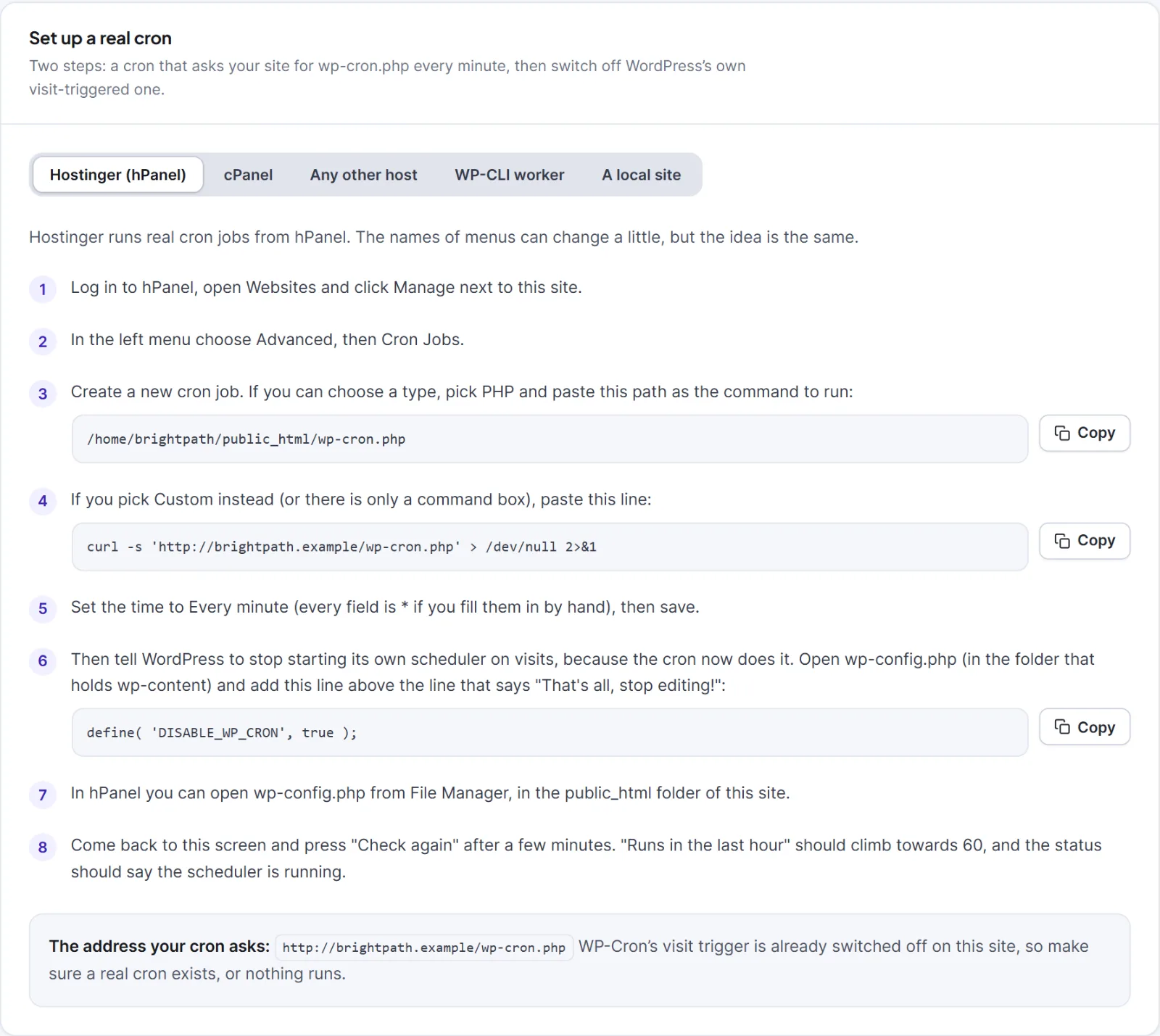
- In your host's control panel, open Cron Jobs. On Hostinger: Websites > Manage > Advanced > Cron Jobs.
- Create a job that runs every minute: type PHP with the
wp-cron.phppath from the tab, or Custom with thecurlline. With SSH on any other host, runcrontab -eand add the line from the tab. With no cron at all, use a web-cron service that opens the address every minute. - Add
define( 'DISABLE_WP_CRON', true );towp-config.php, above the line "That's all, stop editing!". - After a few minutes click Check again. Runs in the last hour should climb towards 60.
Until you add the DISABLE_WP_CRON line, both your cron job and visitors start WP-Cron. That is harmless, since Hive Mail never runs two ticks at once. If you switch WP-Cron off and have no real cron, nothing runs.
WP-CLI worker. Schedule wp hivemail worker --seconds=50 --quiet --path='<your WordPress folder>' every minute, and keep a wp-cron.php call as well, because the daily clean-up does not run from the worker. See WP-CLI commands.
Local site (Local, XAMPP, MAMP, Laragon). Keep the site open in a browser tab, press Run the scheduler now, or run wp hivemail worker. Do not add DISABLE_WP_CRON locally unless you schedule the command yourself.
The Campaigns list also warns you when something is scheduled and the scheduler is late: Scheduled campaigns may go out late or Scheduled campaigns are not going out, with a Fix this button that opens this tab. Campaigns are scheduled in your site's timezone (WordPress Settings > General).
Tip: If Site can call itself says Failed, a firewall, HTTP login, maintenance plugin, wrong site address or SSL problem is blocking your site from calling itself. WP-Cron fails the same way.
Next: Settings: Scheduler, A scheduled campaign did not go out.


