

Logic steps control the path; they do not change the contact. They are in the palette group Logic.
| Step | Ports | Use it to |
|---|---|---|
| Wait | Then | Pause for a fixed time. |
| Wait until | If met, If not met | Pause until a date or an event, with a time limit. |
| If | If yes, If no | Branch on what is true about the person now. |
| Goal | If met, If not met | Pull people forward when they do what you wanted. |
| A/B split | Side A, Side B | Send people down two paths at random. |
| Merge | Then | Join paths back into one. |
| End | None | Finish the run. |
Wait #
Wait for (1 to 365, default 1) and Unit (minutes, hours, days or weeks; default days). You can edit both on the selected card. A wait is a due time, not a sleep: if the scheduler is late, the person moves on when it next runs. The shortest practical wait is about a minute.

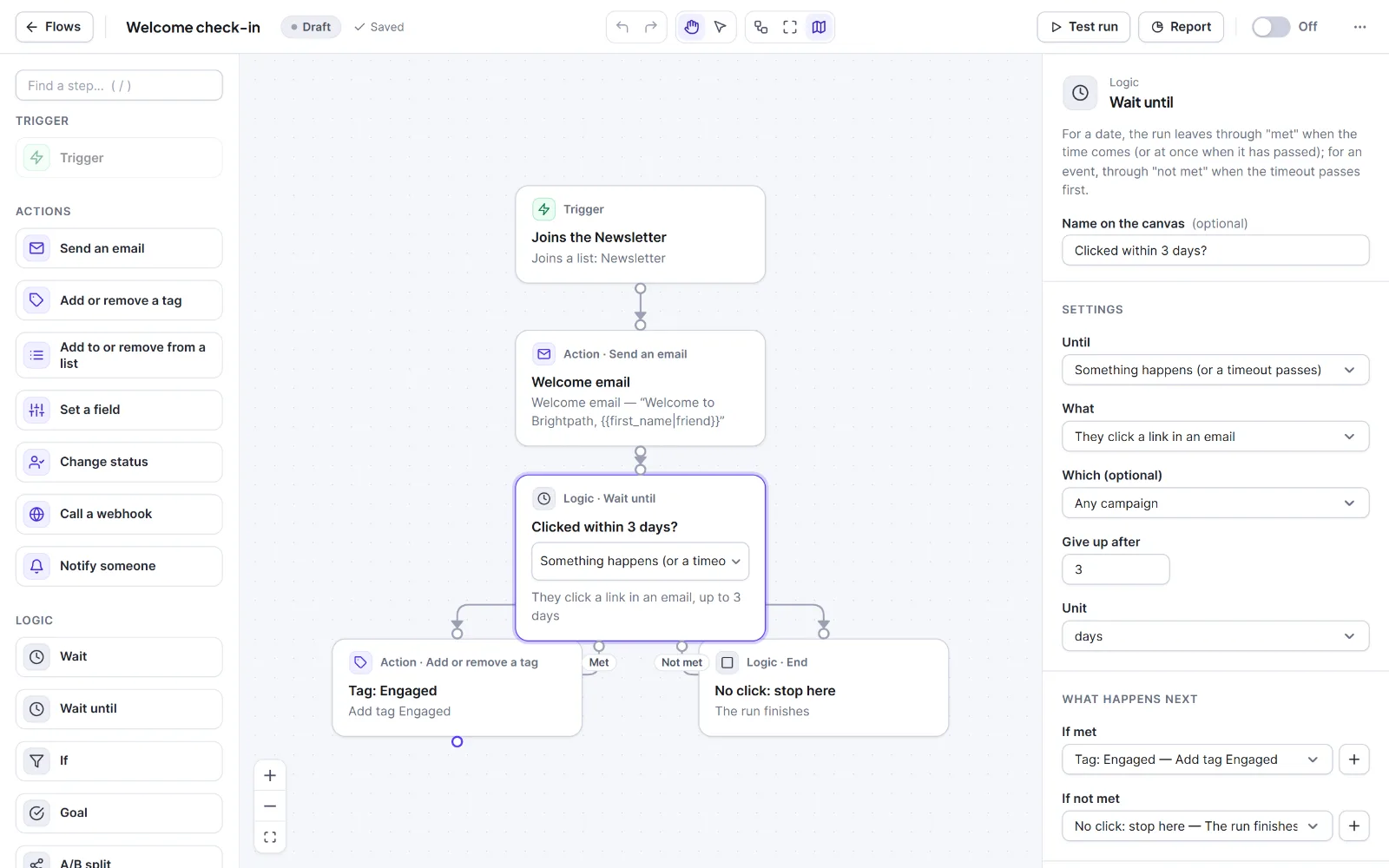
Wait until #
Connect both ports; people on an unconnected port end. Choose Until:
| Choice | Settings | Leaves |
|---|---|---|
| Something happens (or a timeout passes) | What, Which (optional), Give up after (1 to 365, default 3) and Unit | If met when it happens; If not met when the limit passes first. |
| A date and time | Date and time (site timezone, YYYY-MM-DD HH:MM, required) |
If met at that time, or at once if it has passed. |
| A date in a contact field | Date field (date-type fields only), Days after (negative = before) (-365 to 365, 0), At (09:00) | If met at that time. An empty field leaves through If not met. |
What is one of: "They open an email", "They click a link in an email" (default), "They get a tag", "They join a list", "A field of theirs changes", "They unsubscribe". Which (optional) narrows it to a campaign (open, click), a tag or a list; blank means any, including your flows' own emails. People waiting for an event show as Waiting in Runs & Logs. A test run takes the "Not met" way for event waits.
If #
Go the "yes" way when uses the same rule editor as Segments: Match all or Match any and Add a rule (up to 30). A live line shows how many contacts match right now; Larger opens a bigger editor. Rule families: Status; List; Tag; contact details; dates; Custom field; Email activity; and the shop rules when a shop is active. Rules are checked once, when the person arrives. Without a rule the flow cannot be switched on. Example: "Tag has VIP". Yes sends the VIP email, No sends the standard one.
Goal #
The goal is reached when takes the same rules. As soon as they come true, anyone in the flow jumps to the goal, wherever they were waiting. So a goal needs no incoming line: place it off to the side and connect If met to what happens next (or an End). If nothing is connected the run ends as Finished.
A goal is checked whenever something happens to the person and just before they would wait; a person only waiting for time is checked the next time they move. It does not undo earlier steps. Use it to skip the rest of a sequence, for example abandoned-cart reminders after an order (the Abandoned cart recovery recipe does this with "Cart recovered").

A/B split #
Percent going the "A" way (1 to 99, default 50); B gets the rest. Each person is put on a side at random once per split and the choice is remembered for the run. There is no automatic winner; for campaign subject lines see A/B subject line tests.
Merge and End #
Merge ("Paths join here") has no settings: connect any number of paths to its top and its Then port to the next step. End ("The run finishes") has no settings and no ports. A path with no next step also ends the run; End only makes that visible.
Warning: A loop must contain a Wait, or Hive Mail will not switch the flow on.


