

A signup form is a small form (an email box and a button) that adds people to your lists. You build it in Hive Mail and place it on any page.
Before you start, create at least one list. If people will confirm by email, your site must be able to send: see Is my site ready to send email?. To reuse a form from another plugin instead, connect it.
Create a form #
- Go to Audience > Forms, open Signup forms and press New form.
- Choose Build a signup form.
- Give it a Name (only you see it), then set What it asks, Permission, Who joins and After they send (table below).
- Press Create form. Then put it on a page.
The editor has settings on the left and a live Preview on the right (Wide or Phone). Saved forms also show Sent (real people, accepted; robots not counted) and Confirmed (people now subscribed through this form).
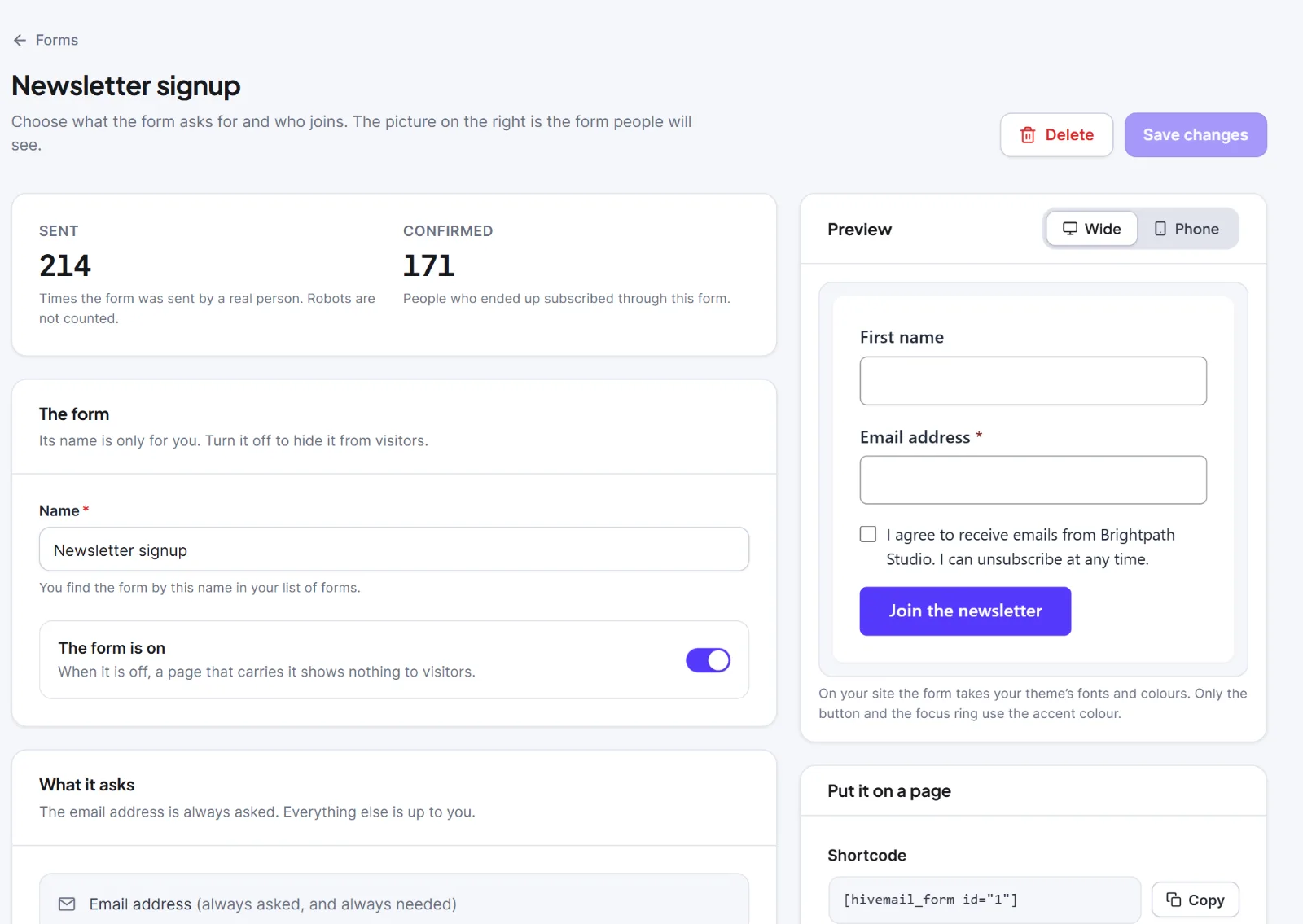
| Setting | What it does | Default |
|---|---|---|
| Name | The form's name in your list. Required, up to 120 characters. | Newsletter signup |
| The form is on | Off: pages that carry it show nothing to visitors. Needs a list to be on. | On |
| First name, Last name | "Do not ask", "Ask, but it can stay empty", or "Ask, and it is needed". | First: ask, optional. Last: do not ask |
| Button text | Up to 40 characters. | Subscribe |
| Example in the email field | Grey placeholder text, up to 60 characters. | Empty |
| Show a box to tick | Adds a tick box with your wording. | Off |
| What the box says | Required when the box is on, plain text, up to 300 characters. | "I agree to receive emails from this site. I can unsubscribe at any time." |
| The box must be ticked to send the form | If off, someone who leaves it empty gets a confirmation email instead of being subscribed at once. | On (when the box is on) |
| Ask people to confirm by email? | See below. | Do what my site setting says |
| Lists | The lists people join (up to 50). The first is named in the confirmation email. | None, or the only list |
| Tags | Tags people get (up to 50). New tags can be created here. | None |
| Ask visitors to pass a CAPTCHA | Asks only when a service and both keys are set. See Spam protection and CAPTCHA. | On |
| Then | "Show a message where the form was" or "Take them to another page". | Show a message |
| Thank-you message | Plain text, up to 300 characters. | Standard words |
| Web address of the page | Required for "Take them to another page"; must start with http:// or https://. | Empty |

Permission and double opt-in #
Ask people to confirm by email? has three answers:
- Do what my site setting says: follows Ask new subscribers to confirm by email in Settings > Compliance (on by default).
- Ask people to confirm by email: they join the list only after pressing the button in the email. The safest choice.
- Subscribe people straight away: no email. Use it only when people clearly ask to join, for example with a ticked box.
Your box wording, the time and the form are saved on each person's timeline as proof of what they agreed to. Someone already on your list sees the same thank-you and nothing changes, so nobody can use the form to find out who is subscribed. Someone who unsubscribed always gets a confirmation email first; a form never resubscribes them by itself. See Double opt-in.
Manage your forms #
The list shows each form's name, its shortcode in Paste this on a page with Copy, People join, Sent, Confirmed, an on/off switch and a ⋯ menu.
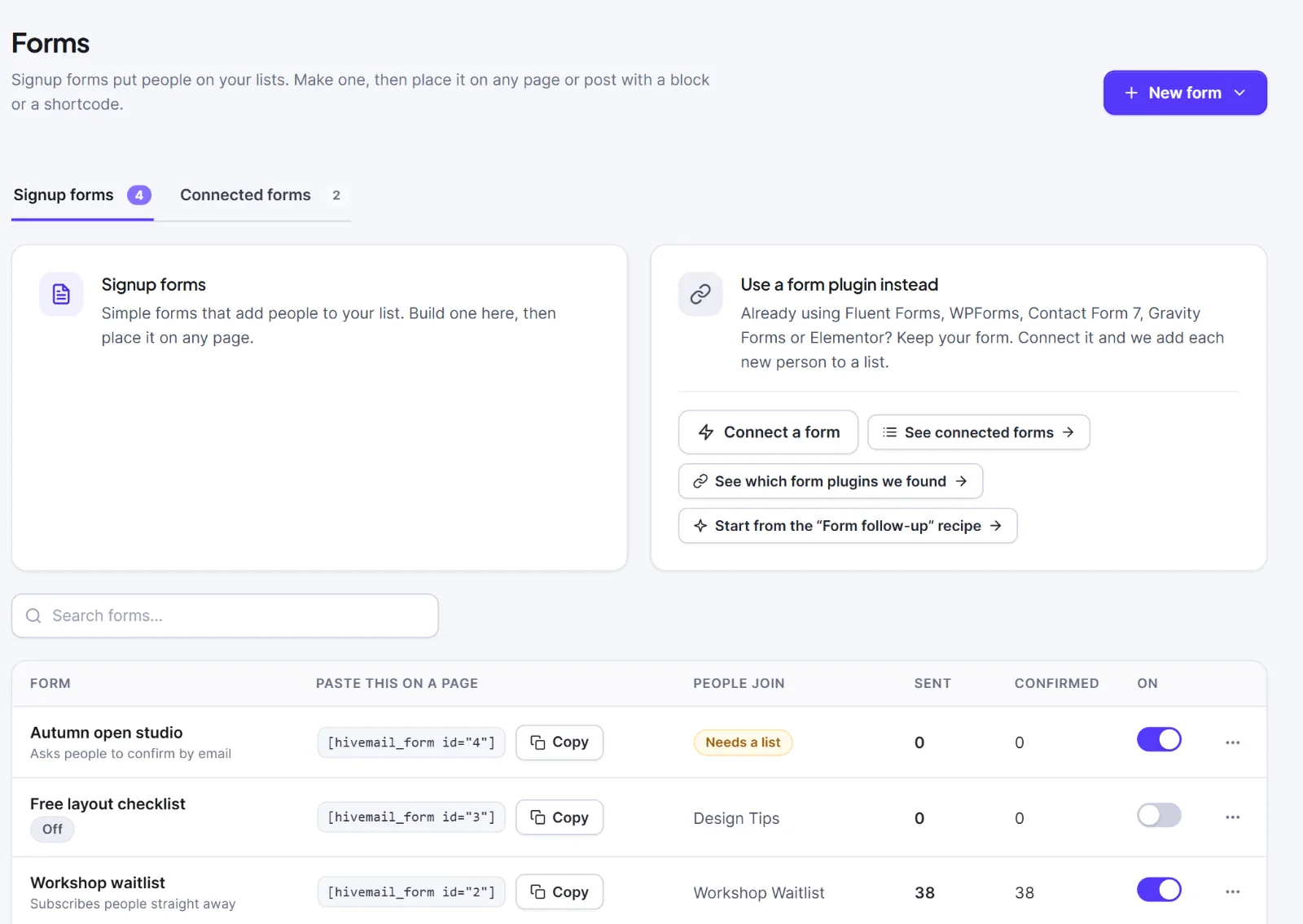
- Edit: click the row. Make a copy creates "Copy of
", switched off, counters at zero. - Delete: choose Delete, then Delete form. People who signed up stay in your audience; pages with its shortcode show nothing and its counts are lost.
- A form with no list shows Needs a list and cannot be switched on. This also happens if you delete a list the form uses.
- If the form was saved elsewhere while you edited, press Load the latest and make your changes again.
Tip: For a newsletter, leave the tick box off and keep double opt-in on. If you ask "I agree to receive emails", switch the box on and write the exact wording.
This is information, not legal advice.
Next: How to put a signup form on a page, Spam protection and CAPTCHA, Settings: Forms.


