

If your site already has a cookie-consent plugin, Hive Mail shows no second banner and follows the visitor's choice about statistics where it can read it. Set Visitor tracking to Full with Consent on Wait for consent (recommended) first (Turn on visitor tracking). If your tool supports it, also install the free WP Consent API plugin and enable the tool's integration.
Check what Hive Mail found #
- Open Settings > Tracking & Privacy.
- Read the status box in the card Cookie banners and other tools.
| Status | Box | What it means |
|---|---|---|
| Blue | No other cookie-consent tool was found on your site | Hive Mail's own banner, if on, is the only one. Tools loaded outside WordPress (a tag manager) are noticed only if Hive Mail knows them: CookieYes, Complianz, Cookiebot, iubenda or any TCF tool |
| Green | {names} is on your site and reports through the WP Consent API | Hive Mail follows its choice; no banner of its own |
| Green | {names} is on your site, and Hive Mail reads its answer | Same |
| Amber | {names} is on your site, but Hive Mail cannot read its answer | In Wait for consent mode Hive Mail records nothing until it can; no banner beside it |
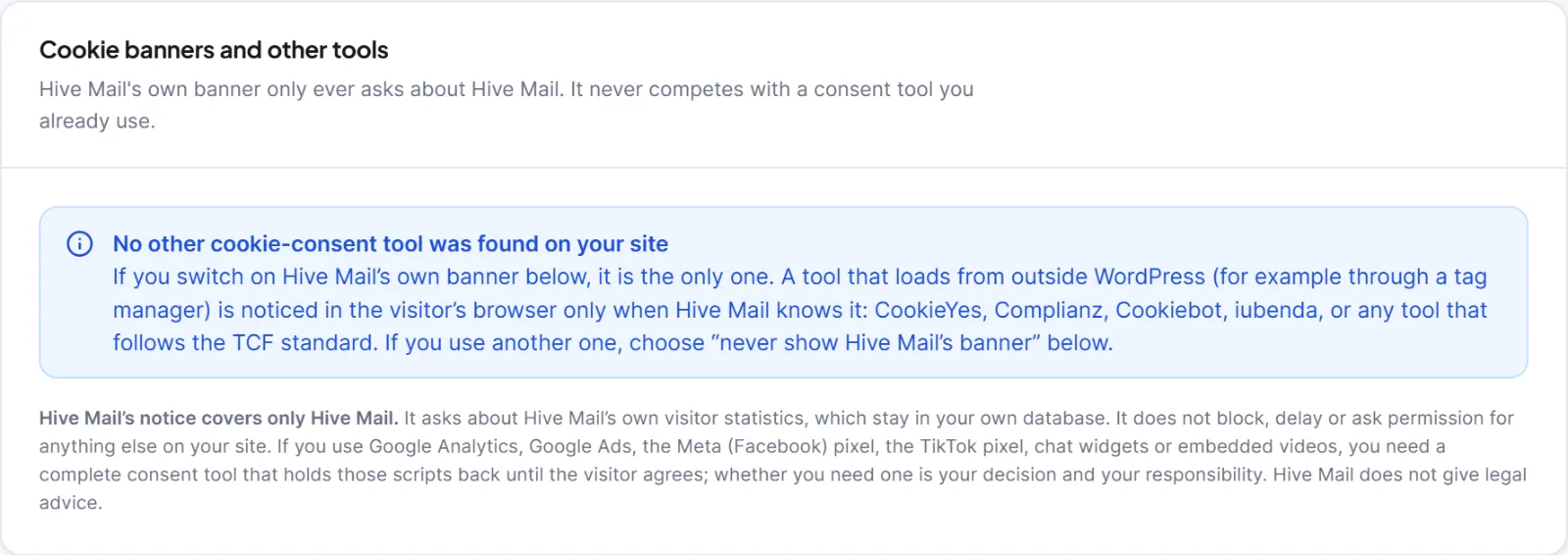
Hive Mail detects Complianz, CookieYes, Cookiebot, iubenda, Cookie Compliance, GDPR Cookie Compliance (Moove), WPConsent, WPLP Cookie Consent, Beautiful Cookie Consent Banner, Real Cookie Banner, Borlabs Cookie, Termly, consentmanager and Quantcast Choice. Detection of Borlabs Cookie is best effort; if it is missed, choose "never" below.
| How the answer is read | Tools |
|---|---|
| Directly in the browser | CookieYes (analytics), Complianz (statistics), Cookiebot (statistics), iubenda |
| Through the WP Consent API (needs a consent type defined by the tool) | Complianz, CookieYes, Cookiebot, iubenda, Cookie Compliance, Moove, WPConsent, WPLP, Beautiful Cookie Consent Banner |
Not readable; Hive Mail waits until the tool calls HiveMail.consent(true) |
Real Cookie Banner, Borlabs Cookie, Termly, consentmanager, Quantcast Choice |
The WP Consent API answers "yes" to everything until a plugin defines a consent type; Hive Mail does not count that as consent. A tool that loads late is noticed within about 10 seconds. If a visitor later withdraws statistics, Hive Mail deletes the cookie and erases the visits.
If the box is amber #
- Install WP Consent API and switch on your tool's integration, or make the tool call
HiveMail.consent(true)when the visitor accepts statistics. - Reload Settings > Tracking & Privacy.
Tool not detected, or two banners #
In the card Consent banner, set If your site already has a cookie-consent tool to I use another cookie-consent tool: never show Hive Mail's banner, then Save changes. The other choices are Show my banner only when no other tool is found (recommended) (default) and Always show Hive Mail's banner, even beside another tool.
Add the cookie to your tool's list #
When a tool is found in Full mode, copy these into its cookie list:
| Item | Value |
|---|---|
| Name | hm_vid (on a multisite network hm_vid_ and the site number) |
| Type, set by | First party, by your server on the first page view |
| Lasts | 13 months |
| Purpose, category | Recognises a returning visitor in Hive Mail's own statistics, never shared; Statistics |
Tip: Test in a private window, logged out; accept statistics in your tool's banner, then open Intelligence > Live. A developer can add an unknown tool with the filter
hivemail_consent_tools.
Next: The consent banner, Visitor tracking shows nothing.
This is information, not legal advice.


