

Action steps do something to a person or tell someone about them. Add one from the palette group Actions or with the + under a free port. Its settings are in the right panel; What happens next sets where the person goes. Each action runs once per run and writes a line in the run log. An action never stops a run: if it fails or is refused, the log says why and the person moves on. Logic steps (wait, if, goal, split, merge, end) are in Waits, conditions, goals and splits.
| Step | What it does | Settings (default) |
|---|---|---|
| Send an email | Queues one of your templates to the person. | Email (required), Subject line (required, merge tags work), Preview text, From name, From email, Reply-to (empty uses Settings > General), Kind: Marketing (subscribed contacts only) (default) or Transactional (receipts, confirmations). |
| Add or remove a tag | Adds or removes one tag. | Do: Add the tag (default) or Remove the tag; Tag (required; you can create one in the picker). |
| Add to or remove from a list | Adds or removes one list. Does not subscribe anyone. | Do: Add to the list (default) or Remove from the list; List (required). |
| Set a field | Writes a fixed value into a custom field. | Field (required); Value (empty clears the field). Merge tags are not expanded. An invalid value is logged as Not set: {reason}. |
| Change status | Moves the contact to another marketing status. | New status: Unsubscribed (default), Transactional only or Subscribed (only with the consent box below); The person gave consent elsewhere (a form, a checkout box) (off; required for Subscribed). |
| Call a webhook | POSTs the person to another tool (Zapier, Make, your server). | Address (https) (required); Secret (for the signature header). |
| Notify someone | Sends a plain-text note to a team member, not to the contact. | Send to (one valid address), Subject, Message (both required; merge tags fill in the contact's details). |
Send an email #
- Select the step and click Choose an email (the button reads Change once an email is chosen).
- In Choose the email, open Starters to make a new template from a starter (it is named after the flow and step), or My templates to use one of your own.
- Click Create the email from this starter or Use this email, then type the Subject line.
A template of your own is used as it is, not copied: a change you make to it applies to every email this step sends from now on. Edit email opens it in the editor. If you delete the template the flow can no longer be switched on.
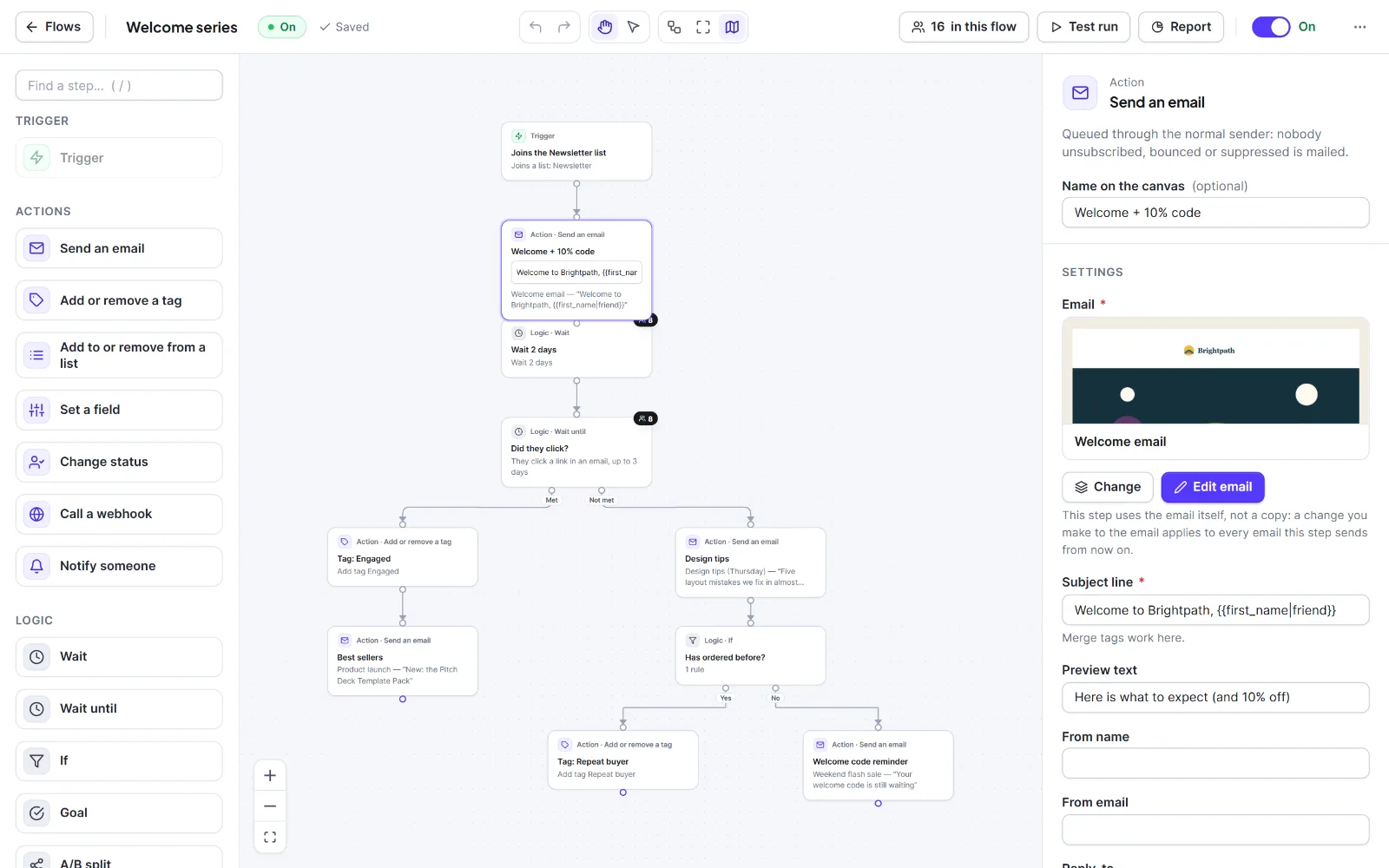
The email is queued and sent like any other: it shows in the Sending log and follows your sending speed, tracking settings, footer and unsubscribe rules. Bounced, complained and suppressed addresses are never mailed. Flow emails can also use {{post_title}}, {{post_url}}, {{form_title}}, the shop tags and similar run tags; type them by hand. See merge tags.
Marketing emails reach subscribed contacts only and carry the footer and unsubscribe link. Transactional emails also reach pending, transactional-only and unsubscribed contacts, and carry no footer, unsubscribe link or tracking. Hive Mail warns if a Transactional email contains a button or link that looks like marketing.
Warning: Use Transactional only for receipts, confirmations and similar service messages. A promotion sent as Transactional skips the unsubscribe link and reaches people who opted out.
Tags, lists and fields #
- Adding or removing a tag fires Tag is added and Tag is removed; joining or leaving a list fires Joins a list and Leaves a list; changing a field fires A field changes. Flows can chain this way, but a loop needs a Wait inside it.
- Log lines:
Added {tag name}.,Removed {tag name}.,Skipped: it no longer exists.
Change status #
A flow never subscribes anyone without consent recorded for it. Allowed changes:
| From | Allowed to |
|---|---|
| Pending | Subscribed, Unsubscribed, Transactional |
| Subscribed | Unsubscribed, Transactional |
| Transactional | Subscribed, Unsubscribed |
Refused (logged as Not changed: {reason}.): any change of a Bounced, Complained or Unsubscribed contact (a flow can never reverse an unsubscribe), subscribing without the consent box, and subscribing an address on the suppression list. See Contact statuses.
Call a webhook #
- The body is JSON:
{ event: "automation", contact, context, run_id, sent_at }. - With a secret, the header
X-HiveMail-Signaturecarries the HMAC-SHA256 of the body as plain hex. Compute the same HMAC to check it. - One attempt, 8 second timeout, no retries. The flow always continues. Addresses on your own network are refused by WordPress, so a local test fails with a log line.
- Log lines:
Called.,The call answered {status}.,The call failed: {reason}.
To start a flow from outside, use the incoming webhook trigger in Triggers.
Notify someone #
Sent with WordPress's own mail function, not Hive Mail's queue: it is not in the Sending log, and the Mailgun and SendGrid settings do not apply (an SMTP plugin does). Only the contact's built-in details and custom fields work as merge tags there.

Tip: Name your steps (F2, or Name on the canvas (optional) in the panel). Names appear in the run log, the flow report and the people drawer.


