

The Hive Mail REST API lives at /wp-json/hivemail/v1 on your own site. It uses WordPress's normal REST authentication. There is no Hive Mail key, token or header: a request acts as a WordPress user, and that user's capabilities decide what it may do.
Create credentials #
An API key is a WordPress application password. Make one in either place.
In your WordPress profile. Open Users > Profile, go to Application Passwords, type a name in New Application Password Name, click Add New Application Password and copy the password. WordPress shows it once.
In Hive Mail. Open Settings > Webhooks & API, type a name in Name of the new key, click Create key, then Copy password and I have copied it.
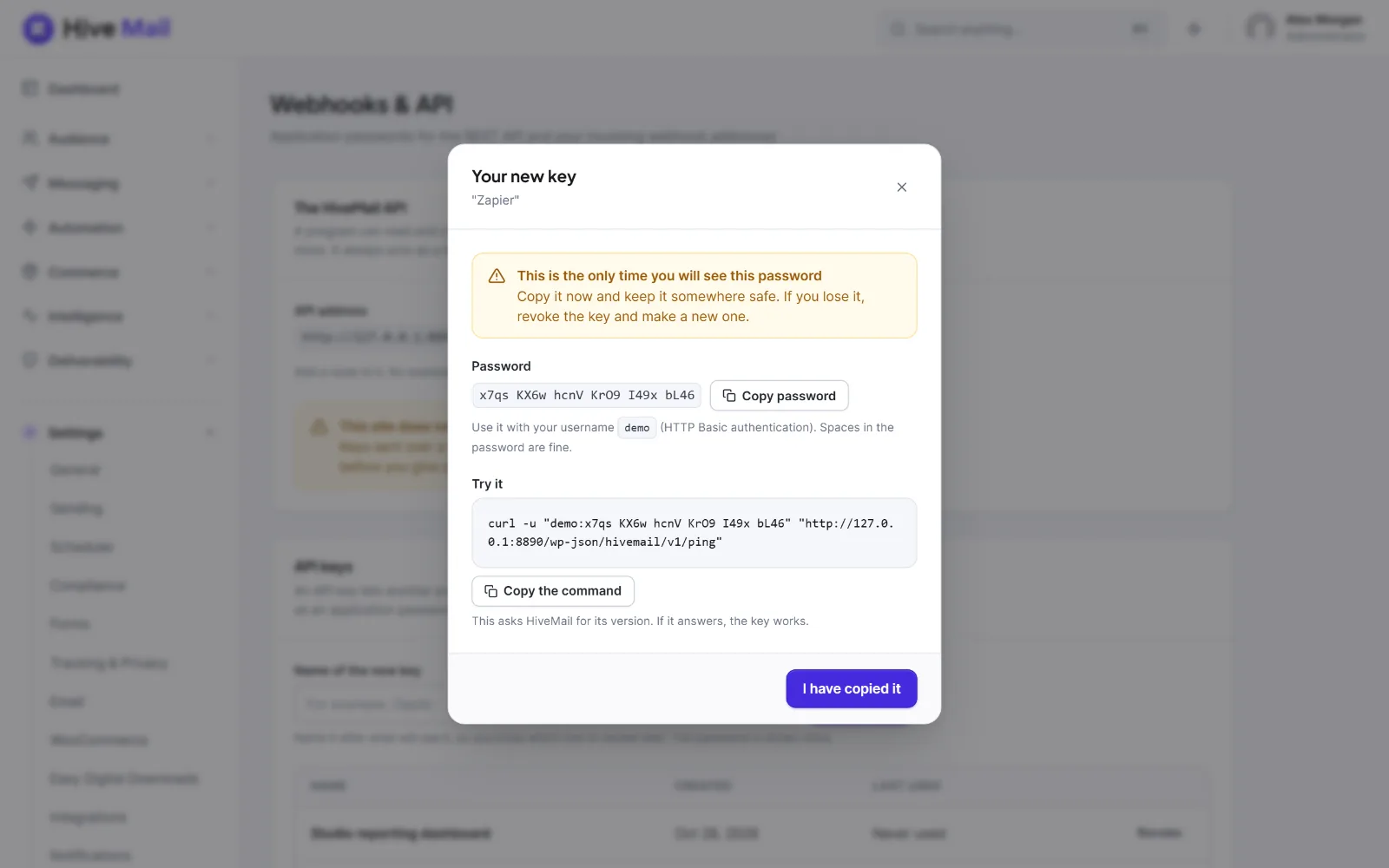
The spaces in the password (blocks of four) are fine when you send it. WordPress offers application passwords on HTTPS sites and on local development sites. On a plain http:// site the screen warns This site does not use HTTPS; if WordPress has application passwords switched off, it says Keys cannot be created here and gives the reason. The screen is described on Webhooks and API keys.
Tip: Use a dedicated WordPress user that holds only the capabilities the program needs (table below), not your own administrator account.
Methods #
Application password (HTTP Basic). Send Authorization: Basic base64(username:password). With curl, use -u.
curl -u "admin:abcd efgh ijkl mnop qrst uvwx" \
  "https://example.com/wp-json/hivemail/v1/contacts?per_page=20&status=subscribed"
Login cookie and nonce (inside wp-admin). Send the X-WP-Nonce header with a nonce made for the action wp_rest. Without it WordPress treats the request as logged out.
// In a script enqueued in the admin with the dependency "wp-api".
fetch( '/wp-json/hivemail/v1/contacts?per_page=5', {
    credentials: 'same-origin',
    headers: { 'X-WP-Nonce': wpApiSettings.nonce },
} ).then( ( r ) => r.json() ).then( console.log );
The same call in PHP, JavaScript and Python #
All three list subscribed contacts. The user needs hivemail_view_audience.
<?php
$response = wp_remote_get(
    'https://example.com/wp-json/hivemail/v1/contacts?per_page=20&status=subscribed',
    array(
        'headers' => array( 'Authorization' => 'Basic ' . base64_encode( 'admin:abcd efgh ijkl mnop qrst uvwx' ) ),
        'timeout' => 20,
    )
);
if ( is_wp_error( $response ) ) {
    die( $response->get_error_message() );
}
$data = json_decode( wp_remote_retrieve_body( $response ), true );
if ( 200 !== wp_remote_retrieve_response_code( $response ) ) {
    die( 'Error: ' . ( $data['message'] ?? 'unknown' ) );
}
foreach ( $data['items'] as $contact ) {
    echo $contact['email'] . "\n";
}
// Node.js 18 or newer. In a browser use btoa( user + ':' + password ).
const auth = 'Basic ' + Buffer.from( 'admin:abcd efgh ijkl mnop qrst uvwx' ).toString( 'base64' );
const res = await fetch( 'https://example.com/wp-json/hivemail/v1/contacts?per_page=20&status=subscribed', {
headers: { Authorization: auth },
} );
const data = await res.json();
if ( ! res.ok ) throw new Error( `${ res.status }: ${ data.message }` );
data.items.forEach( ( c ) => console.log( c.email ) );import requests
r = requests.get(
"https://example.com/wp-json/hivemail/v1/contacts",
params={"per_page": 20, "status": "subscribed"},
auth=("admin", "abcd efgh ijkl mnop qrst uvwx"),
timeout=20,
)
r.raise_for_status()
for contact in r.json()["items"]:
print(contact["email"])Test your credentials #
GET /ping needs only manage_hivemail (Open HiveMail).
curl -u "admin:abcd efgh ijkl mnop qrst uvwx" "https://example.com/wp-json/hivemail/v1/ping"A working key answers a small JSON object such as {"plugin":"hivemail","version":"1.0.0", …}. Without pretty permalinks use https://example.com/?rest_route=/hivemail/v1/ping.
Troubleshooting #
401 (hivemail_forbidden, incorrect_password). WordPress did not recognise a logged-in user. With no credentials the answer is {"code":"hivemail_forbidden","message":"You are not allowed to do that.","data":{"status":401}}.
- Wrong username or password (
incorrect_password, "The provided password is an invalid application password"): create a new key. - The site is not on HTTPS, so WordPress ignores application passwords.
- A security plugin or a filter switched application passwords off for that user.
- Cookie authentication without the
X-WP-Nonceheader. - The host strips the
Authorizationheader (see below).
403 (hivemail_forbidden, rest_cookie_invalid_nonce). You are signed in, but the user lacks the capability the route needs (hivemail_forbidden), or the nonce is wrong or expired (rest_cookie_invalid_nonce). Check the table below and the user's role on Roles & Permissions.
404 (rest_no_route). The path is wrong (the base is /wp-json/hivemail/v1), or a firewall blocks /wp-json/. An item that does not exist is also 404 with a code such as hivemail_contact_not_found.
The host strips the Authorization header. The sign: Basic auth works locally and gives 401 live. On Apache add this to .htaccess above the WordPress block:
RewriteEngine On
RewriteCond %{HTTP:Authorization} ^(.*)
RewriteRule ^(.*) - [E=HTTP_AUTHORIZATION:%1]
On nginx with PHP-FPM add fastcgi_param HTTP_AUTHORIZATION $http_authorization;.
Permission reference #
Every route checks one capability (a few check two). Administrators hold all of them. The first column is the label on the Roles & Permissions screen.
| Label | Capability | Unlocks on the API |
|---|---|---|
| Open HiveMail | manage_hivemail |
/ping, /bootstrap, /system/setup |
| See the audience | hivemail_view_audience |
Read contacts, lists, tags, fields, segments, a contact's timeline, commerce customers |
| Manage the audience | hivemail_manage_audience |
Change, import, export and delete those; signup forms; suppressions; confirmation emails |
| Manage campaigns | hivemail_manage_campaigns |
Campaigns, templates, designs, sending log, campaign reports |
| Manage automations | hivemail_manage_automations |
Flows, runs, recipes, connected forms, a flow's webhook address |
| See visitor reports | hivemail_view_intelligence |
Visitor reports and journeys |
| Manage settings | hivemail_manage_settings |
Settings, sending test, brand kit, scheduler, tools, bounce webhook details, API keys, roles |
| (none on screen) | hivemail_use_ai |
The /ai routes. It has no switch on Roles & Permissions; give it with $role->add_cap( 'hivemail_use_ai' ) |
A route can need two: /api-keys/webhooks needs Manage settings and Manage automations; /contacts/{id}/journey needs See visitor reports and See the audience.
Security #
- One key per program, named after it, so you can revoke it alone (Revoke on the screen, or your profile).
- Use HTTPS. Keep the password out of shared code, front-end JavaScript and version control.
- An application password also opens WordPress's own REST API as that user.
- Watch Last used on the Webhooks & API screen for keys you do not know.
Authenticated REST calls have no rate limit. Public routes do: a signup form allows 3 sends a minute and 10 an hour per visitor, and an incoming flow webhook 300 requests a minute per flow.


