

When WooCommerce is active, Hive Mail reads your orders so segments, flows and reports can use what people bought, and your checkout gets an email sign-up box. The WooCommerce item in the menu appears only while WooCommerce is active. Hive Mail reads orders through WooCommerce's own code, never places or changes them (apart from order notes and a few sign-up box values), and sends no receipts: WooCommerce sends its own order emails. It reads your existing orders once, in the background, the first time it sees the shop.
The Customers tab #
Go to Commerce > WooCommerce > Customers. The other tab, Abandoned carts, is covered in Abandoned cart recovery. Checkout box and cart settings opens WooCommerce settings.
- Read the cards: Customers, Paid orders, Total spent, Also contacts. While old orders are being read, a bar shows "Reading your existing orders…" with progress.
- Choose Sort by (Last order by default, Total spent, Number of orders, First order, Email) or use Search by name or email….
- Click a name to open the contact, or an order number to open the order in WooCommerce.
Columns: Customer (with a status badge or "Not a contact"), Orders, Total spent, First order, Last order. 25 per page.
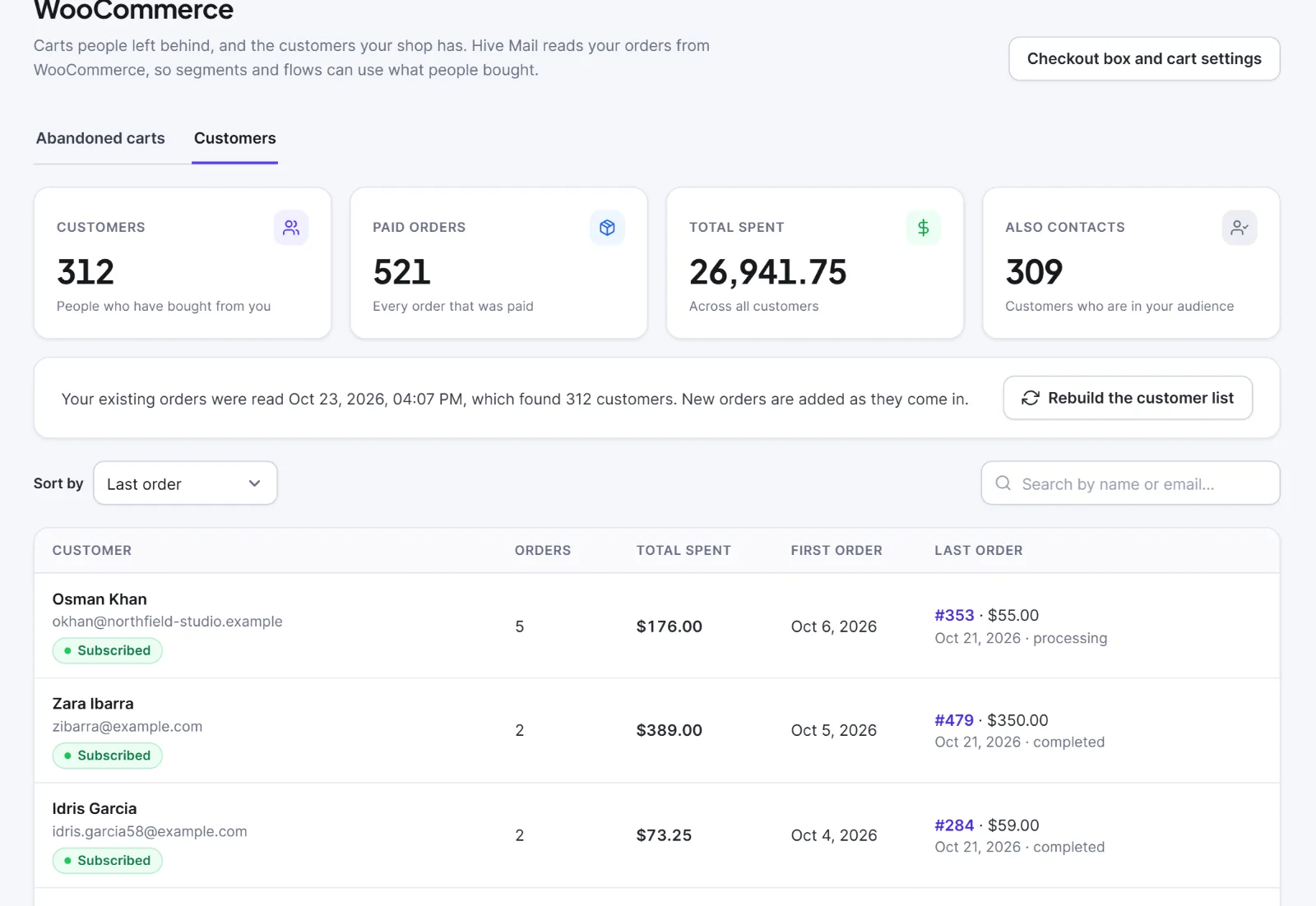
Rebuild the customer list (then Rebuild) works every customer out again from their orders in the background; segments and flows keep working meanwhile. Only people who can change settings see it.
Only paid orders count (by default Processing and Completed), and Total spent is net of refunds. A customer is stored per email address and linked to a contact when one exists. The Total spent card adds amounts without converting currencies, so it means little on a multi-currency shop. This screen never changes a contact or a status.
The checkout sign-up box #
An unticked checkbox, default wording "Yes, send me news and offers by email". On the classic checkout it sits under the billing email; on the block checkout it needs WooCommerce 8.9 or newer. It is not shown to a logged-in customer who is already subscribed. Change it in Settings > WooCommerce: Show an email sign-up box at checkout (on), Wording of the box, Add people who tick it to this list.
When a customer ticks it and the order is placed:
- They become a subscribed contact (a new contact, or a pending or transactional one is upgraded). The consent source is
woo_checkout; the time and exact wording are saved on the contact's timeline and in an order note. The chosen list is joined too. - Nobody who unsubscribed, bounced or complained is subscribed again by the box, and nobody the do-not-email memory holds is added. The order note says so.
- A customer who does not tick the box is not subscribed; marketing emails skip them.
Hive Mail also adds suggested text to WordPress's privacy policy guide. This is information, not legal advice.
Flow triggers #
In a flow, open What starts the flow and look at the WooCommerce group: an order is placed, processing, completed, refunded or cancelled; a customer's first order; a product or category is bought; a customer account is created; a cart is abandoned; an order is still waiting for payment. Settings are on Triggers. Buyers who are not contacts yet become transactional contacts: they get the flow's transactional emails, never marketing, unless they ticked the box.
Rules for segments, If and Goal #
The rule editor has a WooCommerce group:
| Rule | Options |
|---|---|
| Purchases | has ordered / has not ordered, ever or in the last N days (includes people who never ordered) |
| Number of orders | is at least / is less than / is exactly |
| Total spent | is at least / is less than |
| Product | bought / did not buy (includes variations, paid orders only) |
| Product category | bought / did not buy |
| Last order date | is before / is on or after a date; within the last / more than N days (people who never ordered match none) |
| Abandoned cart | has one waiting / has none waiting |
See Segments.
Merge tags #
| Tag | Shows |
|---|---|
{{orders_count}}, {{total_spent}} |
Number of orders, total spent |
{{last_order_number}}, {{last_order_date}}, {{last_order_total}} |
The customer's last order |
{{order_number}}, {{order_total}}, {{order_date}} |
The order that started the flow |
{{order_pay_url}} |
Link to pay for that order (or the My Account page if it is no longer unpaid) |
{{cart_total}}, {{cart_items}}, {{cart_url}} |
Abandoned cart total, items, and a link that refills the cart |
The customer tags also work in campaigns: Merge tags and fallbacks. If you deactivate WooCommerce, its screens say "That shop plugin is not active."
Tip: The recipes Post-purchase thank-you, Abandoned cart recovery and Complete your payment are good starting points: Automation recipes.
Next: Reports and revenue attribution, Easy Digital Downloads with Hive Mail.


