

Some addresses should never get your email: ones that do not exist, ones that reported you as spam, and people who asked to stop. Hive Mail keeps them on a do-not-email list. Automatic bounce handling needs a sending service that can call a webhook (Mailgun, SendGrid, or anything that can send a JSON request); plain WordPress mail cannot report bounces. See Settings: Sending.
| Word | Meaning | What Hive Mail does |
|---|---|---|
| Bounce | Permanent failure, such as a missing mailbox | Blocks the address; the contact becomes Bounced |
| Soft bounce | Temporary failure, such as a full mailbox | Notes it on the timeline; after 5 in 30 days it counts as a bounce |
| Spam complaint | The person marked your email as spam | Blocks the address; the contact becomes Complained |
| Added by hand | An address an administrator blocked | Blocks it |
| Unsubscribed, Erased on request | The do-not-email memory (below) | No marketing email |
The soft-bounce limits are in Settings: Compliance: "Stop emailing an address after this many temporary failures" (1 to 20, default 5) and "Count temporary failures over (days)" (7 to 90, default 30). Bounced, complained and blocked addresses get no email at all, marketing or service.
The list #
Open Deliverability > Bounces & Suppressions. Tabs Filter by reason: All, Bounced, Spam complaints, Added by hand, Asked to stop. Search addresses… finds addresses only.
| Column | What it shows |
|---|---|
| Email address | The address, or "Address not kept" for a person who asked to stop and whose contact was deleted |
| Why it is blocked | Bounced, Spam complaint, Added by hand, Unsubscribed or Erased on request |
| Reported by | The service (mailgun, sendgrid, generic), "You" for hand-blocked, or "—" |
| Added | The date |
| Action | Allow again, or "Only they can rejoin" for the do-not-email memory |

Block an address: click Block an address, type it, click Block address ("Address added to the list"). It can then never be emailed or added as a contact.
Allow an address again: click Allow again, then Take it off the list. The address can be added and emailed again. A contact who already bounced or complained stays that way until you open the contact and choose Reactivate, which sets them to pending and sends a confirmation email. See Contact statuses.
Warning: Use Allow again only when you are sure the address is fine. Mailing bounced addresses hurts your sender reputation.
Connect your sending service #
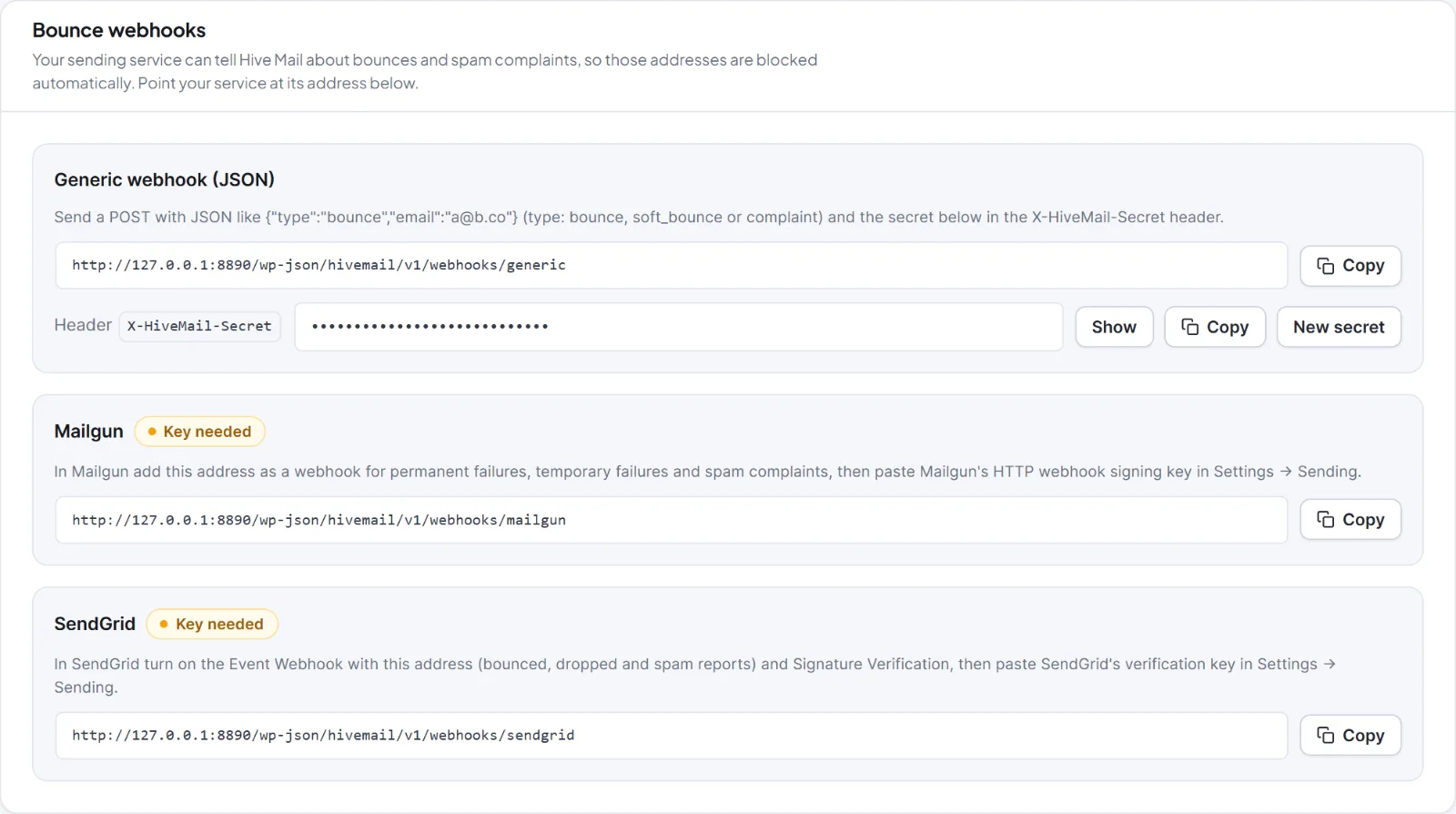
The card Bounce webhooks shows an address per service, with a copy button. It is visible to people who can change settings.
- Mailgun: add the Mailgun address from the card as a webhook for permanent failures, temporary failures and spam complaints, then paste Mailgun's HTTP webhook signing key in Settings > Sending. The badge changes from "Key needed" to "Key saved".
- SendGrid: turn on the Event Webhook with the SendGrid address (events: bounced, dropped, spam reports) and Signature Verification, then paste the verification key in Settings > Sending.
- Anything else: send a JSON request to the "Generic webhook (JSON)" address with the card's secret in the header
X-HiveMail-Secret(or?key=):
{"type":"bounce","email":"a@b.co"}type is bounce, soft_bounce or complaint. You can also send an array or {"events":[...]}, with optional reason and message_id.
New secret > Create new secret replaces the generic secret; services using the old one are refused. Show reveals it. The caller gets 401 Not authorised. for a wrong secret or signature and 413 The request is too large. above 1 MB. Details: Incoming webhooks, bounce webhooks and API keys.
The do-not-email memory #
People who unsubscribe stay in Contacts as Unsubscribed. If their contact is later deleted for good (by hand, by the 30-day trash cleanup or by WordPress's privacy eraser), Hive Mail keeps only a one-way fingerprint of the address. Imports, forms, shop sign-ups and carts then cannot subscribe them again, and the row shows "Address not kept". You cannot remove it here: only the person (a confirmation link, a double opt-in form, "Subscribe again") or an administrator stating that they gave permission again can reverse it. See Privacy tools.
A bounce or complaint makes the person drop out of future audiences ("bounced", "complained" or "on the suppression list" in the audience count). The campaign report counts it if it happens within 7 days of the send. Run Check my list before a big send to spot mistyped addresses.
This is information, not legal advice.


