

The Sending log lists every email Hive Mail has sent or is about to send, and what happened to each. Open Deliverability > Sending Log. You need to be an administrator or have the "Manage campaigns" permission.
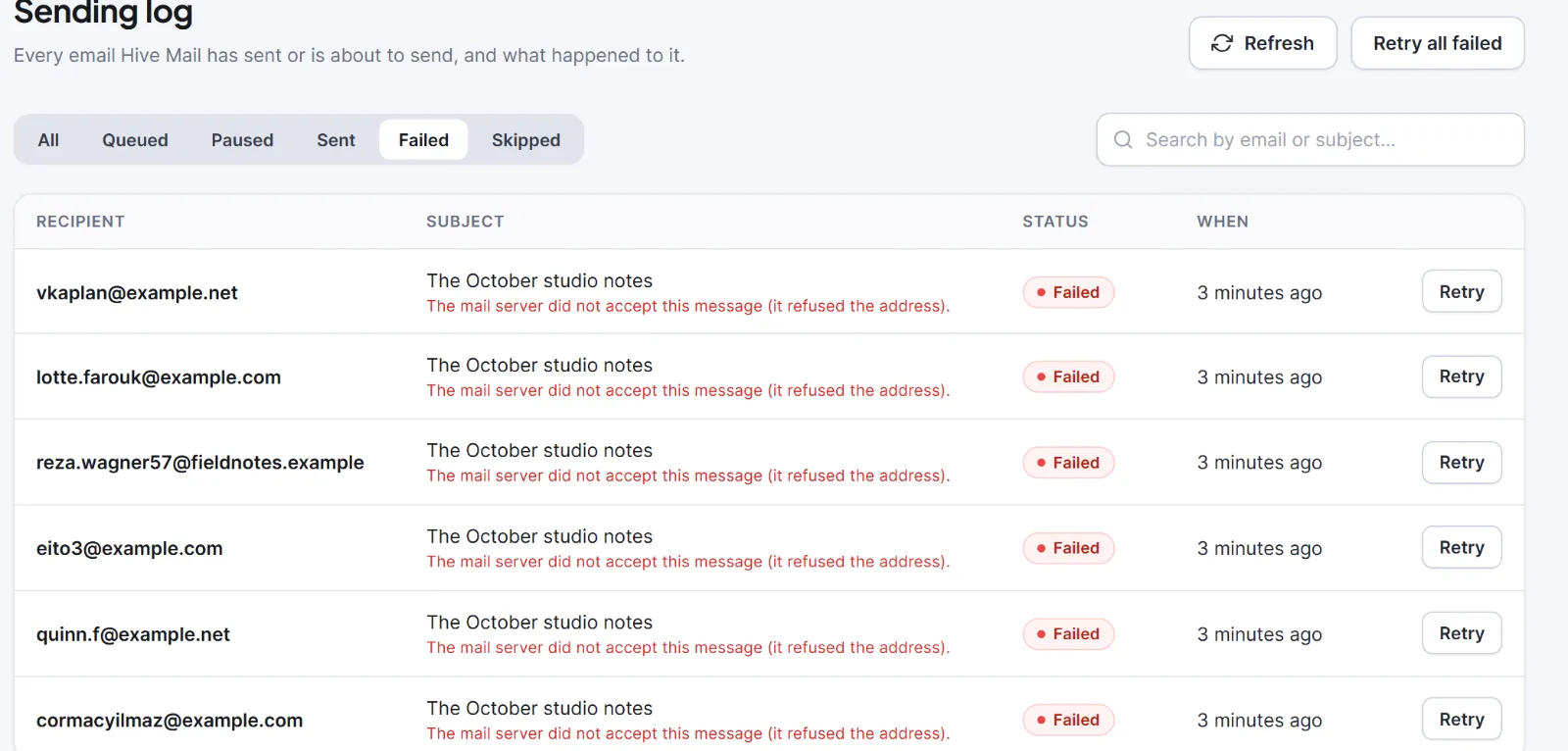
At the top are Refresh and Retry all failed. The tabs Filter by status are All, Queued, Paused, Sent, Failed, Skipped (emails being sent right now show under All). Search by email or subject… needs 2 characters. Results come 20 per page and refresh every 15 seconds while anything is queued or sending.
| Column | What it shows |
|---|---|
| Recipient | The address, linked to the contact, or "Deleted contact". "Transactional email" marks service mail |
| Subject | The subject with merge tags filled in; under it the reason, or "It did not go through, and will be tried again (attempt N)." |
| Status | Queued, Paused, Sending, Sent, Failed or Skipped |
| When | When it was sent or is scheduled |
| Retry | A button on failed rows |
Statuses #
| Status | Meaning |
|---|---|
| Queued | Waiting; emails leave at the speed set in Settings: Sending |
| Paused | Belongs to a paused campaign |
| Sending | Being sent now |
| Sent | The delivery method accepted it (not that it reached the inbox) |
| Failed | It could not be sent; the reason is under the subject |
| Skipped | Hive Mail chose not to send it |
Skipped reasons: "The contact no longer exists.", "The address is on the suppression list.", "This person asked not to be emailed.", "The address bounced or complained.", "The contact is not subscribed (status: {status}).", "The campaign was cancelled." or "The campaign failed." Each person is checked again just before sending, so these appear even for emails queued earlier.
Automatic retries. After a temporary problem Hive Mail tries up to 3 times in total: the second about 5 minutes after the first failure, the third about 10 minutes after the second (a sending service may ask for another delay). Any other failure is Failed at once. An email stuck in Sending for 30 minutes is put back or failed ("Abandoned after repeated attempts").
Retry and filter #
- To find an email, type an address or a word from the subject, or click a status tab.
- Retry on a row queues it again ("Queued to send again") with a fresh set of 3 attempts.
- Retry all failed queues every failed email ("{n} messages queued to send again", or "No failed messages"), at most 1,000 at a time.
- To see one campaign only, click "See every email in the send log" in the campaign. Show all emails goes back.
Retried emails leave at your normal speed and return to Failed with the new reason if they fail again.
The log includes campaign, flow and confirmation emails. It does not include Send test emails or notes from the flow step Notify someone, which use WordPress's own mail function.
Tip: Many Failed rows with the same reason point to one cause, such as a wrong key in Settings > Sending. Fix it, then Retry all failed. A retry can send twice to people who already have the email if the first attempt only looked failed, so read the reason first.
Next: Bounces and the suppression list, Emails are not sending.


