

Hive Mail > Settings > Scheduler shows whether the once-a-minute scheduler runs and how to set up a real server cron job. It has no saved settings. The status refreshes every 20 seconds. Background: Scheduled sending and cron.

Is the scheduler running? #
| Status | Meaning |
|---|---|
| The scheduler is running (green) | Last ran within 5 minutes |
| The scheduler is running late (amber) | Last ran within 30 minutes; scheduled campaigns and queued emails can go out late |
| The scheduler is not running (red) | Last ran over 30 minutes ago or never; nothing scheduled goes out |
| Fact | Shows |
|---|---|
| Last run | "(time) ago" and the date |
| Runs in the last hour | "(number) of 60"; about 60 with a real cron |
| Waiting now | Emails, campaigns and steps due now; over 2 minutes late counts as overdue |
| Runs through | Action Scheduler or WP-Cron |
| WP-Cron on visits | On, or Switched off when DISABLE_WP_CRON is set |
| Site can call itself | Works, Failed or Not tested; click Test it |
Check again reloads the status. Run the scheduler now does the due work at once (about 20 seconds at most, at your sending speed) and reports "Done in (number) ms. (number) emails handled." or "Nothing was waiting to be sent."

Set up a real cron #
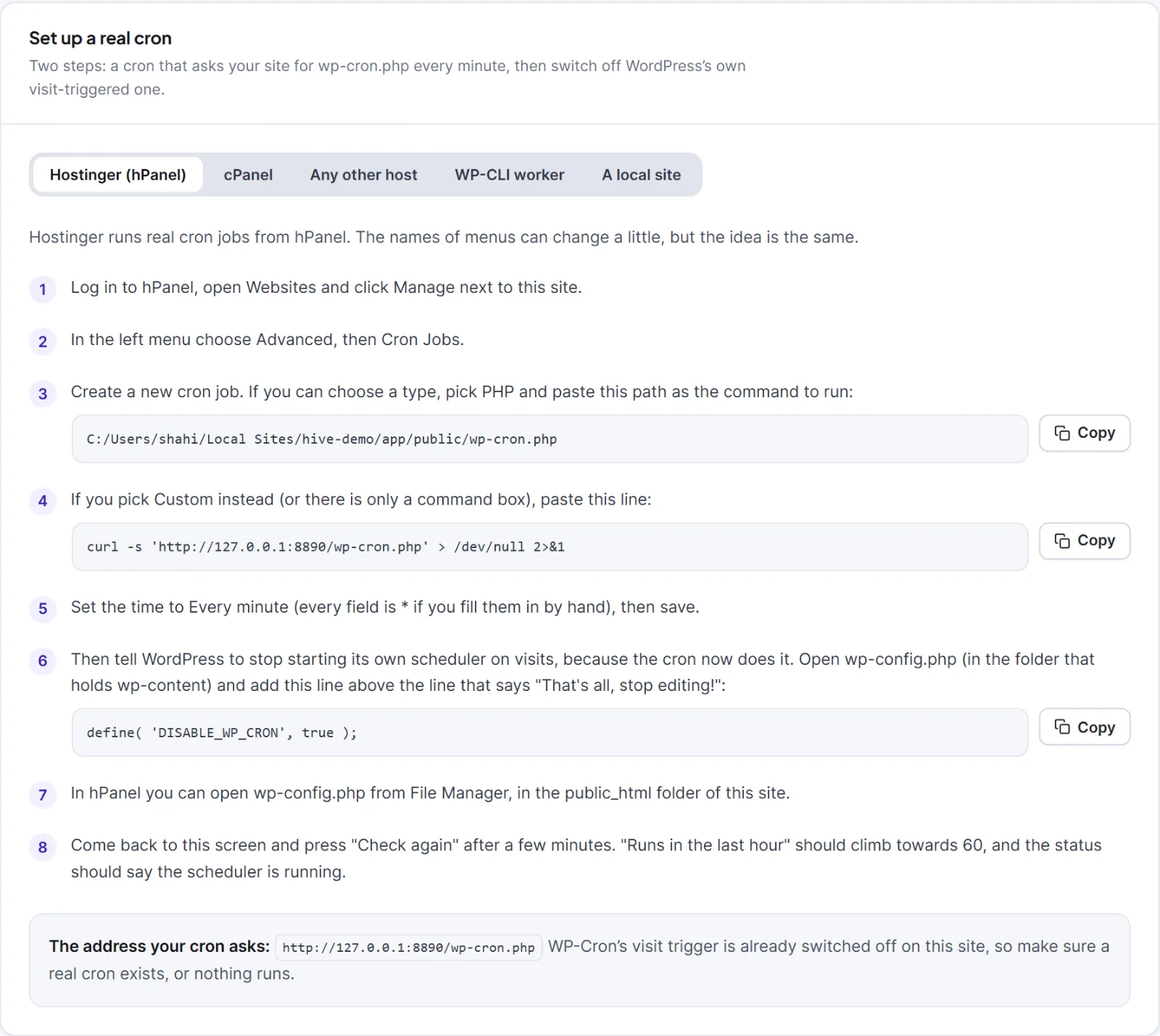
Without one, WordPress runs scheduled work only when someone visits your site. The card Set up a real cron has tabs: Hostinger (hPanel), cPanel, Any other host, WP-CLI worker and A local site. The fitting tab opens first, with commands using your own address and folder.
- Create a cron job that runs every minute:
curl -s 'https://yoursite.com/wp-cron.php' > /dev/null 2>&1(the guide fills in your address).- Hostinger: hPanel, Websites, Manage, Advanced, Cron Jobs.
- cPanel: Advanced, Cron Jobs, "Once Per Minute (* * * * *)".
- Other host with SSH:
crontab -e; awgetversion is offered. With no cron, use a web-cron service.
- Add
define( 'DISABLE_WP_CRON', true );towp-config.php, above "That's all, stop editing!". - After a few minutes click Check again; Runs in the last hour should climb towards 60.
- WP-CLI worker:
wp hivemail worker --seconds=50 --quiet --path='/path/to/wordpress'every minute. Keep awp-cron.phpline too: the daily clean-up, visitor roll-ups and weekly summary still need WordPress's cron. See WP-CLI commands. - Local site: keep a browser tab open, press Run the scheduler now, or run
wp hivemail worker. Do not addDISABLE_WP_CRONunless you schedule the command yourself.
Warning: Before switching off WordPress's cron with
DISABLE_WP_CRON, make sure a real cron exists, or nothing is sent. Until you add the line, both run, which is harmless.
Each minute Hive Mail requeues stuck messages, sends the queue, starts due campaigns, moves people along automations, finishes background jobs, scans abandoned carts, rolls up visitor statistics and checks alerts. When it runs late, the Campaigns list shows Scheduled campaigns are not going out or Scheduled campaigns may go out late with a Fix this button that leads here.
If Site can call itself shows Failed (blocked loopback, firewall, password-protected site, wrong address), see A scheduled campaign did not go out.


