


Black Friday: HiveCRM + Hive Mail
Up to 55% off
See the deals
WooCommerce

Turn one-time buyers into repeat customers.

Your orders, customers and carts are already in WordPress, so Hive Mail uses them directly. Nothing to sync and nothing to keep up to date.
yoursite.com/wp-admin/admin.php?page=hivemail
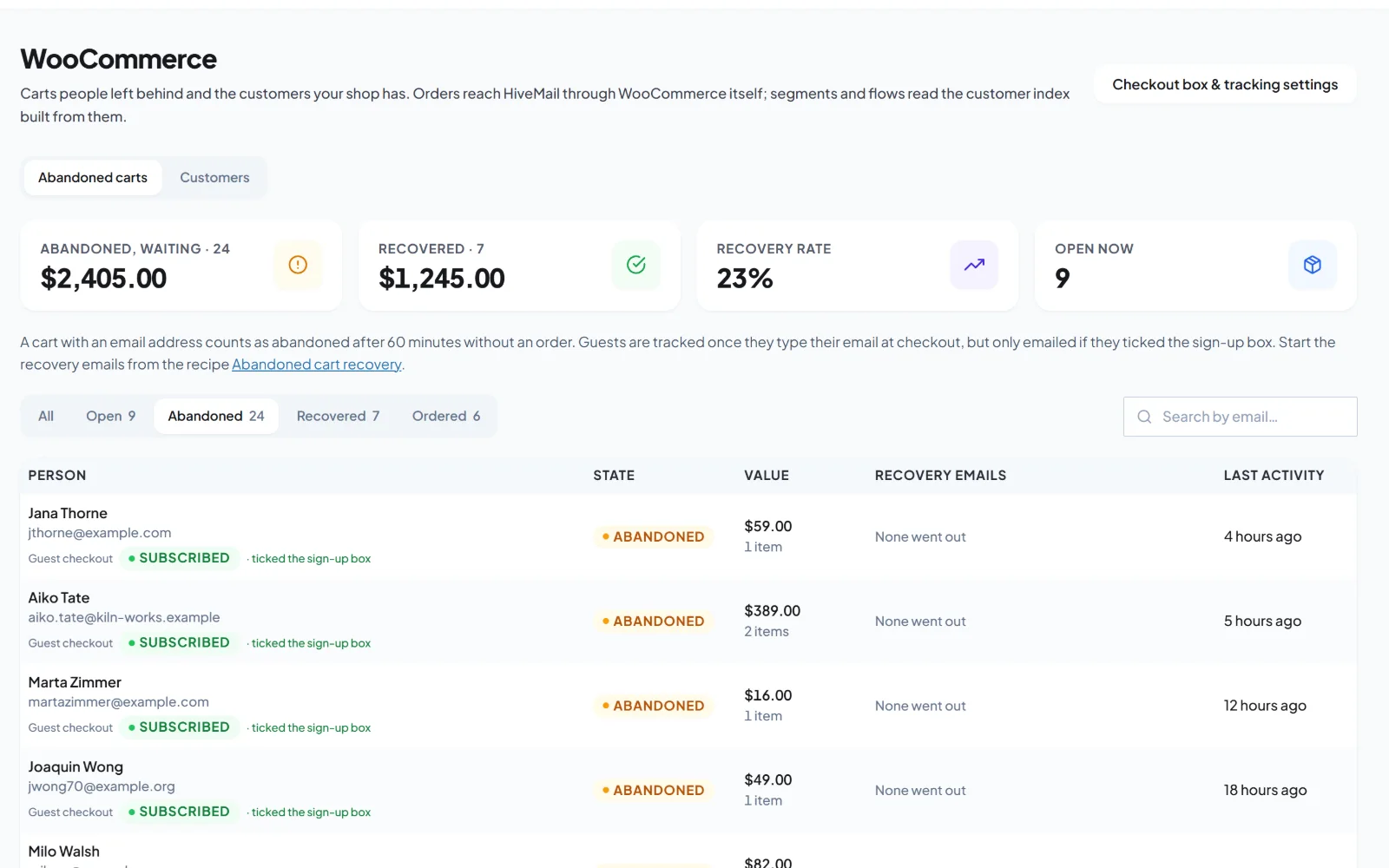
Abandoned WooCommerce carts in Hive Mail
Recovered$1,245
Recovery rate23%
How it works for WooCommerce

Recover the cart while the shopper is still thinking.

Hive Mail reads the cart from WooCommerce and sends three reminders over three days. An order ends the flow.

Abandoned cart recoveryRunning
TRIGGERCart abandonedNo order in 60 minGOALGoal: Cart recoveredAn order skips the rest
  1. TriggerCart abandonedNo order in 60 min
  2. GoalGoal: Cart recoveredAn order skips the rest
  • Guests are emailed only if they opted in
  • A coupon made for one customer, in Pro
  • Recovered revenue in your reports
What you get

Built around your store.

Works with both HPOS and classic order storage.

Abandoned-cart recovery

Detects carts left behind, for logged-in customers and for guests once they type their email.

Restore link

A link in the email refills the shopper's own cart so they can pick up where they left off.

Consent at checkout

An opt-in box that is never pre-ticked, with the time and wording recorded as the permission.

Customer profiles

Orders, total spent, first and last order, products and categories bought, on every contact.

Ten WooCommerce triggers

Order placed, processing, completed, refunded or cancelled, a first order, a product bought, a new account and an abandoned cart. An order still waiting for payment is Pro.

Segments by purchase

Ordered at least N times, spent over an amount, bought a product, last order older than N days, cart waiting.

Privacy by design

Carts are deleted after 90 days by default, and tracking can be limited or switched off.

Revenue per email

An order within seven days of a click counts for that email, in your campaign and flow reports.

Order waiting for paymentPRO

Remind people with an unpaid order, with a pay link in the email.

A coupon for one customerPRO

A flow step makes a WooCommerce coupon that only that customer's email address can use, once, until a date you choose. Percentage or fixed amount, with an optional minimum order.

Set the order's statusPRO

A flow step moves the order that started the flow to Processing, On hold or Completed. Only open orders, never cancelled or refunded ones.

Win-backPRO

Start a flow for customers who have not ordered for a number of days, from 7 to 730. It works for WooCommerce and Easy Digital Downloads customers.

Abandoned carts

Win back the cart, politely.

Choose what to say and how long to wait before a cart counts as abandoned.

  • Three-email recovery automation in the free plugin
  • Guests are only emailed if they ticked the opt-in
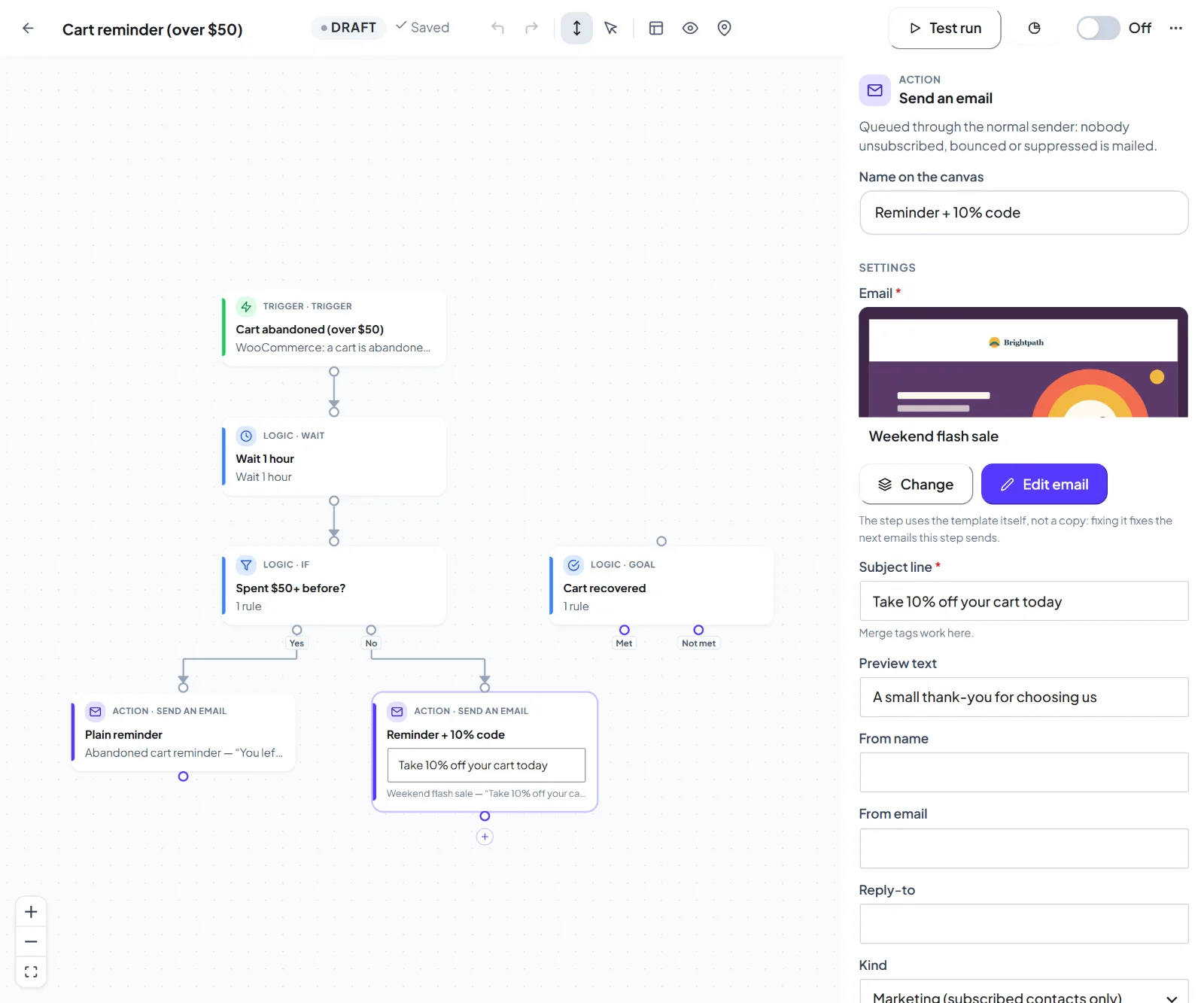
  • Set the trigger to carts worth at least an amount
Use caseEmail 1 goes out right after a cart is abandoned, email 2 a day later and email 3 two days after that. An order ends the flow.
yoursite.com/wp-admin/admin.php?page=hivemail
An abandoned cart flow on the Hive Mail canvas with a step selected
After the sale

Thank, ask, and bring them back.

Use the order to start the next conversation.

  • Post-purchase thank-you, with a follow-up where you can ask for a review
  • Win-back for customers who have not ordered in a while
  • Birthday and anniversary notes
Use caseEmail people who bought twice and have not opened anything in 30 days with a short, personal check-in.
yoursite.com/wp-admin/admin.php?page=hivemail
WooCommerce customers in Hive Mail
Coupons and order status

A coupon made for the customer, not for everyone.

Add a step to a flow and the coupon is created for that one person. The email that follows carries the code.

  • Only their email address can use it, once, until the date you choose
  • Use {{coupon_code}}, {{coupon_amount}} and {{coupon_expires}} in the email, and {{product_name}} for what they bought
  • Another step can mark paid orders as completed, so you do not have to
Use caseA day after an order of 200 or more, thank the customer and give them 15% off their next order for 30 days.
Automation / Big order: a thank-you with a coupon
1
An order of 200 or more is paid
2
Wait 1 day
3
Make a WooCommerce coupon
15% off, 30 days, only this customer's email, used once
Pro
4
Email: a thank-you
Your code is {{coupon_code}}, good until {{coupon_expires}}
Free and Pro

Start with the essentials, add depth later.

In the free plugin

  • Abandoned-cart tracking, a restore link and a three-email recovery automation
  • Customer summaries and purchase segments
  • Order, refund and first-order triggers
  • Checkout opt-in with consent recorded

Added by Pro PRO

  • A reminder for orders waiting for payment
  • Recipes for a first order, a cancelled order, a refund and a review request
  • A step that makes a coupon for one customer, a step that sets an order's status and a win-back trigger
  • Four more ready-made automations: an order follow-up, a big-order thank-you with a coupon, a win-back and marking paid orders completed after 14 days
  • Cart revenue analytics Coming soon
FAQ

Questions about woocommerce

Only if they ticked the opt-in at checkout. A guest who did not tick the box is never emailed.
A tiny script on the checkout sends the email address to your own site when the field is left. Nothing is sent to any other server.
Yes. Orders are read through the WooCommerce API, so HPOS and classic storage behave the same.
Keep exploring

Related features

Automation

A graph canvas with a run log for every contact.

Learn more →

Audience and segments

Contacts, tags and live segments.

Learn more →

Reports and revenue

Opens, clicks, revenue and engagement.

Learn more →

Try it on your own site.

Download the free plugin and see it with your own data.