

A client onboarding checklist is the list of steps you complete between a client saying yes and the first day of real work. It covers the written scope, the first payment, access to the client's site and accounts, and how you will stay in touch. This client onboarding checklist has 12 steps for WordPress freelancers and small agencies, and it shows which of them HiveCRM can do for you.
Thank you for reading this post, don't forget to subscribe!
Table of Contents
Why does a client onboarding checklist matter?
The weeks after a client says yes are where projects quietly go wrong. Logins arrive late, nobody remembers exactly what was promised, and the first invoice goes out after the work has started. A checklist turns those loose ends into a routine you repeat for every client.
It also protects your time. When the scope is in writing and the first payment is in, you start on solid ground, and the client knows what happens next. Whether you keep the list in a document or inside a WordPress CRM plugin, the point is the same: the same steps, in the same order, every time.
The 12-step client onboarding checklist
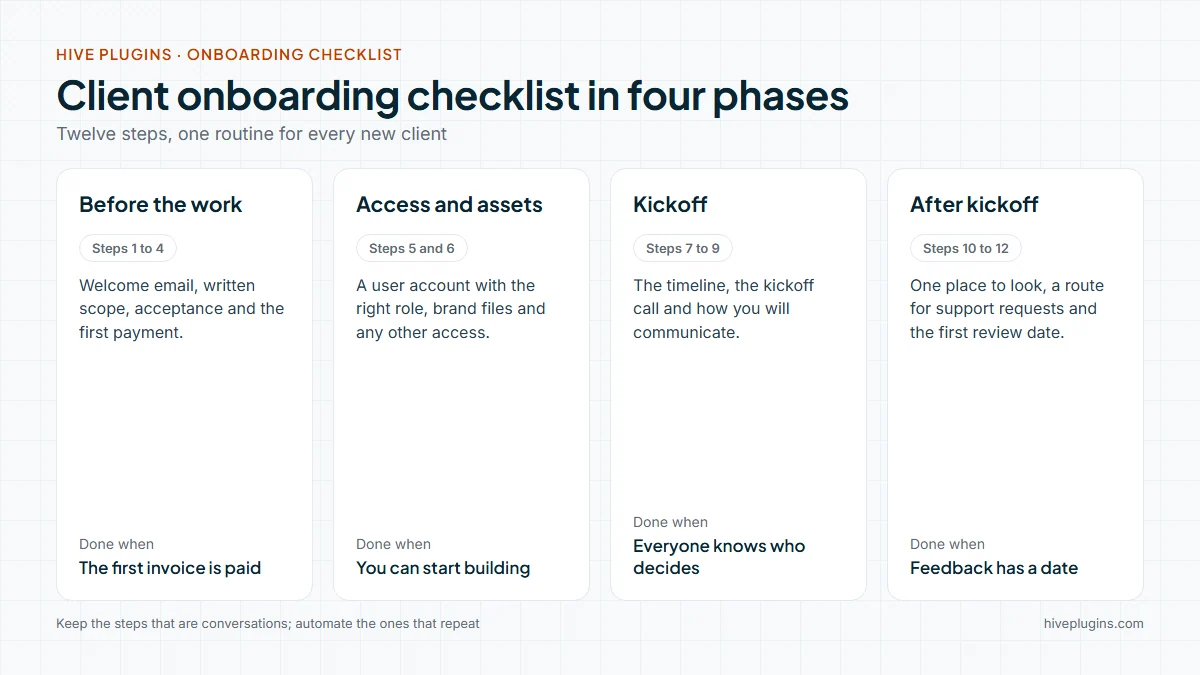
Copy this list into your own notes and adjust it to the kind of work you do.
- Send a welcome email. Within one business day of the yes, thank the client and say what happens next, in three or four lines.
- Confirm the scope in writing. A statement of work describes a project's activities, deliverables and timelines, and usually the price and terms. For a small job it can be one page, as long as both sides have read it.
- Get the scope and price accepted. Do not start work until the client has said yes to the written version. A freelance proposal template makes that step quick.
- Invoice and collect the first payment. Send the first invoice straight after acceptance, and book your time once it is paid.
- Ask for access the safe way. Do not ask the client to email an admin password. WordPress has six pre-defined roles, so ask the client to add you as a user with the role your work needs. Then list any other access you need, such as hosting, domain, analytics and plugin licences.
- Collect brand assets. Ask for logo files, colours, fonts, and any copy or photos the client already has. A client intake form can collect them in one go.
- Share the timeline. Send the milestones and say what you need from the client, and by when.
- Book the kickoff call. Agree a date and a short agenda: goals, audience, who decides and who approves.
- Agree how you will communicate. Choose the channel, the reply time you promise, and who speaks for the project on each side.
- Give the client one place to look. Proposals, invoices and project status in one client portal beat a trail of attachments.
- Decide how support requests arrive. Use a form or a ticket queue, so a request never gets lost in a personal inbox. The guide to a WordPress support ticket system shows how a queue works.
- Book the first review. Put the first progress review in the calendar now, so feedback has a date.
Which of the 12 steps can HiveCRM do for you?
HiveCRM is built for the steps that are the same every time. The conversations and the files stay with you. Here is how each step maps:
| Checklist step | What HiveCRM does |
|---|---|
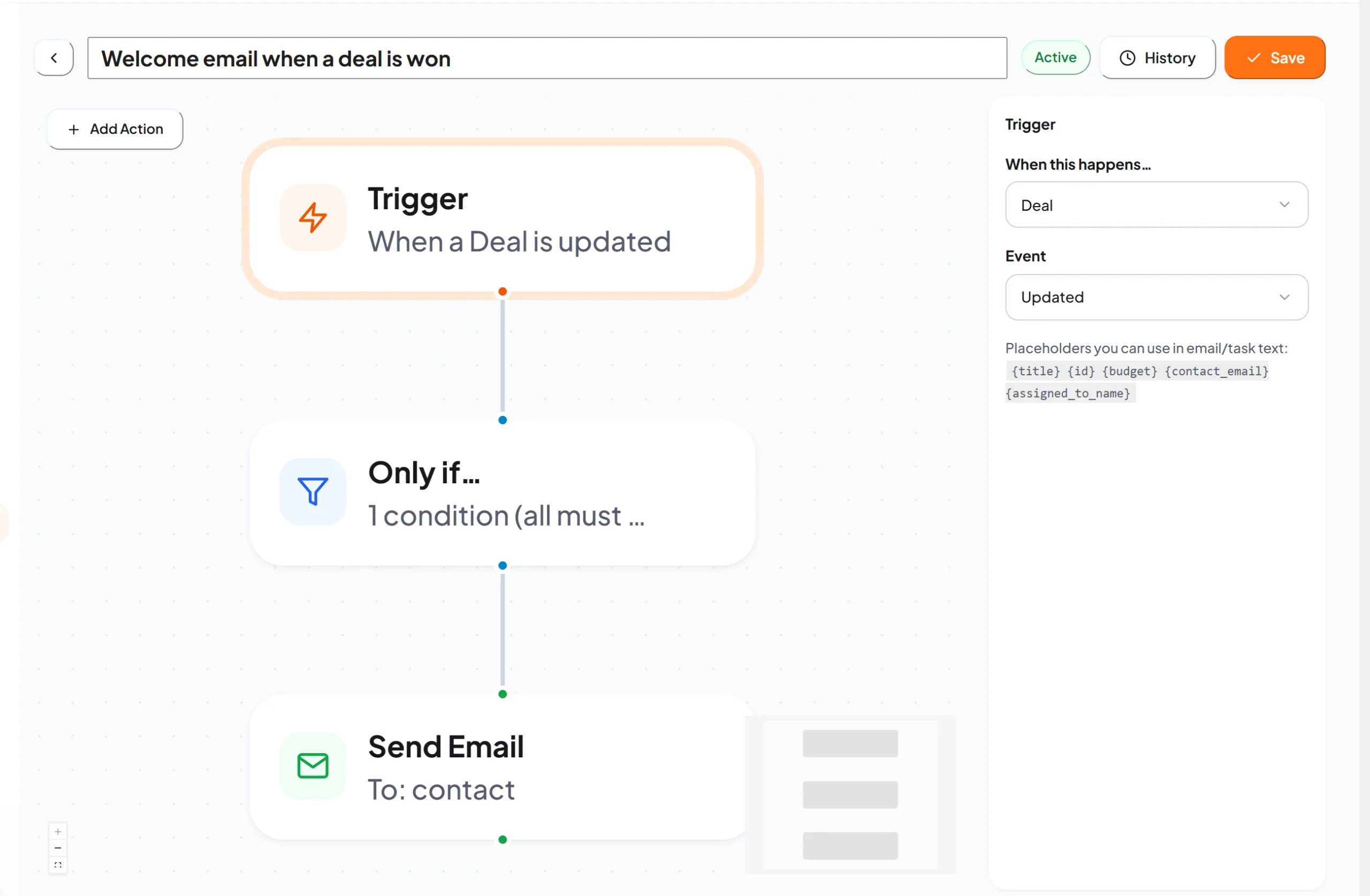
| 1. Welcome email | A workflow emails the client when a deal moves to the Won stage |
| 2 and 3. Scope and acceptance | Build the estimate with line items, tax and discount, and send it to the client. When the client agrees, turn it into an invoice in one click |
| 4. First payment | The client pays the invoice by card with Stripe Checkout or with PayPal, and the invoice marks itself paid |
| 10. One place to look | The client portal shows the client's deals, projects, invoices and support tickets |
| 11. Support requests | Support tickets with a priority, a status and an assigned team member, and the client is emailed when your team replies |
| Tracking the steps | On the client's project page, add each onboarding step as a task with an assignee, a priority and a due date |
Steps 5 to 9 and step 12 are conversations, access and calendar entries, so keep using your checklist for those. If you want them tracked, add them as tasks on the project page, where each task has an assignee and a due date.
How do you set up the welcome email once?
Setting up the welcome email takes a few minutes, and after that it runs for every client:
- Open Workflows in the HiveCRM menu and start a new workflow.
- Set the trigger to Deal and the event to Updated.
- Add a condition: the stage equals Won.
- Add a Send Email action addressed to the contact, and write the welcome message. The side panel lists placeholders, such as the deal title and the assigned team member's name, that you can place in the text.
- Set the workflow to Active and save it.
One thing to know: a workflow runs whenever a matching record is updated. Editing a deal that is already Won can send the email again, so write the message so it still makes sense if it arrives twice, or deactivate the workflow if you edit won deals often.
Here is a short welcome message you can adapt:
Hi, thank you for choosing [your studio]. Here is what happens next. You will get the project timeline within two working days. I will ask you for the logins and brand files the project needs. Then I will book a kickoff call, so everyone knows who decides what.
What does the client see once they are in?
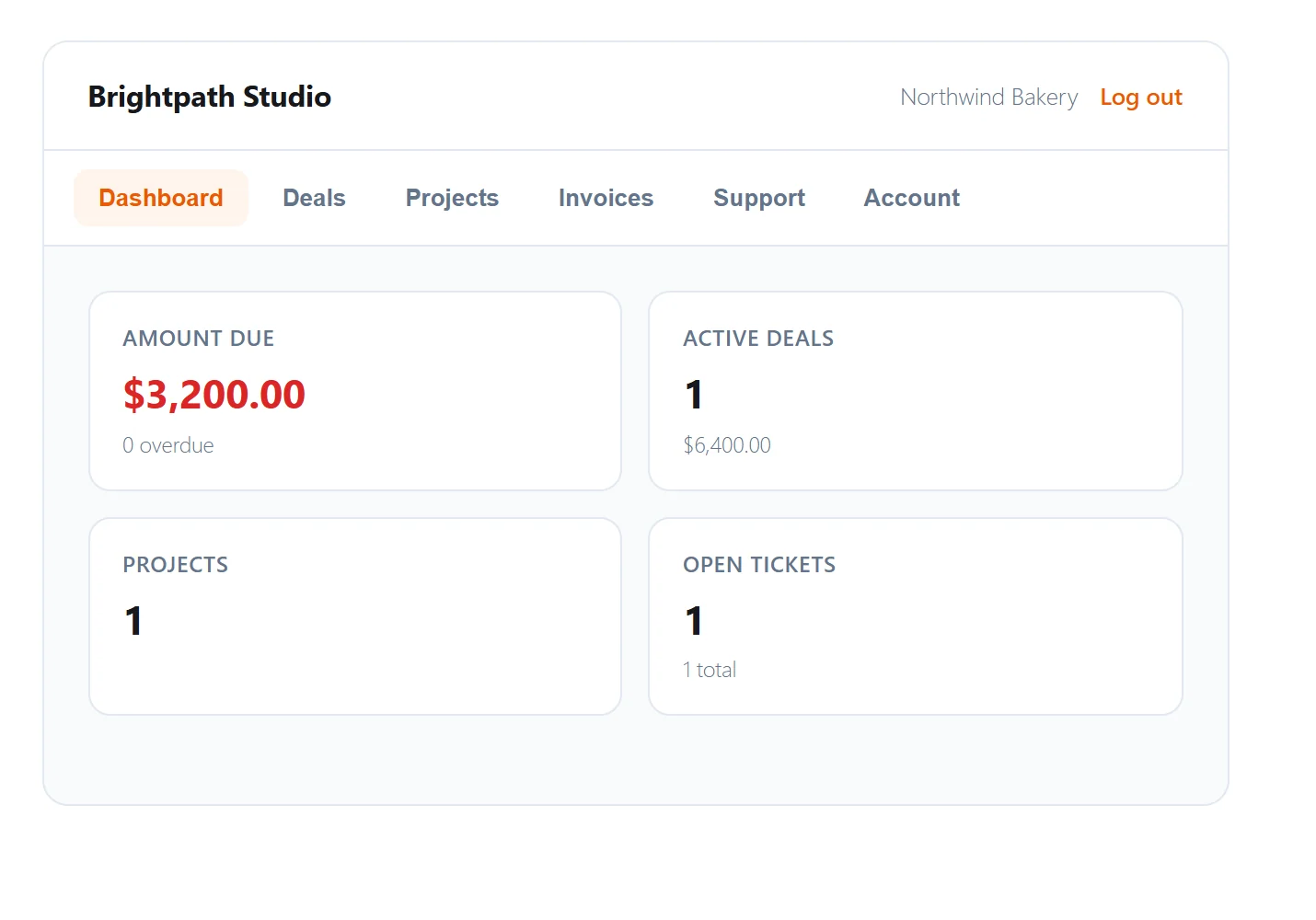
Once the client has a portal login, this is the first screen they see: what they owe, their active deals, their projects and their open tickets. It answers the questions that otherwise arrive as emails.
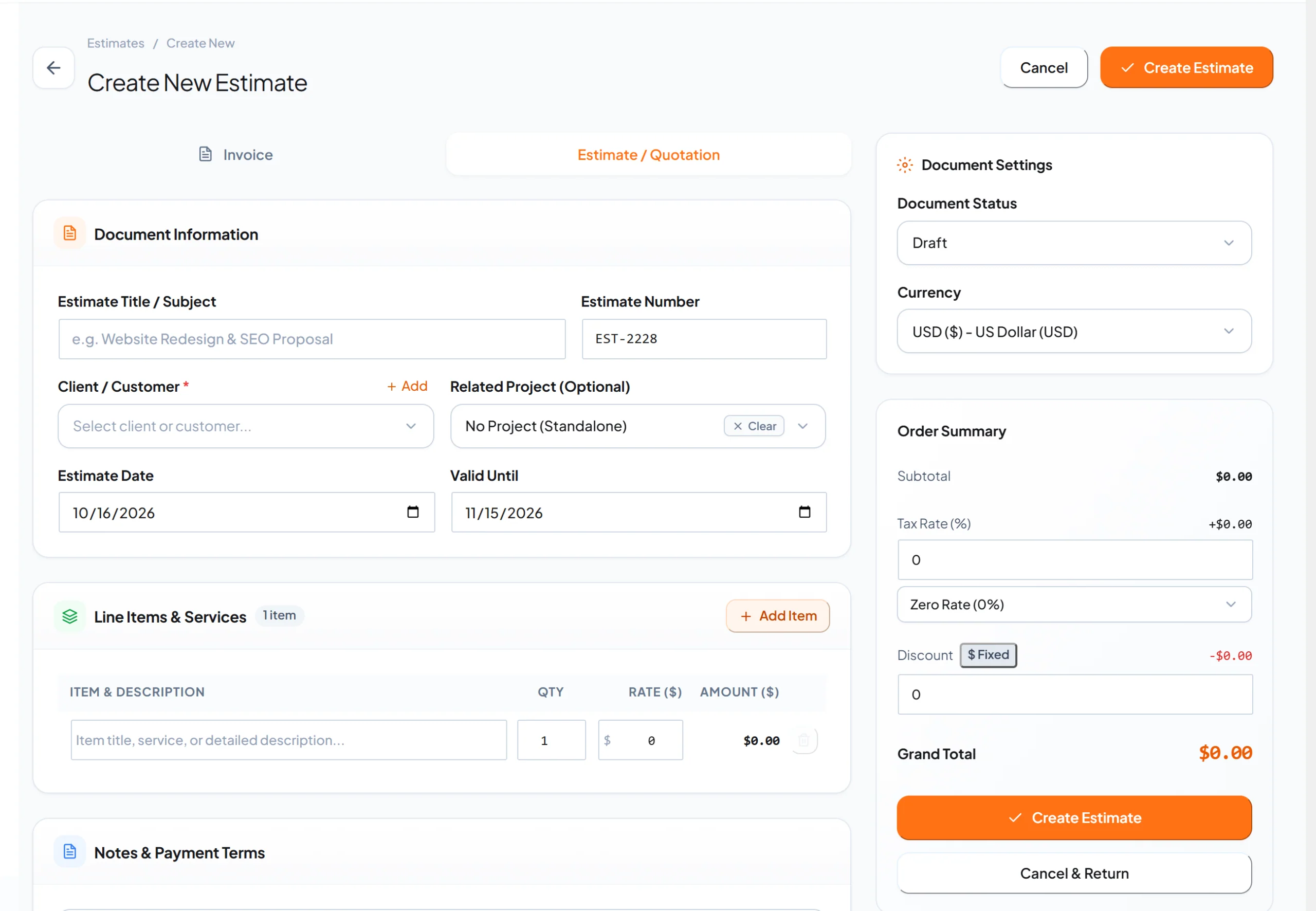
The estimate itself is built from one form. It holds the client, the dates, the line items, tax, discount and your payment terms, so the first invoice later starts from the same numbers.
Which mistakes does a client onboarding checklist prevent?
Four mistakes cause most of the pain, and each one is a missing line on the checklist:
- Starting before the first payment. Work done on a promise is hard to stop and hard to charge for.
- Collecting passwords by email. Ask for a user account with the right role instead.
- A vague scope. If the written scope does not say what is excluded, the client will assume it is included.
- No review date. Feedback arrives late and all at once when nobody booked it.
Frequently asked questions
How long should client onboarding take?
It depends on the project, but the checklist should be finished before real work starts. Steps 1 to 4 can happen within a day or two when the client replies quickly. Access and brand assets usually slow things down, so ask for them early.
Do I need a contract for a small project?
Put the scope, the price and the timeline in writing for every project, however small. A one-page statement of work or an accepted estimate does that job.
Should I charge for onboarding?
Many freelancers include onboarding in the project price, because it is part of doing the job well. If it takes real time, such as a discovery workshop, list it as its own line on the estimate.
Where should I keep my client onboarding checklist?
Keep it wherever you will open it for every new client: a document, a note app, or the notes on the deal in your CRM. What matters is that you use the same list every time.
Make the repeatable steps automatic
If you run client work on WordPress, see how HiveCRM handles leads, estimates, invoices, the client portal and support tickets in one dashboard, and read the full feature list. The guides for building a workflow, the client portal and creating an estimate walk through each step.