

Do I need a CRM? You probably do once your leads, quotes and follow-ups no longer fit in your head or in one sheet, and you have already missed one. Before that point, a spreadsheet and a calendar are enough, and a CRM would be one more tool to open. This guide gives you a copyable 10-question self-check, a score that tells you which side of the line you are on, and a plan for what to use until a CRM earns its place.
Thank you for reading this post, don't forget to subscribe!
Table of Contents
At a glance
- A CRM (customer relationship management software) stores the people you deal with, the deals you are chasing and what happens next, in one place.
- The test: ten yes-or-no questions below. Each yes is one point.
- 0 to 3 points: not yet. Use a one-sheet tracker and a weekly review.
- 4 to 6 points: soon. Fix your process first, then pick a tool.
- 7 to 10 points: yes. Leads are slipping through the cracks you already have.
- If you run WordPress: HiveCRM is a CRM that runs inside your own WordPress site, so the data stays in your own database.
What does a CRM do that a spreadsheet and an inbox do not?
A CRM keeps a record for every person and every deal, and it shows you what to do next. Customer relationship management is the process of managing and improving your interactions with customers, usually with software that stores their data and coordinates sales, marketing and service. A spreadsheet stores rows. A CRM connects them.
A plain contact manager only saves and looks up details of the people you deal with. A CRM goes further and handles the selling work around those people, such as estimates, invoices and follow-up messages. The table shows where each approach holds up.
| Job | Spreadsheet, inbox and calendar | A CRM |
|---|---|---|
| Remember who enquired | Works for a handful of people | Works at any size |
| Capture a form submission | You copy it by hand | Created automatically |
| Show who to contact today | You scan the sheet | A filtered list or board |
| Track a deal through stages | You edit a status cell | Stages with a board view |
| Send a quote or invoice | A separate app, details retyped | Created from the same record |
| Share work with a second person | Shared sheet, easy to overwrite | Owners, roles and history |
| Cost at five clients | Nothing | Time to set up and learn |
The last row matters. A tool has a cost even when it is free, because you have to learn it and keep it up to date.
Do I need a CRM? The 10-question self-check
Answer each question for the last 90 days. A yes is one point. Be honest, because only you will see the score.
- Did an enquiry go unanswered for more than a week because you forgot, not because you decided to pass on it?
- Do you have more than about ten open conversations (leads, proposals and live jobs combined) at the same time? Ten is a rule of thumb, not a study. Use your own limit if it is lower.
- Does more than one person answer enquiries or work on the same leads?
- Do enquiries arrive from more than one place, for example a contact form, email, social messages, phone calls and referrals?
- Do you write the same email again and again: an acknowledgement, a proposal follow-up, a welcome message?
- Do you retype client details when you move from tracking a lead to sending a quote or an invoice?
- Could you not say right now how many proposals are waiting for an answer and what they add up to?
- Do you not know which source (referrals, search, social, your own site) brings the clients who actually pay?
- Do clients ask for the status of their work or invoices, and do you answer by searching your inbox?
- Is client information spread over three or more places, such as your inbox, your phone, a sheet and a notebook?
Copy that list into a note, answer it, and add up the yeses. Then read your score in the table.
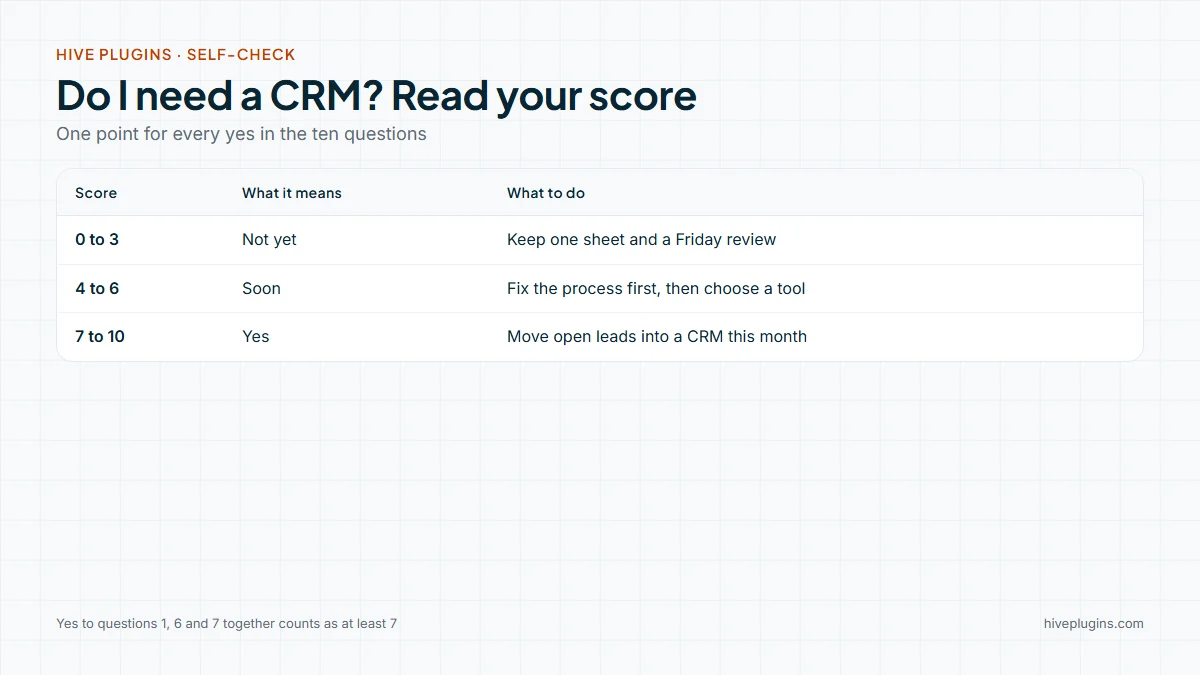
Look at the middle row. A score of 4 to 6 is the most common result, and the advice is not "buy something". It is "fix the process, then choose the tool".
What do the three questions that matter most tell you?
Questions 1, 6 and 7 carry more weight than the rest. A missed enquiry (question 1) is the clearest sign that memory has stopped working. Retyping details (question 6) is a daily time cost. Not knowing your open proposals (question 7) means you cannot plan your month. If you answered yes to all three, treat your score as at least 7, because you already need a CRM even if the other seven answers say otherwise.
What should you use instead until you need a CRM?
Use one sheet, one weekly review and one inbox label. This is not a second-best option. For a solo freelancer with a few open leads, it is the right size of tool, and it teaches you which columns you will want a CRM to hold later.
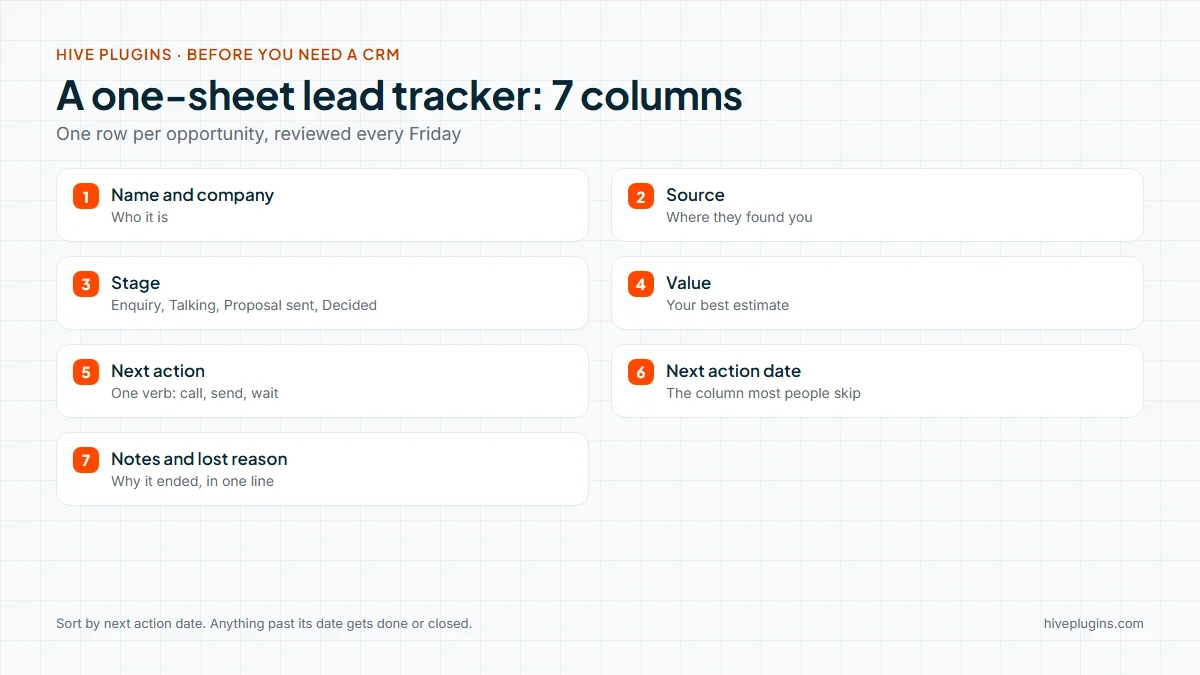
Set it up in about fifteen minutes:
- Make one sheet, one row per opportunity. Use the columns in the picture above. The two that most people skip are "next action" and "next action date". Without them the sheet records the past and does not tell you what to do next.
- Use four stages only: Enquiry, Talking, Proposal sent, Decided. You can add more later, once four stages stop describing your real process (see sales pipeline stages).
- Add a calendar reminder for every proposal on the day you said you would follow up.
- Keep an inbox label called "Waiting". Put any thread there when you are waiting for the other person, and review it once a week.
- Keep your replies in one folder of text snippets. Acknowledgement, proposal follow-up, "not a fit" and welcome are enough to start.
- Review the sheet every Friday for fifteen minutes. Sort by next action date. Anything past its date gets done or closed.
- Write down why a lead was lost in the notes column. After a few months this is the most useful data you own.
If your process is already written down, as in a client onboarding checklist, a later move to a CRM is much easier. You are transferring a habit, not inventing one.
What does a CRM change once you pass the line?
The change is that the sheet's weak points stop being weak. Capture becomes automatic, the next action is visible and quotes start from the same record as the lead. For a service business on WordPress, the overview of a WordPress CRM plugin lists what to look for.
HiveCRM is a CRM that runs inside your own WordPress site. Here is how it answers the pain points from the quiz:
- Questions 1 and 4 (missed or scattered enquiries): Contact Form 7, WPForms, Gravity Forms, Ninja Forms, Fluent Forms and MetForm can create a lead from every submission. Each lead has a level (Hot, Warm and Cold by default), a source, tags, a budget and an assigned staff member (WordPress lead management).
- Question 7 (open proposals): deals sit in a pipeline with stages and a win probability, in list or Kanban view. The Deals screen shows the pipeline value and a weighted figure.
- Question 6 (retyping): estimates and invoices (WordPress invoice plugin) have line items, tax and discounts, an accepted estimate converts to an invoice in one click, and the invoice can be paid by card with Stripe Checkout or with PayPal.
- Question 9 (status requests): the WordPress client portal shows proposals, invoices, projects and tickets, and clients can pay invoices there. Support tickets cover the questions that arrive after the work starts.
- Question 10 (scattered information): leads, deals, contacts, projects and invoices live in one dashboard, in your own WordPress database.
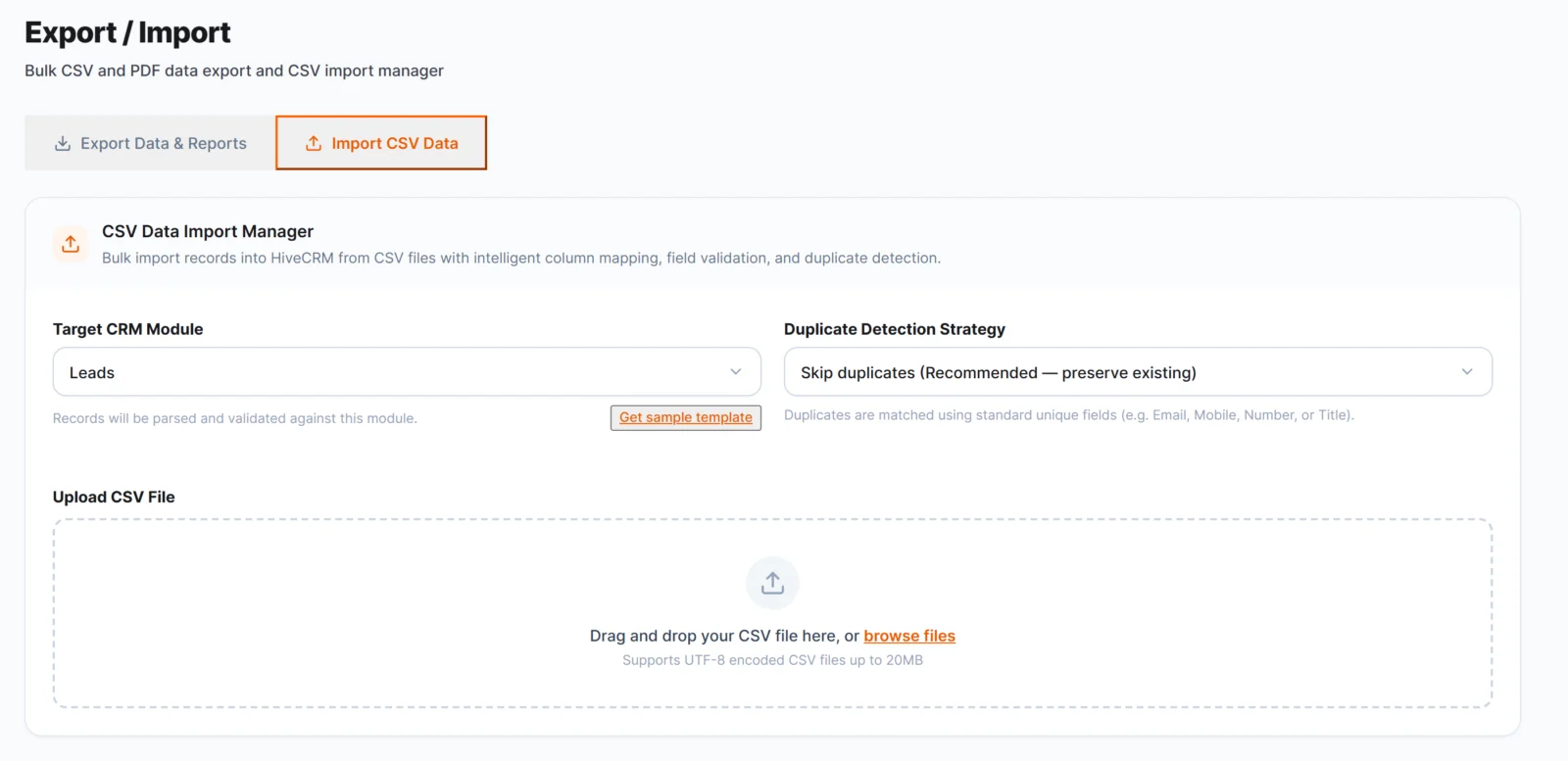
Moving off the sheet is not a cliff. HiveCRM 1.0.5 imports CSV files with column mapping, a template download, a preview step and a choice of what to do with duplicates: skip, update or create. You find it under Settings, Export / Import, and each list screen has its own import menu. You can also export to CSV or PDF, so your data is never locked in.
HiveCRM is built for people who already run a WordPress site. If your business does not use WordPress, it is not the right fit, and a hosted tool is the honest answer. You can see the full list of what it does on the HiveCRM features page.
What are the wrong reasons to get a CRM?
A CRM amplifies a habit. It cannot create one. These are the reasons that usually lead to an unused install:
- "I want to look organised." A clean dashboard with no daily use is worth nothing.
- "A big client might ask what I use." Clients rarely do. They notice whether you reply.
- "It will fix my follow-up." It will show you the follow-ups you owe. Sending them is still your job, and a method that works in a sheet works in a CRM too (how to follow up with a lead).
- "I will set it up properly later." Set up the smallest version on day one: levels, sources and one pipeline.
The right reason to need a CRM is simple. Something you care about keeps slipping, and the sheet cannot stop it.
Your next step
If your score is 7 or more, spend an hour moving your open leads into a tool. If you run WordPress, read the guide to a WordPress CRM plugin, then look at HiveCRM and its pricing. It is paid once, with no monthly subscription. If your score is lower, keep the sheet and check again in three months.
Frequently asked questions
What is the smallest CRM that works?
The smallest working CRM is one record per person or deal, a stage, a next action and a date, with a weekly review. A sheet can do that. A software CRM adds automatic capture, shared access and quotes from the same record.
Can a spreadsheet do the job of a CRM?
Yes, for a small number of leads and one person. It stops working when enquiries arrive from several places, when two people share the follow-up, or when you retype details into quotes and invoices.
Do freelancers need a CRM?
Not on day one. A freelancer needs a CRM when a lead is lost through forgetting, not through a decision. Answer the ten questions above: seven or more yeses is a clear sign.
Is a CRM free or paid?
Both exist, and a free WordPress CRM plugin comes in several shapes. Some tools charge every month. HiveCRM is paid once, runs inside your own WordPress site and has no monthly subscription. See the HiveCRM pricing page for current details.
How many clients before I need a CRM?
There is no fixed number. Ten open conversations at once is a rule of thumb, but your score on the self-check says more than a head count, because a few high-value proposals can be harder to track than many small jobs.