

Double opt in WordPress means a new subscriber must click a link in a confirmation email before they join your list. Until they confirm, they get none of your campaigns. The extra step shows the address is real and the permission is theirs, at the price of a few signups that never finish. This guide covers the trade-offs, five setup steps in Hive Mail, what your subscribers see, and what to do about people who never confirm.
Thank you for reading this post, don't forget to subscribe!
Table of Contents
At a glance
- What it does: holds a new contact as Pending until they press the button in the confirmation email.
- Plan: Free. Double opt-in is part of the free Hive Mail.
- Default: on. The setting is Settings > Compliance > Ask new subscribers to confirm by email.
- The link works for: 30 days by default (you can set 1 to 365).
- Who it protects: you, because a Pending contact is never sent a campaign.
What is double opt-in, and how is it different from single opt-in?
Double opt-in is a two-step signup: the person submits your form, then confirms by email. With single opt in WordPress forms, the form alone adds them to the list. The second step proves the inbox belongs to the person who signed up, which is why Google's sender guidelines advise senders to confirm each recipient's email address before subscribing them.
For a one-minute overview of single and double opt-in and the idea of explicit consent, watch "Single Opt-In vs Double Opt-In Explained" by Brian Karuri:
What are the pros and cons of double opt in WordPress forms?
Double opt in WordPress forms trade a slightly smaller list for a cleaner one. A mistyped or fake address never receives a campaign, and you hold a timestamped record of the confirmation. The cost is people who sign up, mean to confirm and never do.
| Double opt-in | Single opt-in | |
|---|---|---|
| Typos and fake addresses | Never confirmed, so never mailed | Join the list and may bounce |
| Proof of permission | A confirmation time and source on the contact | Only the form submission |
| Signups that finish | Fewer, because the email can land in spam or be forgotten | All of them |
| Speed | One extra step for the subscriber | Immediate |
| Depends on | Your confirmation email being delivered | Nothing extra |
There is no honest universal number for how many people drop out; it depends on your audience and on whether your emails reach the inbox. Hive Mail shows your own: the signup forms list has Sent (real people, accepted) and Confirmed (people now subscribed through this form) columns, so you can see your confirmation rate.
How do you set up double opt in WordPress in Hive Mail?
You set it up in five steps: check the site can send, leave the default on, write the confirmation email, choose the answer per form, and test it yourself. Each step takes minutes. Nothing here needs code.
- Check your site can send email. Open Settings > Sending and look at the readiness checklist. The confirmation email needs a working sending method and a From address on your own domain, because mailbox providers reject or hide mail sent as a free address such as gmail.com.
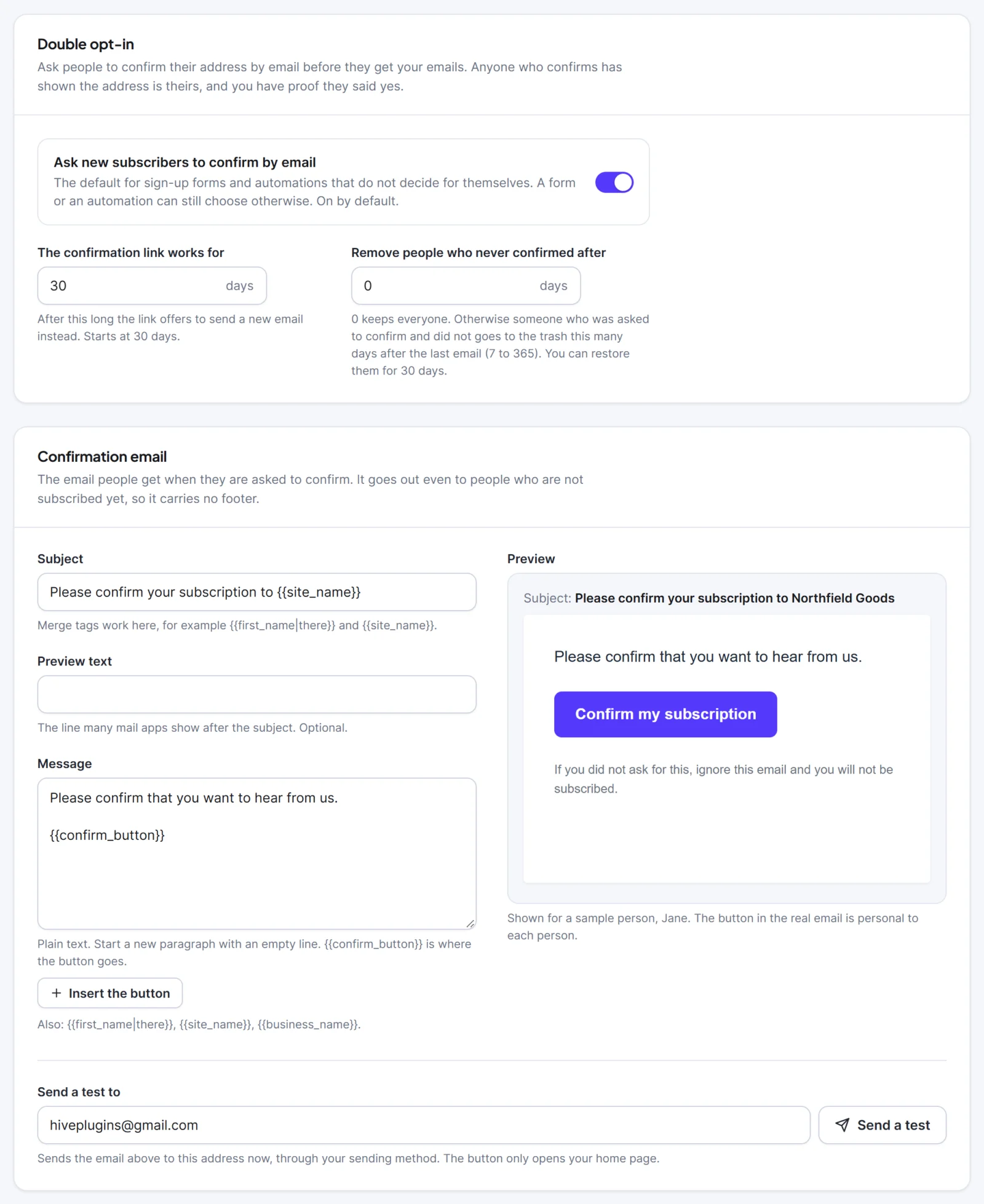
- Leave the default on. Go to Settings > Compliance, card Double opt-in. Ask new subscribers to confirm by email is on by default and applies to every form and automation that does not decide for itself. Set The confirmation link works for (days), and decide on Remove people who never confirmed after (days). Press Save changes.
- Write the confirmation email and the thank-you page. In the card Confirmation email, edit the Subject, the optional Preview text and the plain-text Message. Press Insert the button to place the confirm button where you want it, check the live preview, then type your address in Send a test to and press Send a test. In the card After confirming, choose Show a message or Go to another page.
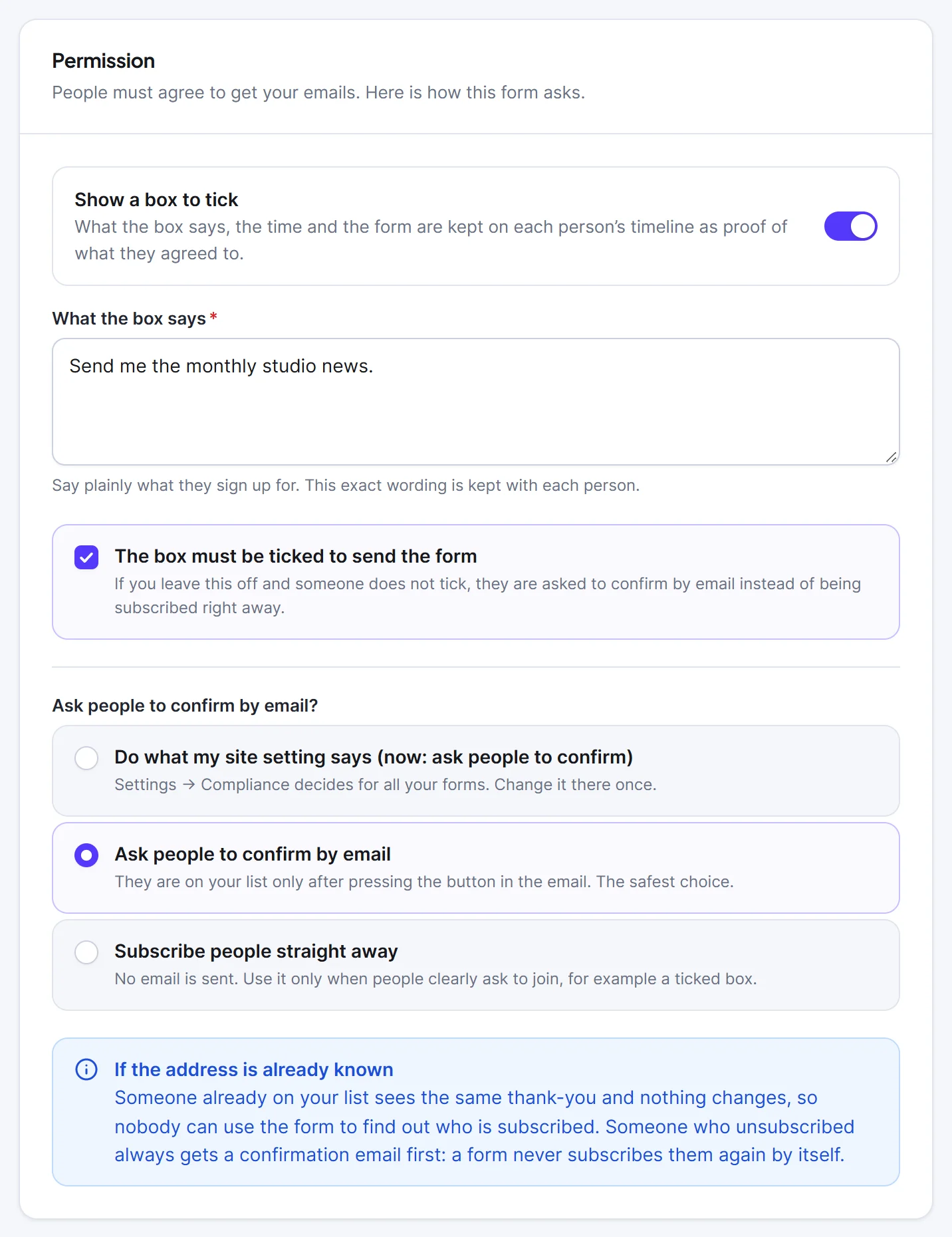
- Choose the answer on each form. In Audience > Forms, open the form and look at Ask people to confirm by email?. The choices are Do what my site setting says (the default), Ask people to confirm by email (the safest) and Subscribe people straight away (no email). Use the last one only when people clearly ask to join, for example with a ticked consent box.
- Test it in a private window. Sign up with an address of your own, open the email, press the button and check the contact's timeline.
The full settings are in the double opt-in documentation, and the signup forms page covers the form side. If you collect sign-ups with another form plugin, the guide to connecting a WordPress form to an email list shows how to add the same confirmation.
What do your subscribers see?
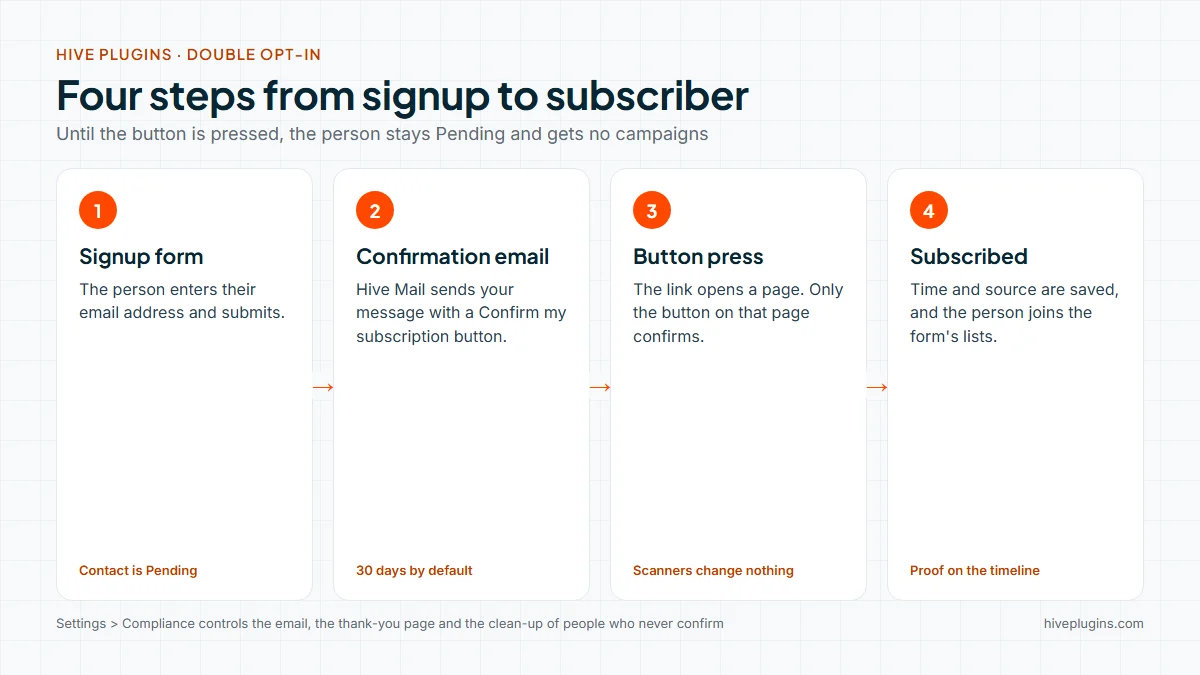
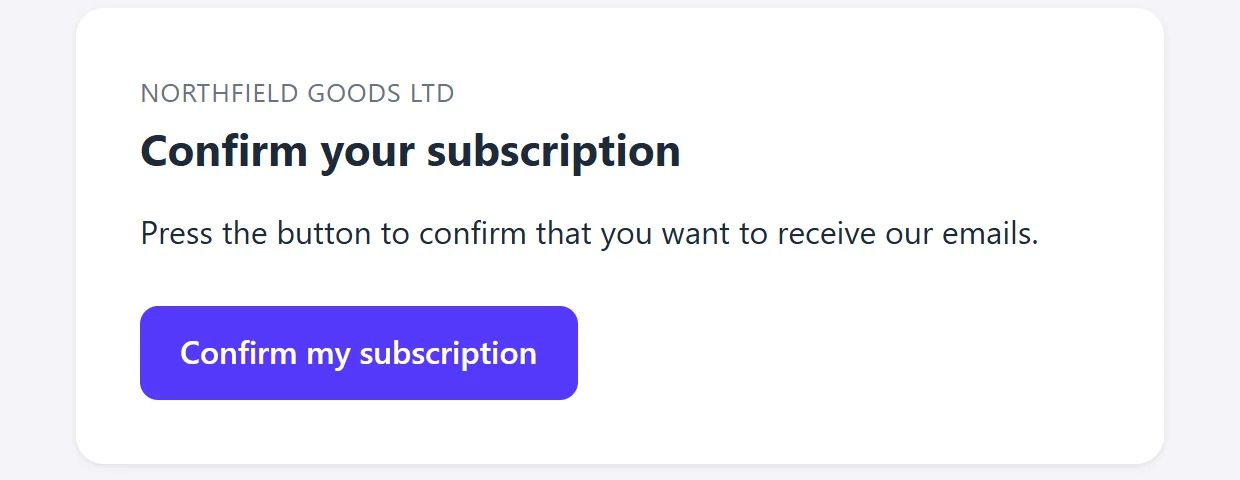
They see three things: a thank-you where the form was, an email with a Confirm my subscription button, and a page with a second Confirm my subscription button. That second button is what actually confirms them.
- The email. Your subject and message, the button, and a closing line telling anyone who did not ask to ignore it. It has no footer and no tracking, because it goes to people who are not subscribed yet.
- The page. Opening the link changes nothing, so a mail scanner that follows links cannot confirm anyone. Pressing the button sets the contact to Subscribed, saves the time and the source
double_optinas proof, and adds them to the form's lists. Their timeline says "Confirmed their subscription by email". - Other cases. "You are already confirmed", "This link has expired" with a Send me a new email button, and plain error pages if the link does not work.
What happens to people who never confirm?
They stay Pending. A Pending contact is never sent your campaigns or marketing automations, which is the protection double opt-in gives you. They can still receive service emails such as the confirmation itself.
Two settings and one button manage them:
- Remove people who never confirmed after (days). The default is 0, which keeps everyone. Set 7 to 365 and a daily job moves Pending contacts who were asked and did not confirm to the trash, where you can restore them for 30 days. People nobody has asked yet are never touched.
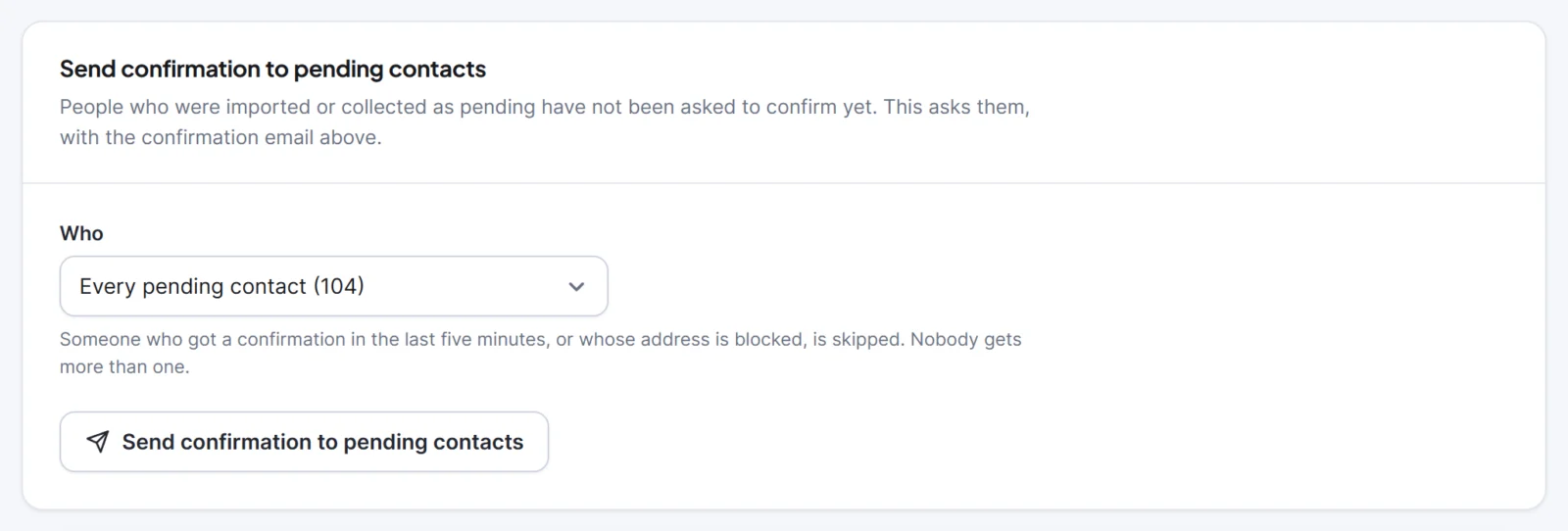
- Send confirmation to pending contacts. In Settings > Compliance, choose Who (every pending contact, or the pending members of one list) and send. Hive Mail skips suppressed addresses, contacts who are not Pending or Transactional, and anyone asked in the last five minutes. Queued emails cannot be taken back, so save your wording first.
- Contacts you imported. An import never emails anyone by itself, so people imported as Pending wait until you ask them. The guide to migrating an email list to WordPress explains how imports arrive.
How do you nudge people who have not confirmed?
Resend once, then let the clean-up do the rest. Hive Mail's resend is a button you press, not an automatic reminder sequence, so the nudge is deliberate. Pending people are the ones who have not agreed yet, so ask politely and once.
- Wait a few days after the first email.
- Use Send confirmation to pending contacts for the list, or Send confirmation email on a single contact's profile.
- Say in your form's thank-you message to check the spam folder (plain text, up to 300 characters).
- After a further week or two, let the optional clean-up remove the rest.
If people say the email never arrives, work through the confirmation email does not arrive page. The usual causes are the scheduler not running, a From address on a free mail domain, and missing SPF, DKIM and DMARC records. The guide to a contact form not sending email explains the same authentication records in plain steps. The guide to WordPress email deliverability goes further.
Does double opt-in apply at the WooCommerce checkout?
Not in the same way. The Hive Mail checkout box is an unticked checkbox; when a customer ticks it and the order is placed, they become a subscribed contact at once, and the time and exact wording are saved on the contact and in an order note. The box is never pre-ticked, and nobody who unsubscribed, bounced or complained is subscribed again by it.
For abandoned carts, a guest who ticked the box on an unfinished cart gets one confirmation email first, with Ask guests to confirm by email first on by default. WooCommerce abandoned cart emails explains who may be emailed, and WooCommerce email marketing automation shows where the consent step sits among the six core flows.
Does the law require double opt in WordPress?
It depends on where your subscribers live, and you decide, not the plugin. Rules differ by country. The United States CAN-SPAM guide describes an opt-out model: honour opt-out requests within 10 business days and include a postal address. UK data protection guidance asks you to be able to show consent was given, and to record who consented, when, what they were told and how, as the ICO's consent guidance sets out.
Double opt-in is one way to keep that record, because Hive Mail stores the confirmation time and source on the contact. It is not the only way, and it does not make a site compliant by itself. Hive Mail's consent and the law guide lists what the plugin does and what you still decide. This is information, not legal advice.
Turn it on and send the first welcome email
Open Settings > Compliance in the free Hive Mail, check Ask new subscribers to confirm by email, and send yourself a test. Then decide what a confirmed subscriber receives first: the welcome email series guide gives you three emails to send. The guide to starting a newsletter on WordPress covers the full setup around it. If you are still choosing a plugin, the WordPress email marketing plugin checklist scores consent handling as one of eight checks. Start from the Hive Mail page when you are ready.
Frequently asked questions
What is double opt in WordPress?
It is a signup method where a new subscriber confirms their address by clicking a link in an email before joining your list. In Hive Mail they stay Pending, and receive no campaigns, until they press the confirm button.
Does double opt-in reduce signups?
Usually some people never finish the second step, so the list grows more slowly. How many depends on your audience and on whether your confirmation email reaches the inbox. Compare the Sent and Confirmed columns on your signup forms list to see your own rate.
Is double opt-in required by law?
Not everywhere. Rules differ by country, and a confirmed signup is one way to keep proof of permission, not the only way. Check the rules for the places your subscribers live. This is information, not legal advice.
Can a mail scanner confirm a subscriber by mistake?
No. In Hive Mail, opening the confirmation link changes nothing. The person must press the Confirm my subscription button on the page, so link-checking security tools cannot confirm anyone.
Can I use double opt-in on only some forms?
Yes. Each signup form can follow your site setting, always ask for confirmation, or subscribe people straight away.