


A WordPress email marketing plugin is software that runs inside your own site: it keeps your subscribers in your database, sends newsletters and automated emails to them, and reports what happened. Choosing one comes down to eight checks: where the list lives, how mail is sent, consent, automation depth, shop support, revenue reporting, deliverability tools and the price model. This guide explains each check, gives you a scorecard to copy, and shows how Hive Mail answers every one.
Thank you for reading this post, don't forget to subscribe!
Table of Contents
At a glance
- Hive Mail is an email marketing and automation plugin that runs inside your WordPress site, made by Hive Plugins.
- The free plugin has no limit on contacts, emails or automations. Hive Mail Pro is a paid add-on bought once.
- It sends through WordPress mail (any SMTP plugin), Mailgun or SendGrid.
- It understands WooCommerce and Easy Digital Downloads customers.
- This is a decision guide: it lists criteria, not a ranking.
What are the 8 checks for a WordPress email marketing plugin?
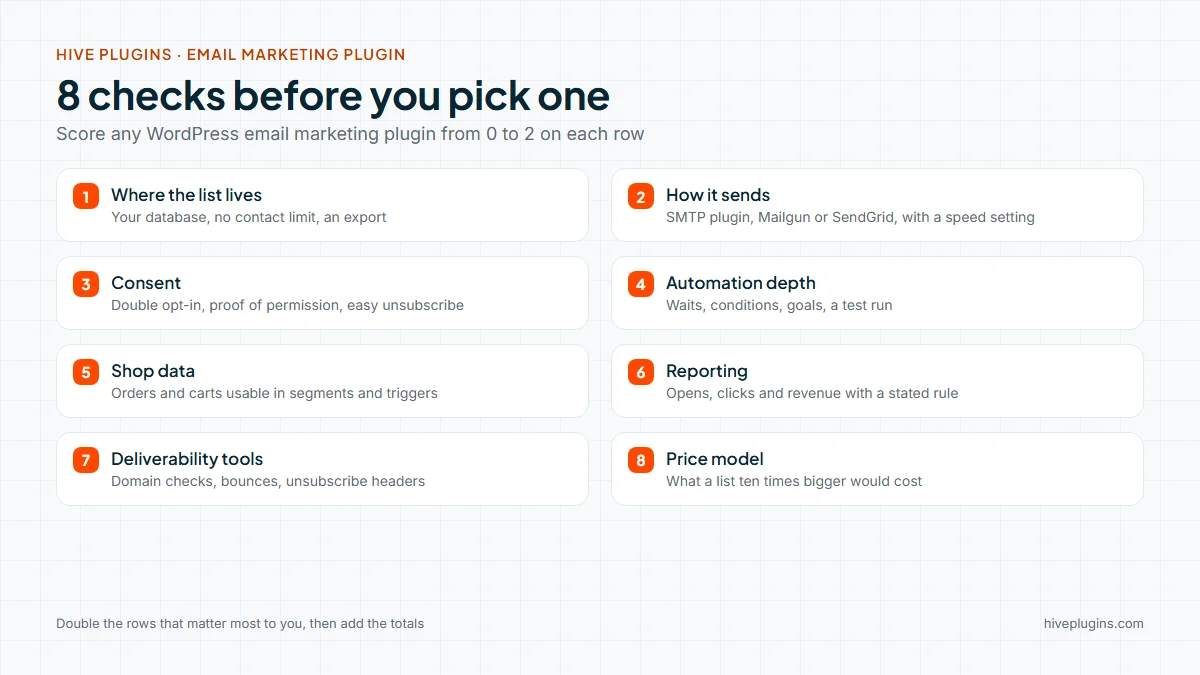
The eight checks are the questions that decide whether a plugin fits your site over the long run: list ownership, sending, consent, automation, shop data, reporting, deliverability and cost. A plugin can look strong on a feature page and still fail one of them. Score each from 0 to 2 and compare totals.
Email marketing plugin or hosted service: which type fits you?
A plugin stores subscribers in your own database and uses your hosting. A hosted service stores them on the vendor’s servers and usually carries the sending. Neither is better in every case. The table shows where each type tends to fit.
| Plugin inside WordPress | Hosted email service | |
|---|---|---|
| Where subscribers live | Your own database | The vendor’s servers |
| Cost model | Often a flat price or free | Often grows with the number of contacts |
| Sending | You choose a sending method | Included |
| Setup | Install, then connect a sender | Create an account, then connect your site |
| Fits best when | You want to own the data and keep customers, orders and email in one place | You have no WordPress site, or want the vendor to run the sending servers |
If you already run a WordPress or WooCommerce site and want your list next to your orders, a plugin is the natural place to start. The eight checks below apply to either type.
Check 1: where does your email marketing plugin keep the list?
The list should sit where you can reach it, export it and delete it. Ask whether contacts live in your own database, whether there is a contact limit, whether you can export everything, and what happens to the data when you remove the plugin.
Hive Mail answers like this:
- Your database. Contacts, lists, tags, custom fields and campaign statistics are stored in your WordPress database. Free.
- No contact limit. The free plugin sets none. Free.
- Moving in. Import from a CSV file with column mapping, from WordPress users, from WooCommerce and Easy Digital Downloads customers, or from other WordPress email plugins (read only, so nothing in the other plugin changes). Free.
- Moving out. Export to CSV, and an optional “delete all data on uninstall” setting. Free.
- No telemetry. Hive Mail does not contact Hive Plugins or any server by itself. It contacts a sending service, a CAPTCHA service or an AI provider only if you set one up.
If you also need to track clients, deals and invoices, that is a CRM job and a different tool. Read what a WordPress CRM plugin does for that side.
Check 2: how does the plugin send email, and what are the limits?
An email marketing plugin writes and queues your emails; a sending method delivers them. Ask which methods it supports, whether you can set the speed, and who handles bounces. Without a real sending method, campaigns land in spam or never leave your host.
Hive Mail has no mail server of its own. It hands each message to one of three methods, all Free:
- WordPress mail. If an SMTP plugin is active, that plugin sends the email. With no SMTP plugin, WordPress sends straight from your web server, which is fine for testing and wrong for campaigns.
- Mailgun, through its API (United States or Europe region).
- SendGrid, through its API.
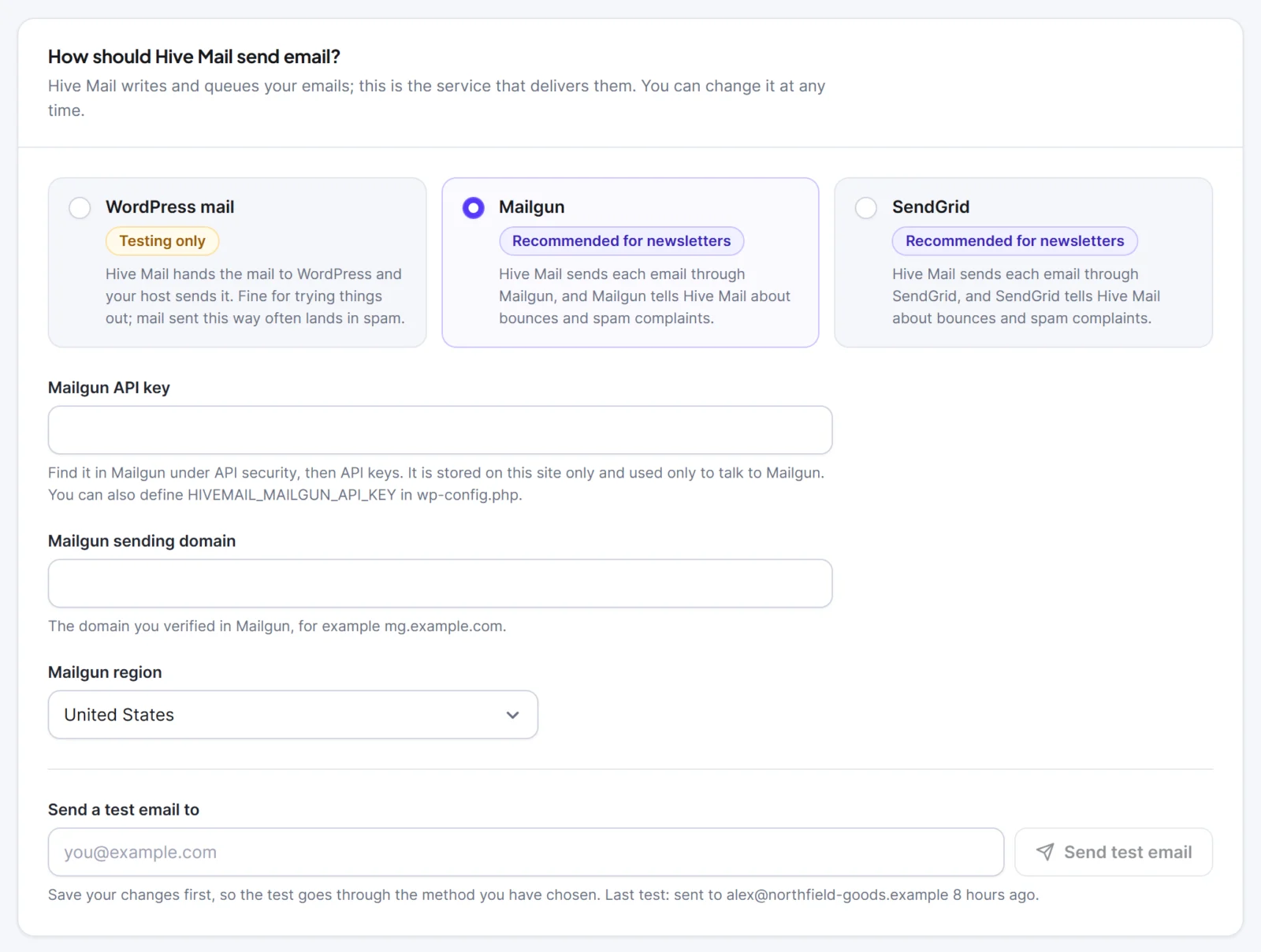
You also set the sending speed, either the recommended pace or your own count of emails per number of minutes. Hive Mail tries a temporary failure up to three times in total. “No limit” describes Hive Mail, not your host: how many emails you can send per hour depends on your host or sending service.
Check 3: how does it handle consent and unsubscribing?
Good consent handling collects permission clearly, keeps proof of it, and makes leaving easy. Ask whether double opt-in is available, whether you can show when and how a person agreed, and whether unsubscribing takes one step. Rules differ by country, so a plugin gives tools and you decide how to use them.
In Hive Mail (all Free):
- Double opt-in with an editable confirmation email. Contacts stay Pending, and get no campaigns, until they press the button. The double opt-in guide covers the full set-up and the settings.
- Signup forms with an optional consent box. The wording, the time and the form are saved on the person’s timeline as proof.
- A checkout box for WooCommerce and Easy Digital Downloads that is never ticked in advance.
- Unsubscribe and preference pages that are made for you, plus the one-click
List-Unsubscribeheaders on marketing email. - A do-not-email memory, so an address that unsubscribed or bounced cannot be imported back by accident.
- WordPress privacy tools: contact data appears in the Export and Erase Personal Data screens.
This is information, not legal advice.
Check 4: how deep is the automation?
Automation depth is the difference between “send one email after sign-up” and a flow with waits, conditions and goals. Ask whether you can branch on a yes or no, stop people who already bought, test a run before it goes live, and see what happened to each person afterwards.
Hive Mail’s visual canvas (Free) gives you:
- A trigger, a send-email step, fixed waits, “wait until” an event or date, an If with Yes and No paths, a goal, an A/B split, a merge and an end.
- Steps to add or remove a tag or list, set a field, change status, call a webhook or notify someone.
- More than 30 triggers: contact and tag changes, form submissions from Fluent Forms, WPForms, Contact Form 7, Gravity Forms and Elementor forms, WordPress user events, an incoming webhook, and WooCommerce and Easy Digital Downloads events.
- A test run, a run log per contact, re-entry rules and a report per flow.
- Seven ready-made recipes, including the welcome series that the welcome email series guide walks through. To change a recipe or build one from scratch, read the guide to email automation workflows on WordPress.
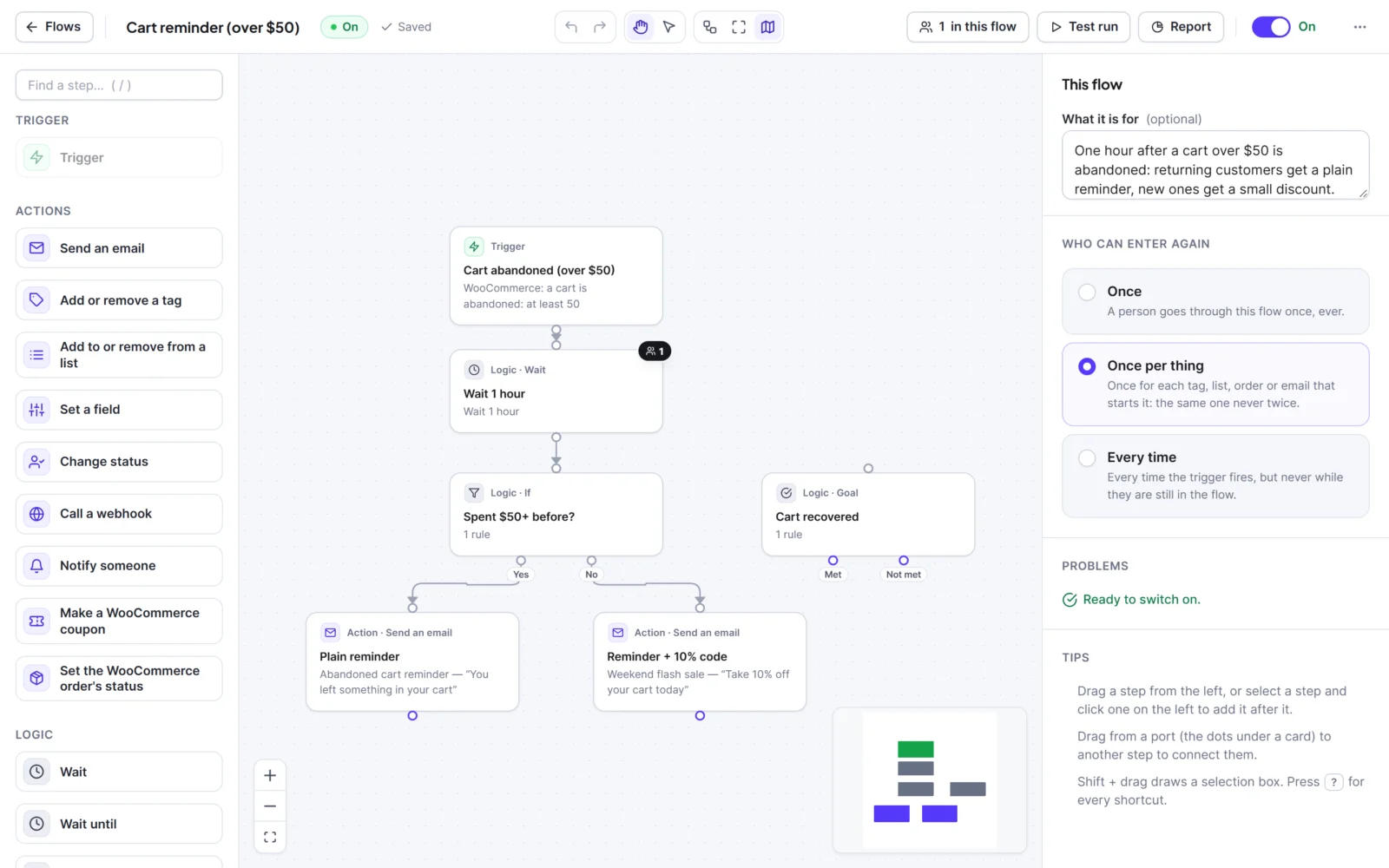
Hive Mail Pro raises the recipes to 45 and adds Flow Studio, a second editor for the same flows with colour-coded steps and a + on every line.
Check 5: does it understand your shop?
A shop-aware email marketing plugin reads orders, so you can email people by what they bought and react to what they did. Ask whether it reads WooCommerce or Easy Digital Downloads data, whether you can use purchases in segments and triggers, and how it treats consent at checkout.
- WooCommerce (Free): customer summaries (orders, total spent, first and last order, products and categories bought), triggers for order events, a first order, a product or category bought and an abandoned cart, segment rules on purchases, and the checkout sign-up box.
- Abandoned-cart recovery (Free): carts are tracked for logged-in customers and for guests once they type an email at checkout, with a restore link. Only people who agreed to hear from you are emailed. WooCommerce abandoned cart emails covers the three-email sequence.
- Easy Digital Downloads (Free): customer summaries, the checkout box, and triggers for a purchase, a first purchase, a refund and a download bought. EDD has no carts, so there is no cart tracking for it. The guide to Easy Digital Downloads email marketing covers the download-seller version.
- Hive Mail Pro: a WooCommerce coupon step that makes a one-customer code, and a win-back trigger for customers who have not ordered in a number of days.
Planning a sale? The Black Friday email schedule for WooCommerce shows how these pieces fit into six dated emails.
Check 6: can you see what the emails earned?
Reporting should tell you who opened, who clicked, who left and, for a shop, which orders followed. Ask how the plugin credits revenue, and whether it admits the limits of open rates.
Hive Mail (Free) reports opens, clicks, links clicked, unsubscribes, bounces and orders that followed, per campaign and per flow, plus a Reports screen for the last 30 or 90 days. Its revenue rule is one sentence: when an order is paid, Hive Mail credits it to the last email that customer clicked in the previous 7 days. An email that was only opened gets no credit, refunds lower the amount, and currencies are never added together.
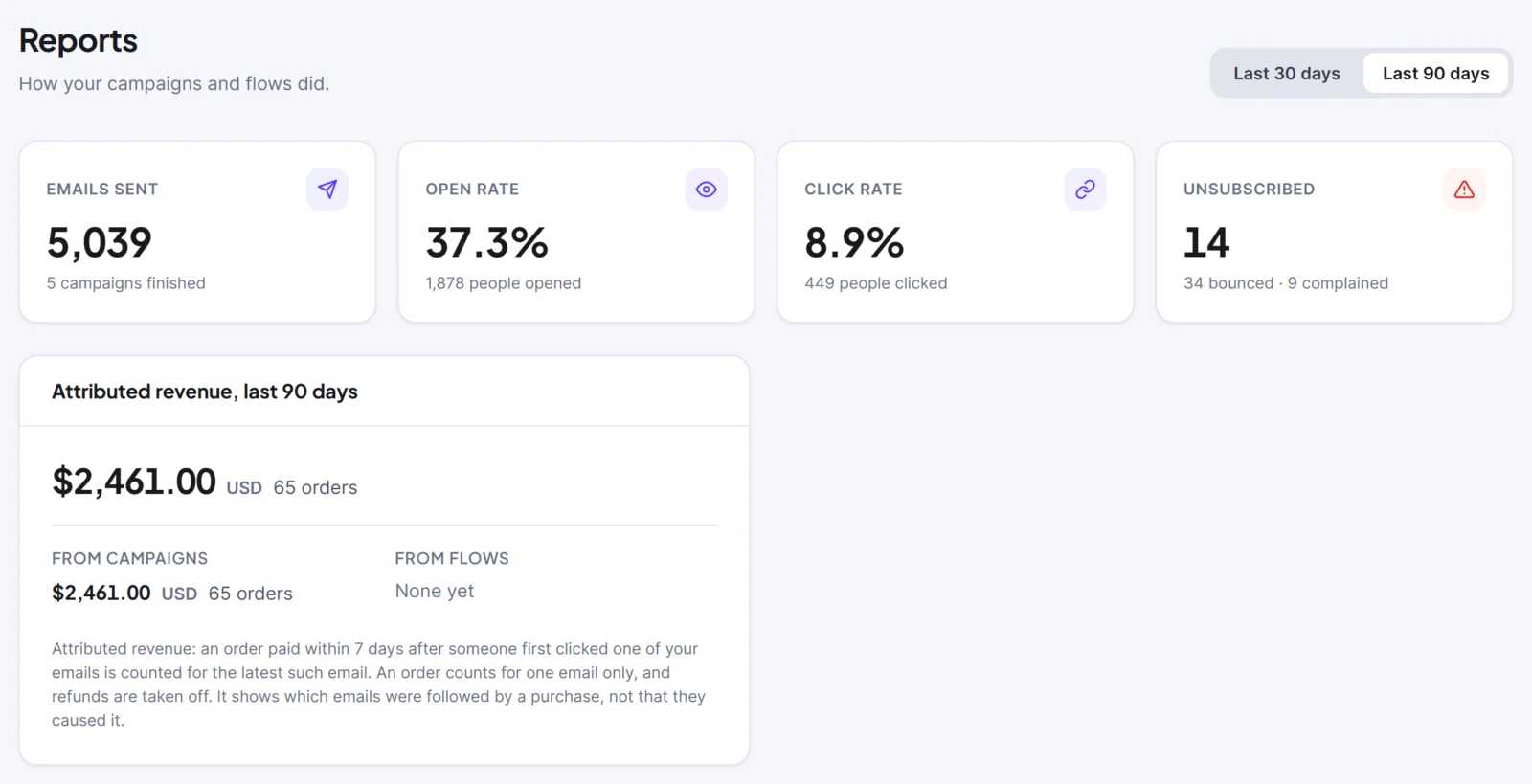
Treat the numbers as a guide. Security scanners and Apple Mail privacy protection affect open counts, and attributed revenue shows which emails were followed by a purchase, not that they caused it. Open and click tracking can be full, anonymous or off. The reports and revenue page in the docs lists every number.
Check 7: which deliverability tools does it give you?
Deliverability tools help your email reach the inbox by catching setup problems and unwanted addresses early. Ask whether the plugin checks your sending domain, handles bounces and complaints, and adds the unsubscribe headers that mailbox providers now expect.
Mailbox providers have raised the bar. Google’s email sender guidelines ask bulk senders for SPF, DKIM and DMARC, one-click unsubscribe, and a spam rate below 0.30%, with a target under 0.10%. Yahoo’s sender best practices ask for similar authentication, one-click unsubscribe, unsubscribes honoured within two days and a spam rate below 0.3%. The one-click method is a standard, RFC 8058.
To see what the three DNS records do, this short explainer helps. Watch “CertMike Explains DMARC, DKIM and SPF” by Mike Chapple, about six minutes, for the plain-language basics:
What Hive Mail adds:
- Readiness checklist (Free). In Settings > Sending, eight checks: a sending method, a test email, a From address on your own domain, SPF, DKIM and DMARC, bounce reporting, unsubscribe headers, your business address and the scheduler.
- Check my domain (Free). Looks up SPF, DKIM (common selectors) and DMARC records. It sends nothing to any service.
- Bounces and complaints (Free). Handled through webhooks for Mailgun, SendGrid or any service that can call a webhook, with a Bounces & Suppressions screen.
- Domain Health (Hive Mail Pro). Explains each record, checks your mail servers, lets you enter your DKIM selector, and shows your own bounce, complaint and unsubscribe rates against the limits Google and Yahoo publish. It shows facts and does not score your reputation.
- Check my list (Hive Mail Pro). Flags mistyped, disposable, role and duplicate addresses before you send.
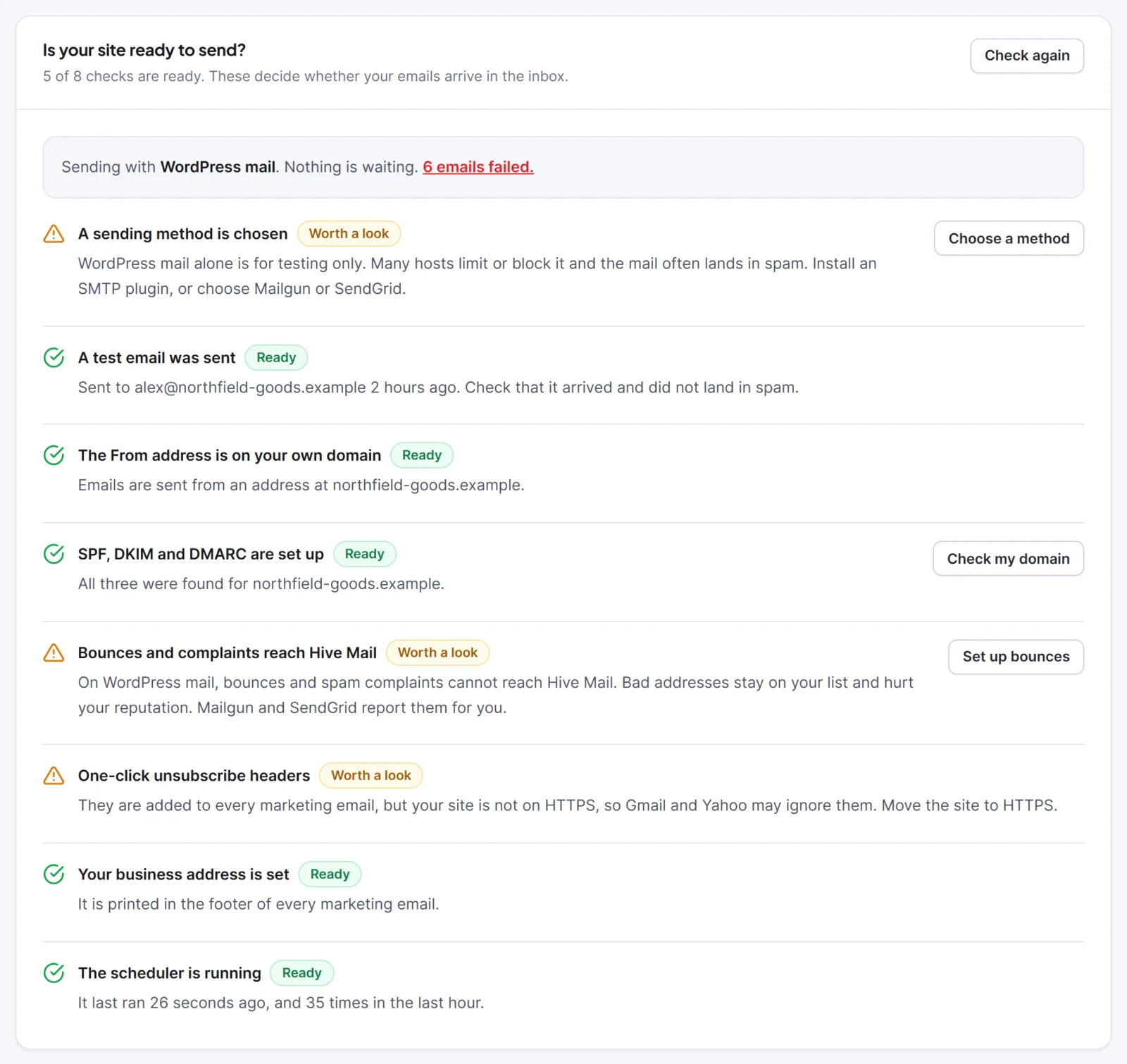
A green checklist removes common causes of spam-folder trouble. It does not guarantee delivery, and no plugin can honestly say it does. The guide to WordPress email deliverability explains each record and how to fix it.
Check 8: what is the price model?
The price model of an email marketing plugin decides what a growing list costs you. Ask whether the plugin charges per contact or per email, which features sit behind the paid tier, and what else you will pay for, such as a sending service.
- Hive Mail Free: no limit on contacts, emails or automations, and no per-subscriber fees.
- Hive Mail Pro: a one-time purchase in three plans. It adds more ready-made automations and emails, Flow Studio, deliverability and shop tools, roles and permissions, and an AI assistant that uses your own Anthropic or OpenAI key and asks you to approve every change. Current terms are on the pricing page.
- Outside the plugin: your host, and your sending service if you choose Mailgun or SendGrid, set their own limits and charges.
That covers the “free” question in “wordpress email marketing plugin free”: the plugin itself is free without limits, and sending is the part someone has to pay for.
How do you score a WordPress email marketing plugin? (copy this scorecard)
Copy this table into a spreadsheet. Give each email marketing plugin 0, 1 or 2 per row and add the totals. A 0 means a gap you cannot work around, a 1 means it works with effort, and a 2 means it does the job cleanly.
| # | Check | Question to answer | Your score (0 to 2) |
|---|---|---|---|
| 1 | List location | Is the list in my database, with no contact limit and an export? | |
| 2 | Sending | Does it support a method I can use, with a speed setting and bounce handling? | |
| 3 | Consent | Double opt-in, proof of permission, one-step unsubscribe? | |
| 4 | Automation | Waits, conditions, goals, a test run and a run log? | |
| 5 | Shop | Does it read my shop’s orders and carts for segments and triggers? | |
| 6 | Reporting | Opens, clicks and revenue, with a stated attribution rule? | |
| 7 | Deliverability | Domain checks, bounce handling, unsubscribe headers? | |
| 8 | Price | Can I afford it at ten times today’s list, including sending? |
Weight the rows that matter to you by doubling them. A newsletter writer might double checks 1, 3 and 8. A WooCommerce store might double 5 and 6. A seller of digital downloads might double 4 and 5. The Hive Mail features page lists what each area includes, and the guide to WooCommerce email marketing automation covers check 5 in more detail.
Try Hive Mail against your own scorecard
Install the free Hive Mail, open Settings > Sending, run the readiness checklist and fill in the scorecard with what you see. That takes less than an hour, and it tells you more than any feature table. Start at the Hive Mail page, and add Hive Mail Pro later only if a row on your scorecard needs it. When you are ready to send, follow the steps to start a newsletter on WordPress.
Frequently asked questions
What is the best WordPress email marketing plugin?
The best one is the one that scores highest on the checks that matter to you. A newsletter writer, a WooCommerce store and a course seller weigh list ownership, automation and shop data differently. Use the scorecard above and test your top two on a staging copy of your site.
Is there a free WordPress email marketing plugin with no subscriber limit?
Yes. The free Hive Mail sets no limit on contacts, emails or automations. You still need a way to send, such as an SMTP plugin, Mailgun or SendGrid, and those services or your host may have their own limits and charges.
Do I need a separate service to send email from WordPress?
You need a proper sending method. Plain WordPress mail sends from your web server and is often limited or marked as spam. An SMTP plugin, Mailgun or SendGrid is a better choice for campaigns, and Hive Mail works with all three.
Can a plugin guarantee my emails reach the inbox?
No. A plugin can check your DNS records, handle bounces and add unsubscribe headers, which removes common causes of spam-folder trouble. Whether a mailbox provider delivers your email still depends on your sending reputation and how people respond.