


HiveCRM Black Friday Offer
Up To 50% off
00Days
00Hrs
00Min
00Sec
Get Lifetime Del
Automation

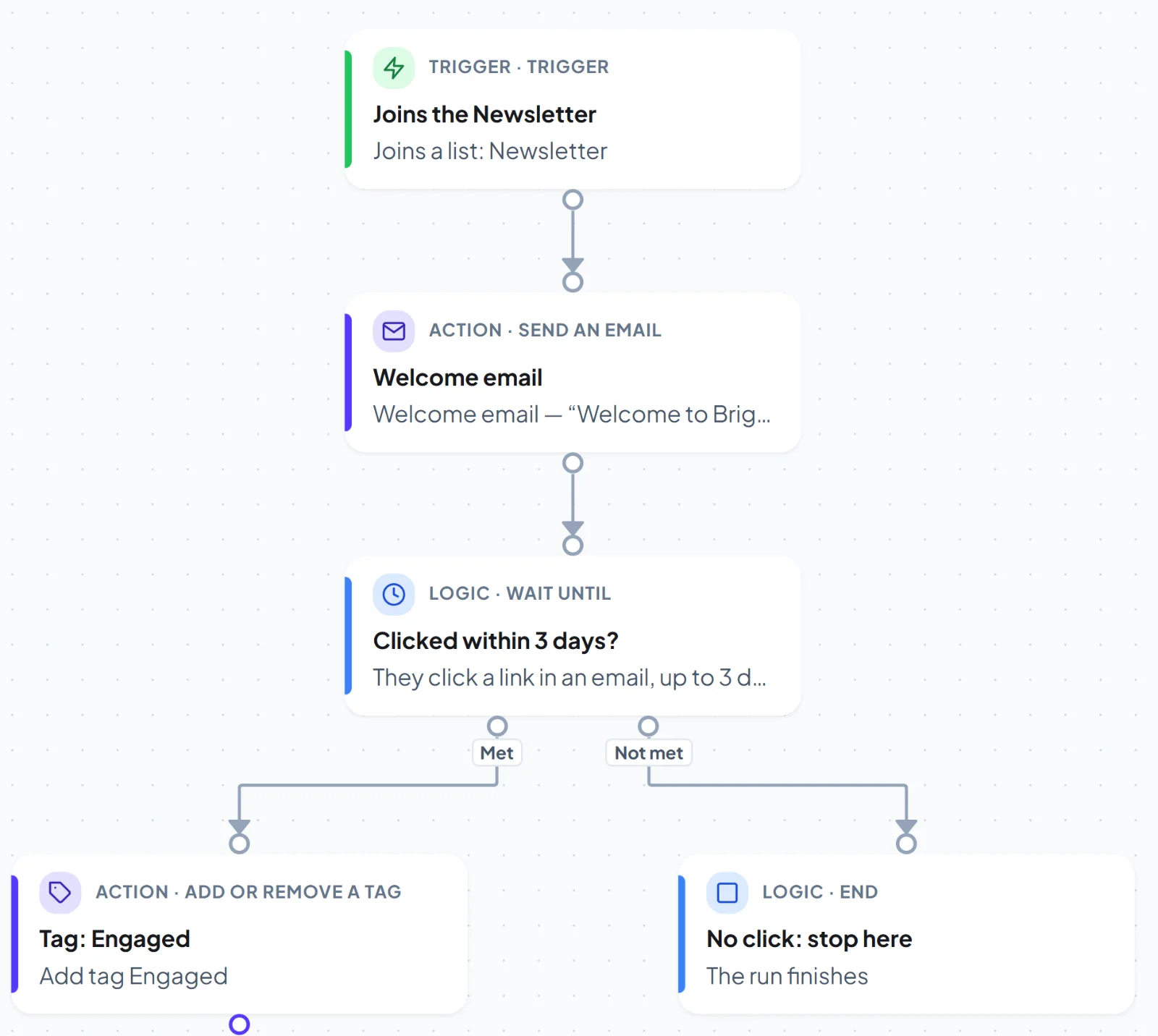
A real automation canvas, not a list of steps.

Draw the journey: triggers, waits, conditions, goals and actions. See exactly what happened to every contact.
yoursite.com/wp-admin/admin.php?page=hivemail
A welcome flow on the HiveMail automation canvas
See a workflow run

From a signup to a sale, drawn once and left running.

A trigger starts it, waits and conditions steer it, goals end it. Every step is logged for every contact.

Welcome seriesRunning
YesNoTRIGGERJoins a listNewsletter signupWAITWait 2 daysThen check for a clickIF / ELSEDid they click?Yes or noADD A TAGTag: EngagedClicked the offer
  1. TriggerJoins a listNewsletter signup
  2. WaitWait 2 daysThen check for a click
  3. If / elseDid they click?Yes or no
  4. Yes
    Add a tagTag: EngagedClicked the offer
  • Test run before you switch on
  • A run log for every contact
  • Goals end a flow early
What you get

Everything a flow needs.

Fifteen building blocks and twelve triggers, with no limits on how many flows you run.

Graph canvas

Branches, merges and loops of thought, not just a straight line. Snap to grid, minimap, undo and redo.

Twelve triggers

Contact created, tag or list added, email opened or clicked, date or birthday, form submitted, user registered, post published, incoming webhook.

Conditions and goals

Branch on segment rules, and end a flow early when a contact reaches the goal.

Waits that make sense

Wait a time, until a date, until a field date, or until an event, with a timeout.

Send email

Use any template. The email step opens the builder and returns you to the flow.

Update the contact

Add or remove tags and lists, set fields, change status, call a webhook or notify your team.

Test run

Walk a test contact through the flow before you switch it on.

Run log

Every run and every step is logged, with errors, for every contact.

Add a whole segment

Enrol everyone in a segment into a flow as a background job.

Triggers

Start a flow from what actually happens.

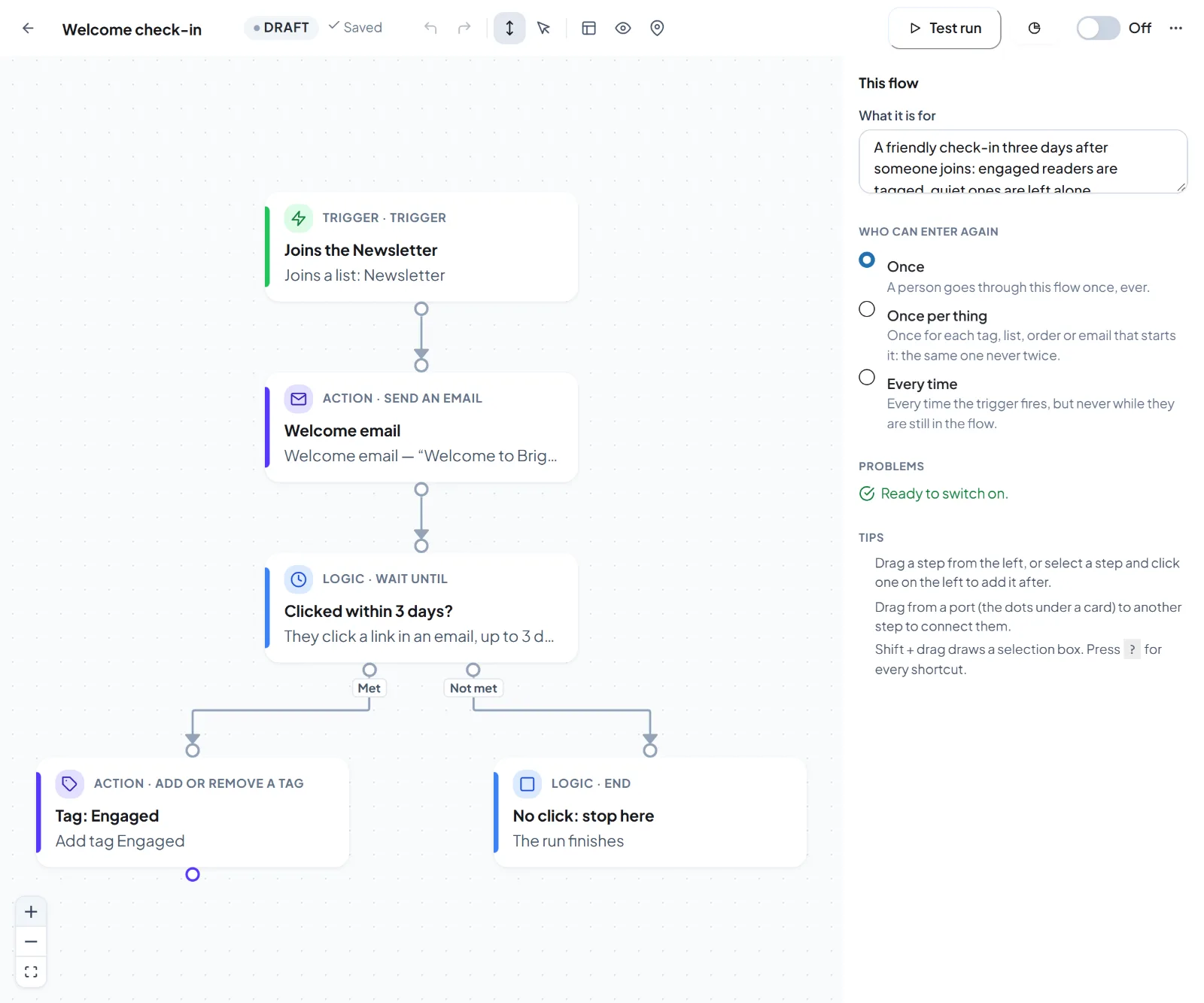
Flows start from your forms, your shop, your site and your list.

  • Fluent Forms, WPForms, Contact Form 7, Gravity Forms and Elementor forms
  • WordPress events: user registered, logged in, role changed, post published
  • An incoming webhook with its own address and optional signature
Use caseA visitor submits your contact form, becomes a contact, gets a tag and receives a welcome email, all without leaving WordPress.
yoursite.com/wp-admin/admin.php?page=hivemail
A welcome flow on the HiveMail automation canvas
Automation recipes

Seven ready-made automations.

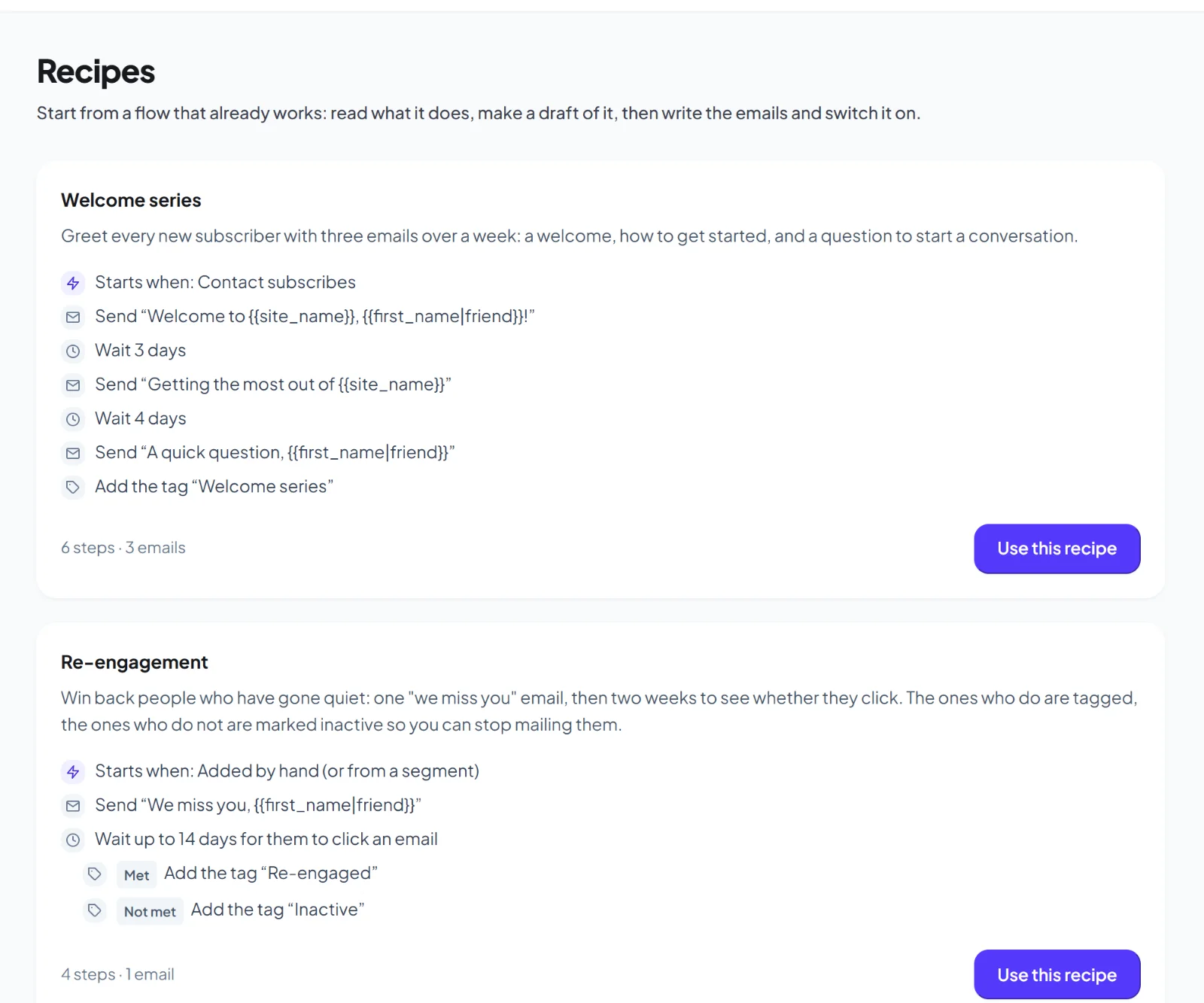
Each automation recipe builds the lists, tags, emails and a draft flow for you, so you only review and activate.

  • Welcome series and form follow-up
  • Re-engagement for people who stopped opening
  • Birthday or anniversary
Use casePick Abandoned cart, review the three emails, and activate in a few minutes.
yoursite.com/wp-admin/admin.php?page=hivemail
HiveMail automation recipes
How it works

From idea to live flow in three steps.

Pick a trigger

Choose what starts the flow, such as a form, an order or a tag.

Draw the path

Add waits, conditions and emails. Test it with a sample contact.

Switch it on

Activate. Watch the run log fill as contacts move through.

FAQ

Questions about automation

No limits in the free plugin.
Yes. Every contact has a run log with each step, its result and any error.
Each run keeps the version of the flow it started on, so edits do not break people already inside.
Keep exploring

Related features

Email builder

Four editors, 14 starters and a brand kit.

Learn more →

WooCommerce

Carts, customers and order-based emails.

Learn more →

AI and MCP

An assistant, AI Studio and an MCP server.

Learn more →

Try it on your own site.

Get early access and see it with your own data.

Early access

Be first to try HiveMail.

Leave your name and email and we will tell you the day it launches. Nothing else.

HiveMail Early Access

One email at launch. No spam, unsubscribe any time.