

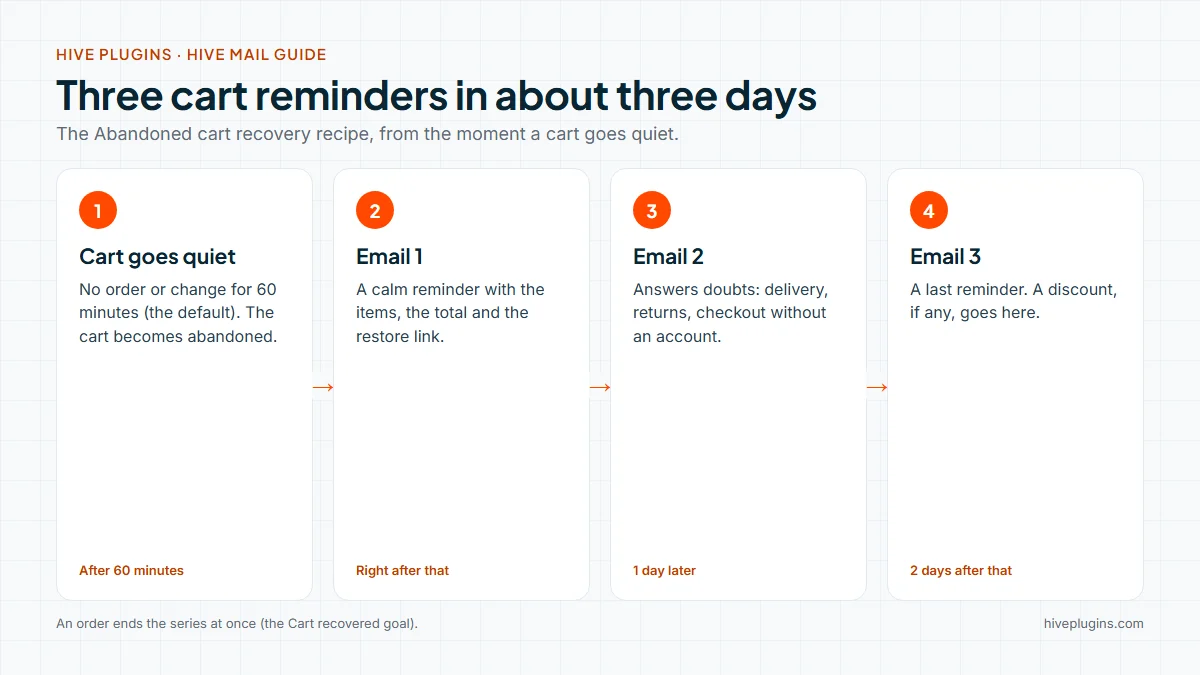
WooCommerce abandoned cart emails are automatic reminders sent to a shopper who put items in a cart, gave an email address and did not order. Hive Mail, an email marketing and automation plugin that runs inside your WordPress site, sends three of them over about three days, each with a link that refills the cart. This guide gives you the timing, copy for all three emails, the consent rules and how to read the results.
Thank you for reading this post, don't forget to subscribe!
Table of Contents
WooCommerce abandoned cart emails at a glance
- Emails: three, with the second a day after the first and the third two days after the second.
- Cart counts as abandoned: after 60 minutes with no order or change. You can set 15 minutes to 24 hours.
- Needs: WooCommerce, a working sending method and the scheduler running.
- Free or Pro: the Abandoned cart recovery recipe, cart tracking and the restore link are in the free plugin. A one-customer coupon step is in Hive Mail Pro.
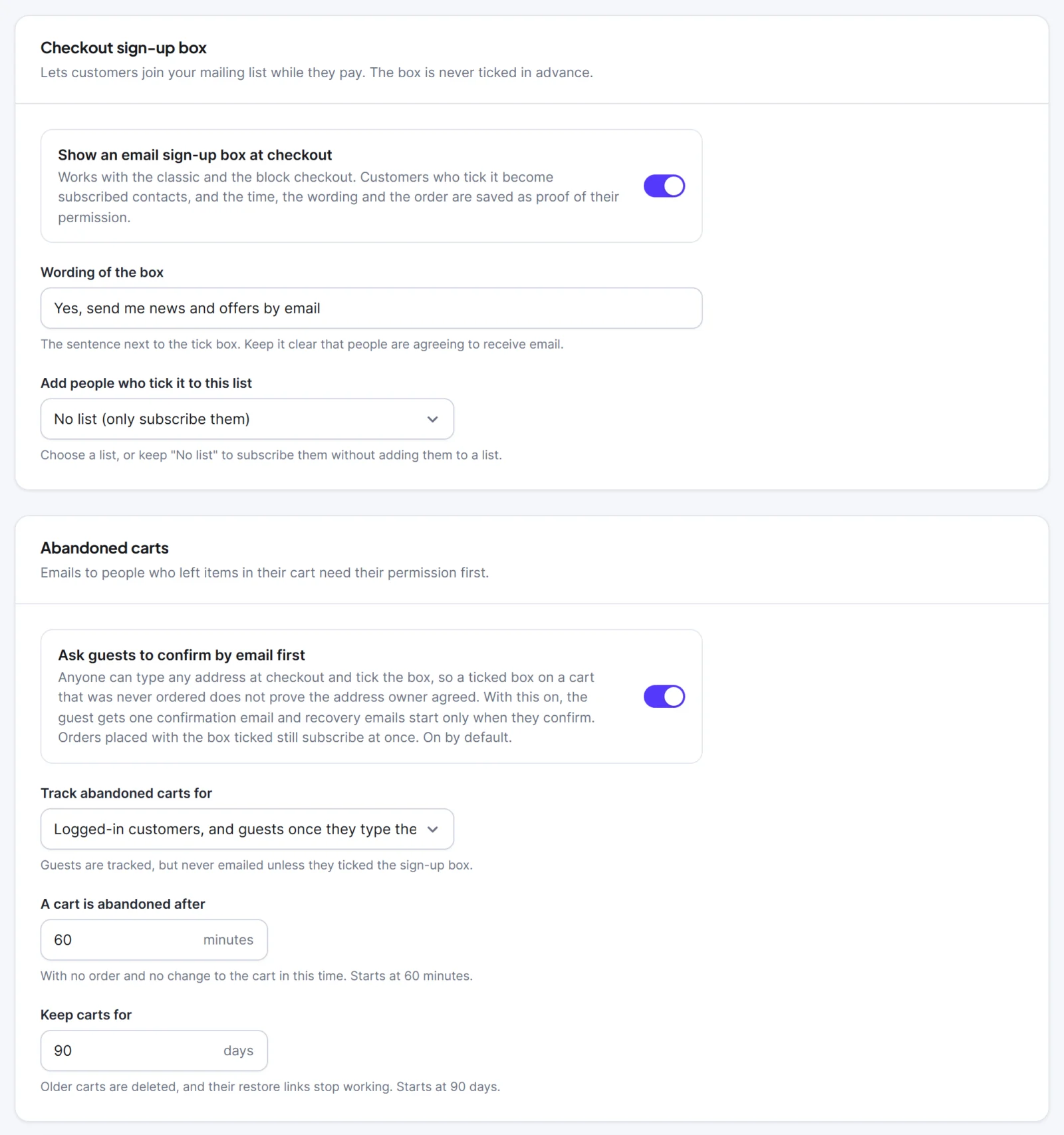
- Who is emailed: only people who may be emailed. A guest who did not tick the checkout sign-up box is never emailed.
- Ends early: an order takes the shopper out of the series at once.
How do WooCommerce abandoned cart emails work?
Hive Mail watches WooCommerce carts. When a cart that has an email address sees no order for the waiting time, it becomes abandoned and starts a flow. The flow sends the first reminder at once, waits a day, sends the second, waits two days and sends the third. A goal named Cart recovered stops it as soon as the shopper orders.
A cart moves through four states. You see them on the Abandoned carts tab.
| State | Meaning |
|---|---|
| Open | Items and an email address, and nothing has happened for less than the waiting time. |
| Abandoned | No order or change for the waiting time. Recovery flows start for people who may be emailed. |
| Recovered | An abandoned cart that later became an order. |
| Ordered | A cart that became an order before it was abandoned. |
Why bother? Baymard Institute puts the average documented cart abandonment rate at 70.22%, from 50 studies. Its list of reasons, once people who were only browsing are set aside, is led by extra costs at checkout (40%), slow delivery (20%) and being forced to create an account (18%). Write the emails to answer those doubts, not to push.
Who may you email about an abandoned cart?
Hive Mail emails only people who may receive marketing email. A cart needs an email address, either a customer's or one a guest typed at checkout, and only a subscribed contact enters the flow when the cart is abandoned. Tracking a cart is separate from emailing it.
| Shopper | Cart tracked? | Emailed? |
|---|---|---|
| Logged-in customer who is subscribed | Yes | Yes |
| Guest who typed an email and ticked the checkout sign-up box (confirmation on, the default) | Yes | One confirmation email first. Reminders start only if they confirm within 3 days of abandonment |
| Same guest with confirmation off | Yes | Yes, the tick counts as permission |
| Guest who typed an email and did not tick the box | Yes | Never |
| Anyone unsubscribed, bounced, complained or on the do-not-email list | Yes | Skipped, and checked again when each email is sent |
The sign-up box is never ticked in advance, and the time and exact wording are saved as proof. That matches the ICO's guidance, which says people must take a positive action to consent and that pre-ticked boxes do not count. Rules differ by country, you stay responsible for compliance and this is information, not legal advice. The guide to double opt-in on WordPress explains how a confirmation email works.
Open any cart on the Abandoned carts tab and Hive Mail shows the reason, for example "Did not tick the checkout box: tracked, never emailed."
What should the three abandoned cart emails say?
Each email has one job and one button, and the button is {{cart_url}}. Email 1 reminds, email 2 answers doubts and email 3 closes politely. Do not invent urgency: no fake countdown, no "only 2 left" unless the shop really shows it. The three tags {{cart_items}}, {{cart_total}} and {{cart_url}} fill in the cart for each person.
Email 1: about an hour after the cart goes quiet.
- Subject ideas: "You left something in your cart", "Your cart is saved, {{first_name|there}}".
- Preview text: "Your items are waiting for you."
- Body:
Hi {{first_name|there}},

Your cart at {{site_name}} is saved.

{{cart_items}}
Total: {{cart_total}}

Return to your cart: {{cart_url}}

Questions about delivery or payment? Reply to this email.
Only add the last line if someone reads those replies.
Email 2: one day later. Answer the doubts Baymard lists: cost, delivery and account creation.
- Subject ideas: "Still thinking it over?", "Questions before you order?"
- Body: say what shipping costs and how long delivery takes, say what the returns promise is and that checkout works without an account (if it does). Then the cart link again.
Email 3: two days after email 2. A last reminder, written so that ignoring it is fine.
- Subject ideas: "Last reminder about your cart", "Your cart link, one more time".
- Body: one sentence that this is the last reminder, the cart link and a plain line such as "If you have already decided, no action is needed."
A discount belongs in email 3 at most, and only if your margin allows it. Sending it earlier teaches shoppers to abandon on purpose. With Hive Mail Pro you can add the flow step Make a WooCommerce coupon before email 3. It makes a normal WooCommerce coupon that only that customer's email address can use, once, until a date you choose, and email 3 can show it with {{coupon_code}}, {{coupon_amount}} and {{coupon_expires}}. WooCommerce itself offers the same kind of limits: an allowed emails list, an expiry date and usage limits.
How do you set up WooCommerce abandoned cart emails in Hive Mail?
Use the ready-made recipe, write your three emails and switch it on. It takes about ten minutes, plus the time you need to write.
- Go to Settings > WooCommerce. Under Track abandoned carts for, choose Logged-in customers, and guests once they type their email at checkout (the default). A cart is abandoned after is 60 minutes unless you change it. Click Save changes.
- Go to Automation > Automation recipes, click Use this automation on Abandoned cart recovery, then Create the draft flow and Open it on the canvas.
- Open each of the three emails. Write your text and put
{{cart_url}}in each one. - Click an empty spot on the canvas and check that the This flow panel says "Ready to switch on."
- Click Test run, pick a contact and run it. Nothing is sent. Then switch the flow on.
- Add a product to your cart in a private window, type your email at checkout, leave and wait.

The picture shows a similar cart reminder flow: a trigger, a wait, a decision, two emails and a Cart recovered goal off to the side. The recipe itself adds the tag and three emails.
The recipe starts from the trigger WooCommerce: a cart is abandoned. It has one setting, Only carts worth at least (0 = any), which keeps small carts out. It also adds the tag "Abandoned cart", which comes off again when the cart is recovered. Re-entry is once per cart, so a shopper can start the series again for a later cart.
Two limits to know. A trigger reacts only to new events, so carts abandoned before you switch the flow on are not included. Scheduled emails also depend on the scheduler, so check Settings > Scheduler. See the abandoned cart recovery docs and the WooCommerce settings page for every field. The guide to WordPress email deliverability covers the sending method behind it.
How does the restore link work?
The link {{cart_url}} refills the shopper's cart and sends them to checkout. It looks like your site address followed by ?hivemail=cart&t= and a long code. Opening it empties the visitor's current cart, puts the saved items back, fills the billing email if it is empty and sends the visitor to the checkout.
It never logs anyone in, and unavailable items are skipped with a notice. A link for a cart you deleted shows an "invalid link" page.
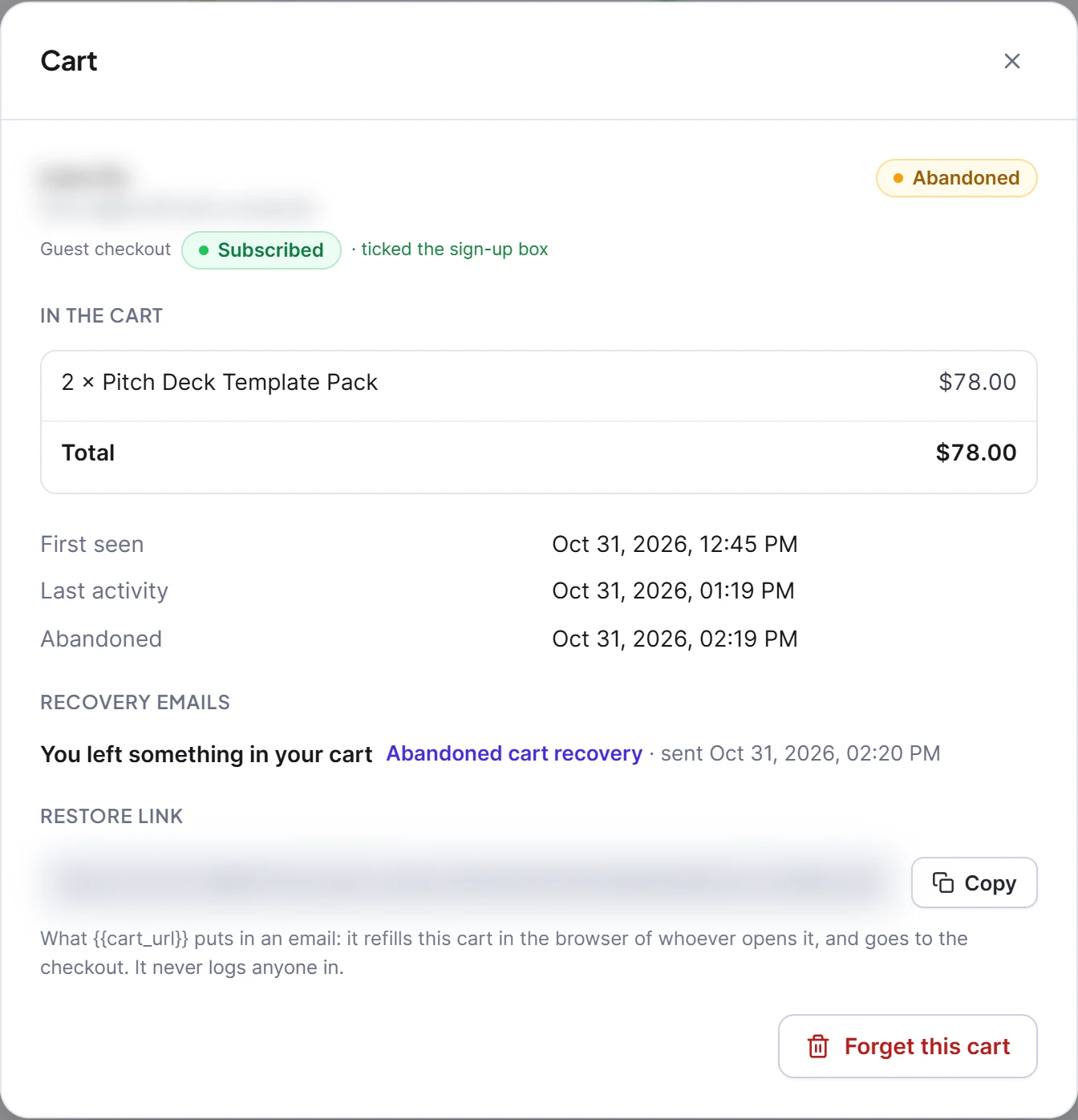
The picture shows the dialog of an abandoned cart that has a sent recovery email.
The restore link replaces the visitor's current cart. Someone who opens an old link while shopping loses what is in their cart.
How do you read the results?
Open Commerce > WooCommerce. Abandoned carts is the first tab, with four cards: Abandoned, waiting, Recovered, Recovery rate and Open now.
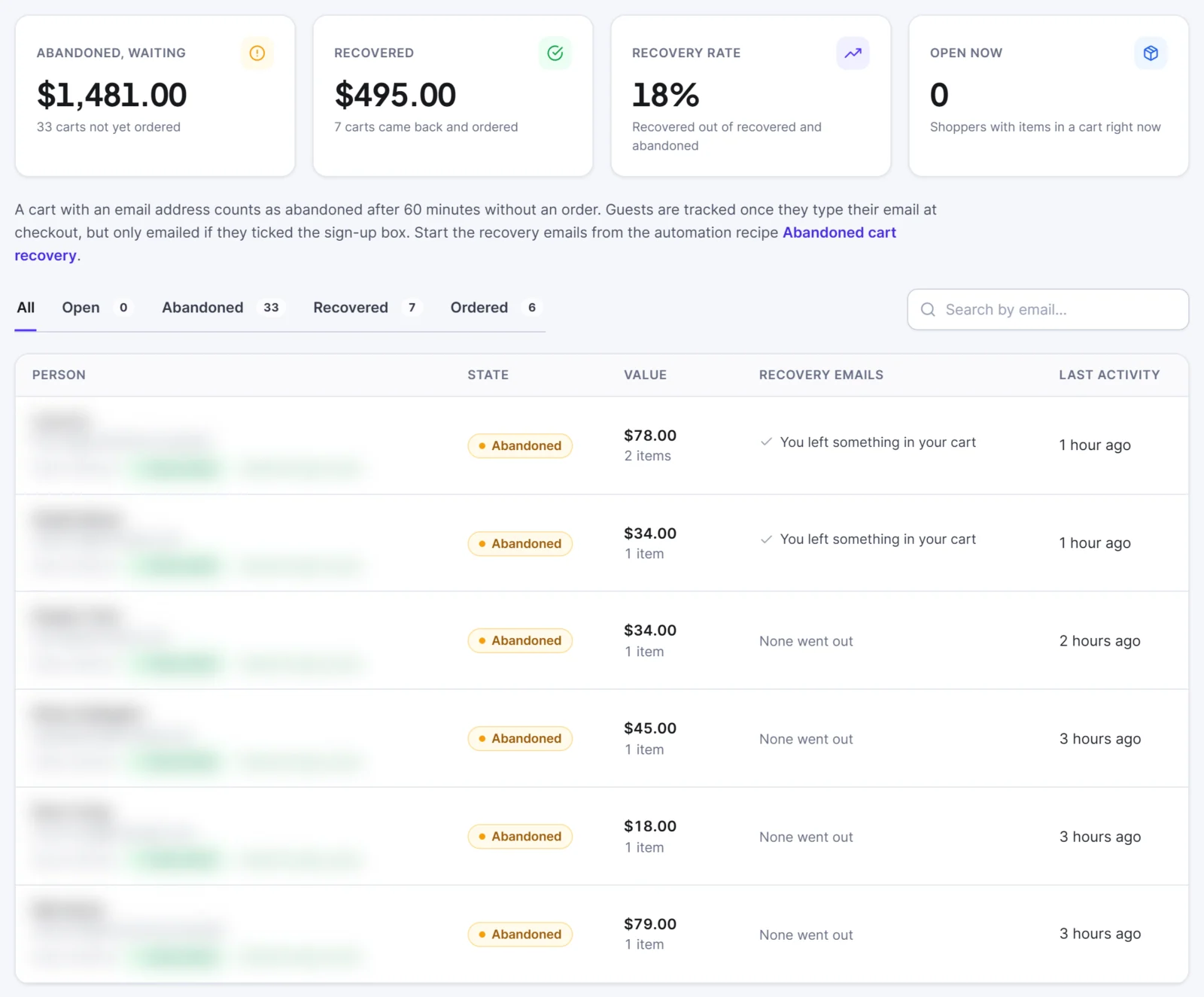
- The table shows each person, the cart state, its value and an icon for each recovery email: queued, sent, opened or clicked.
- The flow report (Automation > Flows, row menu Report) shows how many reached each email and how many opened and clicked.
- Attributed revenue credits an order to the latest email the customer clicked in the previous 7 days, once, and refunds lower it. See reports and revenue.
Read recovery as "orders that followed a reminder", not "orders the reminder caused". Some shoppers return on their own. Opens are only a guide, because Apple Mail privacy protection loads images for everyone. Judge the series by clicks, recovered carts and revenue.
If you also run a sale, keep the series on and exclude shoppers with a cart waiting from the big campaign that day. The Black Friday email schedule for WooCommerce shows how.
What are the limits of WooCommerce abandoned cart emails?
Carts are tracked for WooCommerce only. Easy Digital Downloads has no carts, so there is nothing to recover there. Carts are kept 90 days by default, which you can change from 7 to 730 days, and an order closes every live cart with the same address. A script on the checkout sends the typed email address to your own site, and nothing leaves your site.
No email goes to a guest who did not tick the box, and email is the only channel Hive Mail uses for recovery. The guide to WooCommerce email marketing automation covers the other automations a store needs.
Start with the Abandoned cart recovery recipe
Install the free Hive Mail, turn on cart tracking and open the Abandoned cart recovery recipe. See what else it does for shops on the WooCommerce features page. If you want the coupon step, see the Hive Mail Pro plans. To compare other options first, read the guide to choosing a WordPress email marketing plugin.
Frequently asked questions
When should you send the first abandoned cart email?
About an hour after the cart goes quiet. Hive Mail marks a cart abandoned after 60 minutes of no order or change by default, and the first email goes out right after that. You can set the waiting time from 15 minutes to 24 hours.
How many abandoned cart emails should you send?
Three over about three days is the Hive Mail recipe: one reminder, one that answers doubts and one last note. Add a fourth only if your own report shows people still clicking. An order stops the series at once.
Can you email guests who abandon a cart?
Only if they ticked the checkout sign-up box. Hive Mail tracks a guest's cart once they type an email, but never emails a guest who did not tick the box. By default a guest who ticked it gets one confirmation email first.
Does the restore link log the shopper in?
No. It refills the cart with the saved items and sends the shopper to checkout, and it never logs anyone in. It does replace whatever is in their cart at that moment.
Do you need Hive Mail Pro for abandoned cart emails?
No. The recipe, cart tracking, the restore link and the Abandoned carts tab are in the free plugin. Pro adds the coupon step that makes a one-customer WooCommerce code.