

The Visual builder lets you build a designed email from blocks: logo, headings, text, pictures, buttons, columns and a footer. Open a Visual template, or choose Visual builder on the Content step of a campaign. The top bar, preview and test send are on Choose an email editor. If you saved a brand kit, new blocks start with your logo, colours and links.
Work with blocks #
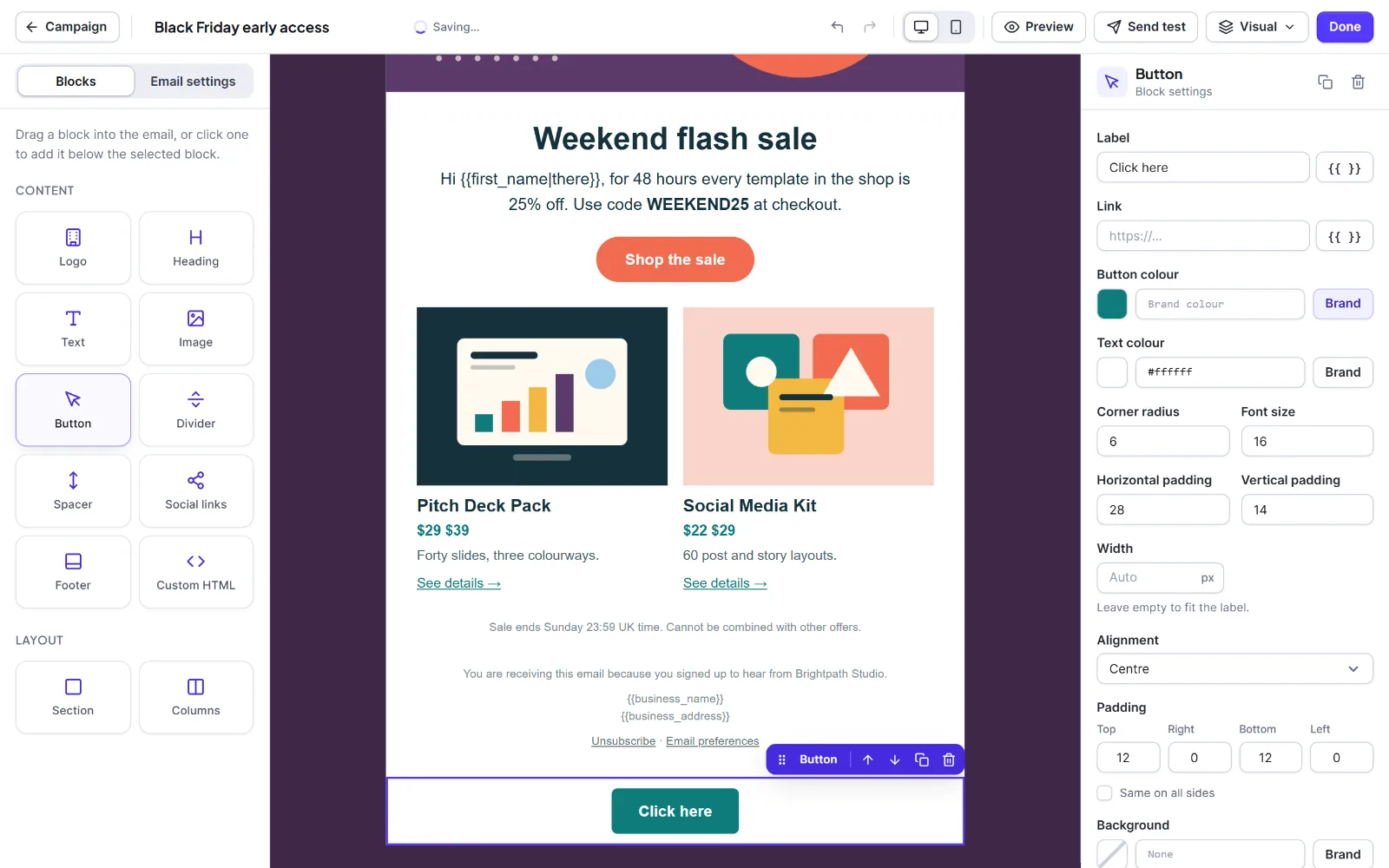
The left panel has the tabs Blocks and Email settings. Blocks has two groups: Content (Logo, Heading, Text, Image, Button, Divider, Spacer, Social links, Footer, Custom HTML) and Layout (Section, Columns). The centre is the email. The right panel, Block settings, shows the selected block. On a phone-sized screen the panels become tabs.

- Drag a block onto the email, or click it to add it below the selected block (or inside the selected container).
- Click a block to select it and change its settings. Type straight into text blocks.
- Move it with the drag handle or Alt+Up / Alt+Down. Duplicate with Ctrl+D. Delete with Del. Esc selects the whole email.
- For columns: add Columns, pick 1 to 4 under Number of columns, click a column to set its Width in percent (empty shares equally), then drop blocks into it. Columns stack on a phone.
- For a picture: add Image, click Choose image (or paste a full
https://address) and type the Alternative text.
Nesting: a Section cannot sit in a Section, Columns cannot sit in a Column, and a Column exists only inside Columns. An email holds up to 400 blocks, 8 levels deep, 1 MB. The builder warns at about 90 KB because Gmail cuts messages over about 100 KB.
Block reference #
Every block has Padding (top, right, bottom, left, 0 to 200 px, or Same on all sides) and Background unless noted. Colour settings take a hex code, a Brand button and a clear button. Text and link boxes have a {{ }} button for merge tags.
| Block | Use it for | Settings | Limits and defaults |
|---|---|---|---|
| Section | A coloured band or hero | Padding, Background | Holds any block except a Section or Column. Padding 16 / 24 / 16 / 24. |
| Columns | Side-by-side columns | Number of columns, Vertical alignment (Top, Middle), Padding, Background | Holds only Column blocks. Up to 4. |
| Column | One column | Width (%), Padding, Background | Width 10 to 90. |
| Logo | Your logo | Logo, Alternative text, Width, Link, Alignment | Width 40 to 600, default 160. Link default {{site_url}}. Alignment default Centre. |
| Heading | A title | Text, Level (H1, H2, H3), Font size, Colour, Alignment | Text up to 300 characters. Size 14 to 64, default 26. Level H2. |
| Text | Paragraphs, lists, links | Text, Font size, Line height, Text colour, Link colour, Alignment | Size 10 to 40, default 16. Line height 1 to 2.5, default 1.5. |
| Image | A picture, optionally linked | Image, Alternative text, Width, Height, Link, Alignment | Width 16 to 1200 px (empty is full width). Height 8 to 2400, used for Outlook only. With no picture the block is left out. |
| Button | A button that works in every mail app | Label, Link, Button colour, Text colour, Corner radius, Font size, Horizontal padding, Vertical padding, Width, Alignment | Label up to 120, default "Click here". Radius 0 to 40, default 6. Font 10 to 32. Padding 4 to 80 / 2 to 40. Width 60 to 600. |
| Divider | A line | Colour, Thickness | Thickness 1 to 12. Colour #e5e5ea. |
| Spacer | Vertical space | Height | 4 to 200, default 24. No padding or background. |
| Social links | Profile links | Links, Style (Rounded labels, Plain links), Label colour, Text colour, Font size, Alignment | Up to 10 links, text only (no icons). Font 10 to 20. |
| Footer | The legal footer | Text, Show business name and address, Unsubscribe link text, Show a link to the preferences page, Preferences link text, Font size, Text colour, Link colour, Alignment | Text up to 1000; link texts up to 60; font 10 to 16. |
| Custom HTML | Your own snippet | HTML | Filtered to email-safe tags. |
Social links. Each link has a network, an address and an optional label (default: the network name). Networks: Facebook, Instagram, X, LinkedIn, YouTube, TikTok, Pinterest, Threads, Bluesky, Mastodon, WhatsApp, Telegram, GitHub, Website, Email. Use Add link, Move up, Move down, Remove this link. A new block starts with your brand kit links.
Footer. With a Footer block in the email, Hive Mail does not add its own footer. Default text: "You are receiving this email because you subscribed to {{site_name}}." Link texts: "Unsubscribe" and "Email preferences". See The email footer.
Email settings #
The Email settings tab holds settings for the whole email. Use brand kit (under Your brand kit) applies your saved colours and font and shows only when a brand kit exists.
| Setting | What it does |
|---|---|
| Preview text (under In the inbox) | The line shown after the subject. Keep it under about 90 characters. |
| Brand colour | Buttons and links, unless you choose another colour. |
| Page background | Colour around the email. |
| Content background | Colour of the email itself. |
| Text colour | Body text. |
| Link colour | Empty uses the brand colour. |
| Font | Arial, Helvetica, Verdana, Tahoma, Trebuchet MS, Georgia, Times New Roman, Courier New or System font. |
| Content width (px) | Width of the email. 600 works in most mail apps. |
| Page title (under More) | Browser tab title when opened in a browser. |
| Language code, Direction (under More) | For example en; Left to right or Right to left. |

Editing the brand kit later does not change an email you already made.
Next: Templates, The brand kit.


